How to generate a tiling (in python if possible)

  • Context: Python 
  • Thread starter Thread starter caffeinemachine
  • Start date Start date
  • Tags Tags
    Python
Click For Summary

Discussion Overview

The discussion revolves around generating interactive polymino tiling in Python, focusing on user interface design and programming challenges. Participants explore different GUI frameworks and their capabilities for creating a graphical representation and user interaction.

Discussion Character

  • Exploratory
  • Technical explanation
  • Debate/contested

Main Points Raised

  • One participant expresses interest in generating polymino figures interactively and seeks guidance on implementation in Python.
  • Another participant suggests that serious GUI programming is necessary, mentioning that Python's GUI development is less advanced compared to languages like C++ or Java, and recommends Qt Designer and tkinter as potential tools.
  • Some participants note that Python may not be ideal for mouse and keyboard interfaces but has reasonable libraries for graphical presentations and can run algorithms.
  • A participant mentions having found a Tetris program in Python on GitHub and plans to modify it to control polyminos using the keyboard, indicating a desire for experimentation with translations.
  • Concerns are raised about the steep learning curve associated with GUI frameworks like Qt, while also suggesting that Python may allow for quicker results.

Areas of Agreement / Disagreement

Participants do not reach a consensus on the best approach or framework for implementing the desired functionality, with multiple competing views on the suitability of different programming languages and tools for GUI development.

Contextual Notes

Participants express varying levels of experience with GUI programming, and there is acknowledgment of the complexity involved in adapting existing code for specific purposes. The discussion reflects uncertainty about the best practices and tools for achieving the desired interactive functionality.

caffeinemachine
Gold Member
MHB
Messages
799
Reaction score
15
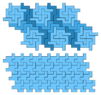
I was reading this wikiperdia article on polyminos (https://en.wikipedia.org/wiki/Polyomino).

The pictures look very nice. Example

View attachment 8921
I want to learn how to generate these figures myself in an interactive way.

Basically I want to start with a polymino and then I want to be able to translate (by unit distance up-down or left-right) this polymino by pressing arrow keys and place it at the desired location. Then I want to pick another copy of the same polymino and place it at another desired location and so on.

Can somebody please help me get started as to where can I learn this?

Can I implement this is python?

Thank you.
 

Attachments

  • 800px-Conway_criterion_false_negative_nonominoes.svg.png
    800px-Conway_criterion_false_negative_nonominoes.svg.png
    5.9 KB · Views: 142
Technology news on Phys.org
Well, you're going to need some serious GUI programming, unless you want to do it all in ASCII art, in which case it won't look like what you've got there. Python GUI dev is not as advanced as, say, LabVIEW or C++, but I have heard of a sort of WYSIWYG editor: Qt Designer, though that locks you into Qt as your GUI framework. I have a bit more experience with tkinter, but as far as I know, it doesn't have a WYSIWYG editor. Most people don't do heavy GUI development in Python (a major area for future growth, in my opinion: the Python folks need to get this aspect of Python out there and competing): they turn to C++ or Java, where the tools are undeniably more mature (though I have to say, GUI development in LabVIEW has spoiled me for anything else; I don't know of any GUI development that is as fast as LabVIEW).

My current impression is that tkinter is a little faster development initially, but not as full-featured. Qt is a steeper learning curve, but has more features, plus you might be able to leverage Qt Designer to help out.

Does that answer your question?
 
Do you want a nice user interface with mouse and/or keyboard?
Or just a nice graphical presentation?
Or ability to run algorithms that 'solve' it?

Python is not particularly good at a mouse and/or keyboard interface.
It has some reasonable libraries for graphical presentations.
And it can run algorithms just fine, although for high complexity algorithms a lower level language may be desired.

Personally I like Qt with C++ that can do all of it, but as Ackbach already said, it has a steep learning curve.
So you may prefer python to get some results pretty quick.
A java development environment may be a good fit.
Unfortunately I do not have much experience with GUI programming in java, so I cannot recommend the best tool for it.
 
Ackbach said:
Well, you're going to need some serious GUI programming, unless you want to do it all in ASCII art, in which case it won't look like what you've got there. Python GUI dev is not as advanced as, say, LabVIEW or C++, but I have heard of a sort of WYSIWYG editor: Qt Designer, though that locks you into Qt as your GUI framework. I have a bit more experience with tkinter, but as far as I know, it doesn't have a WYSIWYG editor. Most people don't do heavy GUI development in Python (a major area for future growth, in my opinion: the Python folks need to get this aspect of Python out there and competing): they turn to C++ or Java, where the tools are undeniably more mature (though I have to say, GUI development in LabVIEW has spoiled me for anything else; I don't know of any GUI development that is as fast as LabVIEW).

My current impression is that tkinter is a little faster development initially, but not as full-featured. Qt is a steeper learning curve, but has more features, plus you might be able to leverage Qt Designer to help out.

Does that answer your question?

Thanks for the response. I have never done GUI programming before and all I can muster is a nervous laughter in response to the myriad of languages you are familiar with. I will try to see if I can use LabVIEW.

Thanks.

- - - Updated - - -

Klaas van Aarsen said:
Do you want a nice user interface with mouse and/or keyboard?
Or just a nice graphical presentation?
Or ability to run algorithms that 'solve' it?

Python is not particularly good at a mouse and/or keyboard interface.
It has some reasonable libraries for graphical presentations.
And it can run algorithms just fine, although for high complexity algorithms a lower level language may be desired.

Personally I like Qt with C++ that can do all of it, but as Ackbach already said, it has a steep learning curve.
So you may prefer python to get some results pretty quick.
A java development environment may be a good fit.
Unfortunately I do not have much experience with GUI programming in java, so I cannot recommend the best tool for it.

Thanks for replying.

I want to be able to control the tiles (polyminos) using the keyboard. I do not an algorithm which solves the tiling problem, though that would be awesome.

I just got hold of a tetris programme in python written by someone who has freely distributed it on github. I am trying to tinker with the code to switch gravity off and have fun with translations!
 
caffeinemachine said:
I want to be able to control the tiles (polyminos) using the keyboard. I do not an algorithm which solves the tiling problem, though that would be awesome.

I just got hold of a tetris programme in python written by someone who has freely distributed it on github. I am trying to tinker with the code to switch gravity off and have fun with translations!

That sounds as if you already have what you are looking for.
 
Klaas van Aarsen said:
That sounds as if you already have what you are looking for.
Yeah think so. However, the code is arcane (to me) and it will take some time before I can figure out what needs to be changed in the code to adapt to my purpose.
 

Similar threads

  • · Replies 8 ·
Replies
8
Views
3K
  • · Replies 5 ·
Replies
5
Views
2K
  • · Replies 1 ·
Replies
1
Views
5K
Replies
17
Views
10K
Replies
6
Views
3K
  • · Replies 4 ·
Replies
4
Views
2K
  • · Replies 2 ·
Replies
2
Views
3K
  • · Replies 4 ·
Replies
4
Views
10K
  • · Replies 10 ·
Replies
10
Views
3K
  • · Replies 15 ·
Replies
15
Views
3K