Smooth
- 6
- 3
Hi,
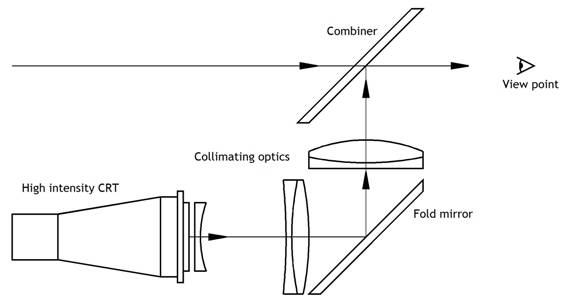
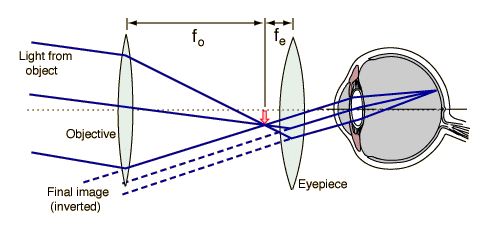
I am trying to create an HUD display - basically create a virtual image at infinity and look at it. I have two plano-convex lenses; the distance between them is the sum of their focal lengths; my object is therefore imaged at infinity. Here is the schematics that I'm pretty much trying to make:
HUD optics:
 Virtual image at infinity (Galilean Telescope):
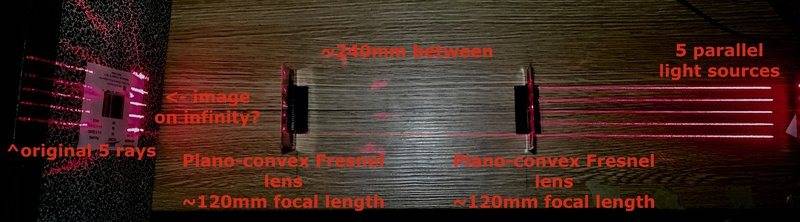
Set-up 1: (with lasers)
I have two plano-convex fresnel lenses with the focal lengths of ~120mm each; I position them with ~240mm between them (sum of two focal lengths). I have an object on the right; after the light from it passes through my lenses, the rays should be collimated. They are - the distances between the rays of the light source and between the points on the image on the right are about the same (5cm vs 5.5cm. As good as it gets though. Is it because the lenses are not perfectly vertical?).
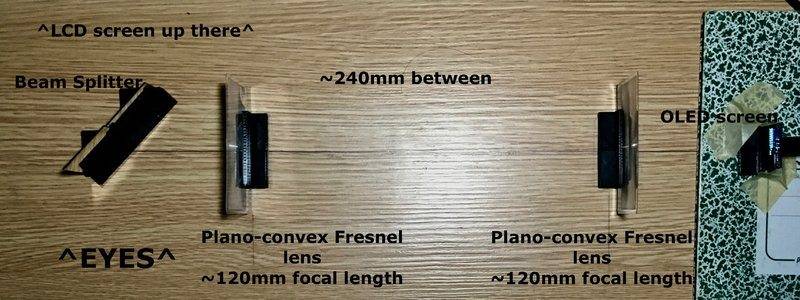
Set-up 2, OLED screen, no lasers.
Now I get rid of the lasers, I put the OLED screen instead, put a beam splitter to the left of all the lenses, and an LCD screen behind the beam splitter.
This way when I look at the beam splitter I see both images - from OLED (went through optics) and from LCD. However, the image from OLED screen is not at infinity: I have to focus my eyes on the LCD, then refocus to the OLED.
Why does it happen - why isn’t the OLED image at infinity? I want the virtual image from OLED screen to be always crisp and clear - well, imaged at infinity.
Also, there is a plano-concave lens on the schematic that explains the HUD. What's its purpose? I don’t quite get it.
I would really appreciate some help here; many thanks in advance.
I am trying to create an HUD display - basically create a virtual image at infinity and look at it. I have two plano-convex lenses; the distance between them is the sum of their focal lengths; my object is therefore imaged at infinity. Here is the schematics that I'm pretty much trying to make:
HUD optics:
Set-up 1: (with lasers)
I have two plano-convex fresnel lenses with the focal lengths of ~120mm each; I position them with ~240mm between them (sum of two focal lengths). I have an object on the right; after the light from it passes through my lenses, the rays should be collimated. They are - the distances between the rays of the light source and between the points on the image on the right are about the same (5cm vs 5.5cm. As good as it gets though. Is it because the lenses are not perfectly vertical?).
Set-up 2, OLED screen, no lasers.
Now I get rid of the lasers, I put the OLED screen instead, put a beam splitter to the left of all the lenses, and an LCD screen behind the beam splitter.
This way when I look at the beam splitter I see both images - from OLED (went through optics) and from LCD. However, the image from OLED screen is not at infinity: I have to focus my eyes on the LCD, then refocus to the OLED.
Why does it happen - why isn’t the OLED image at infinity? I want the virtual image from OLED screen to be always crisp and clear - well, imaged at infinity.
Also, there is a plano-concave lens on the schematic that explains the HUD. What's its purpose? I don’t quite get it.
I would really appreciate some help here; many thanks in advance.


