- 2,180
- 2,721
In my previous thread, I learned about the H11AA1 optocoupler, which can be used instead of the 4N35 to detect zero crossings with Arduino.
Arduino has a specific function for detecting interrupts:
The function allows the following four modes:
Code:
[CODE lang="c" title="Arduino"]const int PIN_INTERRUPT = 7;
void setup() {
Serial.begin(9600);
pinMode(LED_BUILTIN, OUTPUT);
pinMode(PIN_INTERRUPT, INPUT);
digitalWrite(LED_BUILTIN, LOW);
attachInterrupt(digitalPinToInterrupt(PIN_INTERRUPT), zeroCrossing, FALLING);
}
void loop() {
Serial.println(analogRead(A0));
}
void zeroCrossing(){
digitalWrite(LED_BUILTIN, HIGH);
}[/CODE]
The code is quite simple: the inbuilt LED is originally off, but the first time an interrupt is detected, it is turned on, and it stays on thereafter. I do not have an oscilloscope, so I am using the Arduino serial plotter and
Circuit:
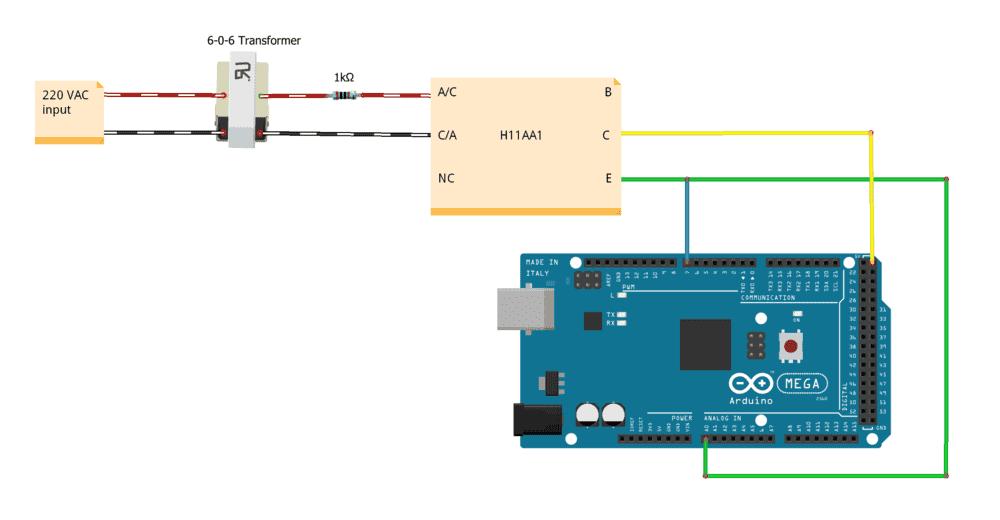
The diagram for the optocoupler follows from the Vishay datasheet.
Problem: Arduino is not detecting the interrupts: the inbuilt LED is not glowing, which implies that the ISR is not being called.
Output of Arduino serial plotter:
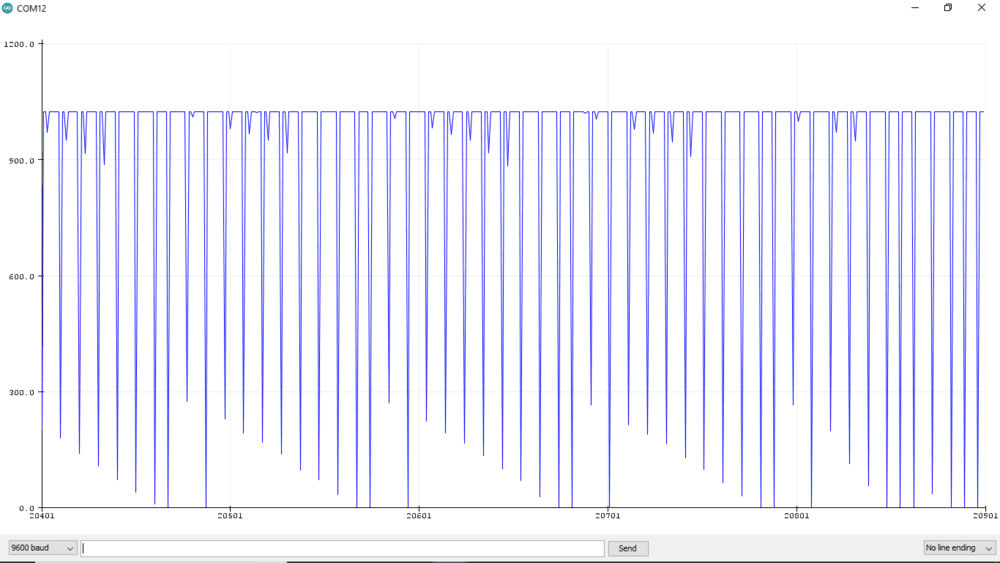
The above plot has interesting characteristics — it has a periodic pattern. The spikes almost always go below 300 (< 1.24V, LOW for arduino digital logic) from > 900 (> 4.41V, HIGH for Arduino digital logic), so these are the interrupts I want to see. This implies that the optocoupler is working fine, but Arduino still does not call the ISR.
I have tried many times before; this is the best graph I got. Now I don't know what to do. I cannot keep on using the
All help appreciated.
Arduino has a specific function for detecting interrupts:
attachInterrupt(digitalPinToInterrupt(pin), ISR, mode) This function is supposed to be used rather than the loop() function. Interrupt Service Routines (ISR) have to be short, but the code inside the loop() function can often be long, which will delay the next iteration and an interrupt can be missed.The function allows the following four modes:
mode:defines when the interrupt should be triggered. Four constants are predefined as valid values:
LOWto trigger the interrupt whenever the pin is low,CHANGEto trigger the interrupt whenever the pin changes value,RISINGto trigger when the pin goes from low to high,FALLINGfor when the pin goes from high to low.
Code:
[CODE lang="c" title="Arduino"]const int PIN_INTERRUPT = 7;
void setup() {
Serial.begin(9600);
pinMode(LED_BUILTIN, OUTPUT);
pinMode(PIN_INTERRUPT, INPUT);
digitalWrite(LED_BUILTIN, LOW);
attachInterrupt(digitalPinToInterrupt(PIN_INTERRUPT), zeroCrossing, FALLING);
}
void loop() {
Serial.println(analogRead(A0));
}
void zeroCrossing(){
digitalWrite(LED_BUILTIN, HIGH);
}[/CODE]
The code is quite simple: the inbuilt LED is originally off, but the first time an interrupt is detected, it is turned on, and it stays on thereafter. I do not have an oscilloscope, so I am using the Arduino serial plotter and
analogRead() to plot voltage values.Circuit:
The diagram for the optocoupler follows from the Vishay datasheet.
Problem: Arduino is not detecting the interrupts: the inbuilt LED is not glowing, which implies that the ISR is not being called.
Output of Arduino serial plotter:
The above plot has interesting characteristics — it has a periodic pattern. The spikes almost always go below 300 (< 1.24V, LOW for arduino digital logic) from > 900 (> 4.41V, HIGH for Arduino digital logic), so these are the interrupts I want to see. This implies that the optocoupler is working fine, but Arduino still does not call the ISR.
I have tried many times before; this is the best graph I got. Now I don't know what to do. I cannot keep on using the
loop() function because that will later be used for user input.All help appreciated.