Kindly, help me to understand the given MIPS programming problem

  • Thread starter Thread starter user366312
  • Start date Start date
  • Tags Tags
    Mips Programming
Click For Summary
SUMMARY

The discussion revolves around a MIPS programming problem that involves recognizing food types from a BMP image based on color components. The task requires preparing a histogram of the color components, calculating the mode, and comparing it with predefined mode values for each food type. The confusion arises regarding the purpose of a specific table and the interpretation of color components, particularly the 11th row, which indicates a green component despite the image appearing red. Clarification from the instructor is recommended for better understanding.

PREREQUISITES
  • Understanding of MIPS assembly language programming
  • Knowledge of image processing concepts, specifically BMP format
  • Familiarity with histogram creation and mode calculation
  • Basic understanding of color theory and RGB color components
NEXT STEPS
  • Research MIPS assembly language for image processing tasks
  • Learn about BMP image format and how to manipulate pixel data
  • Study histogram creation and mode calculation techniques
  • Explore color theory, focusing on RGB components and their significance
USEFUL FOR

Students and developers working on image processing projects, particularly those using MIPS assembly language, and anyone interested in understanding color component analysis in digital images.

user366312
Gold Member
Messages
88
Reaction score
3
Homework Statement
I am given a project of MIPS assembly programming. But, I am not being able to understand what it says.
Relevant Equations
Histogram, and Mode.
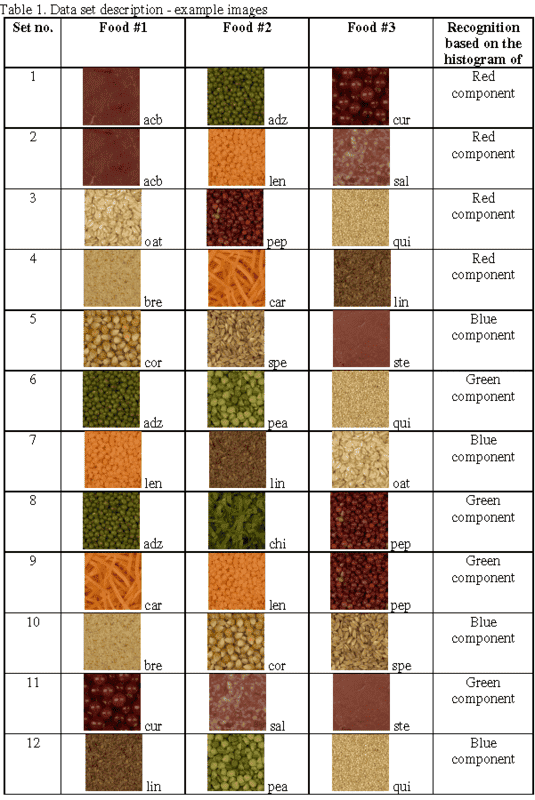
The input BMP image (24-bit RGB) contains one of three food types from the given set
(Table 1). Your task is to recognize the food and print in the console window its three-
character code given in Table 1.
The recognition should be performed in two three steps:
1. Preparation of the histogram of given color component (table 1). The histogram
contains number of pixels for each value of given color component.
2. Based on the histogram the mode should be calculated. Mode of a set of data values
is the value that appears most often.
3. Mode ranges of images belonging to different food types are different. So, you can
make decision which food type the image should be assigned to.
243397

I don't think I understood the problem clearly.

What I understood is this:
1. Each food item has a specific major color-component (and, hence, a fixed mode-value of that specific color component). First, I need to calculate all mode values, and use them as constants in my program.
2. When I am given a sample image as an input, 1st I need to see which component is major (based on its mode-value).
3. Then, I need to compare that mode-value with previously computed constant mode values.
4. Closest one matches the food.

Am I correct?

If that is so, what is the purpose of that table with 12 rows? What is it given for?

Especially, take a look at 11th row of the table where all pictures are red, but says green-component.
 

Attachments

Last edited:
Physics news on Phys.org
Problem doesn't seem to be clearly stated to me. What I get from the description (in the PDF) is that you are given an image file of 200px across by (up to) 200px down. Part of the file is the image data, which shows the colors used in each pixel, in 24 bits. I'm guessing that your program needs to find the image data, and then go through it pixel by pixel, figuring out what is the major color component.

I don't know what the purpose of the table is, nor do I know why the 11th says green component, but possibly the green component is the strongest and it's mixed with some amounts of red and blue.

I would advise you to get clarification from your instructor.
 

Similar threads

  • · Replies 7 ·
Replies
7
Views
3K
  • · Replies 4 ·
Replies
4
Views
3K
  • · Replies 3 ·
Replies
3
Views
6K
  • · Replies 5 ·
Replies
5
Views
4K
  • · Replies 19 ·
Replies
19
Views
2K
  • · Replies 12 ·
Replies
12
Views
2K
Replies
2
Views
2K
  • · Replies 5 ·
Replies
5
Views
6K
  • · Replies 2 ·
Replies
2
Views
2K
  • · Replies 1 ·
Replies
1
Views
2K