Making a simple animated cartoon

  • Thread starter Thread starter julian
  • Start date Start date
  • Tags Tags
    Animated
Click For Summary
SUMMARY

This discussion focuses on creating a simple animated cartoon using various online tools and software, specifically highlighting Blender 2.91's 2D animation capabilities. Users can utilize platforms like Animaker, Renderforest, and Pixteller for cartoon creation. The process involves drawing objects, setting keyframes, and using motion paths in Blender to animate a polo mint moving from a table to a person's mouth. The discussion emphasizes experimentation and seeking feedback to improve animation clarity.

PREREQUISITES
  • Basic understanding of Blender 2.91 and its 2D animation tools
  • Familiarity with keyframe animation concepts
  • Knowledge of using grease pencil objects in Blender
  • Experience with motion paths in PowerPoint for animation
NEXT STEPS
  • Explore Blender 2.91's grease pencil features for 2D animation
  • Learn about keyframe animation techniques in Blender
  • Research online cartoon-making tools like Animaker and Renderforest
  • Investigate motion path animation in PowerPoint for simpler projects
USEFUL FOR

Animators, graphic designers, and hobbyists interested in creating animated cartoons using Blender or online animation tools.

julian
Science Advisor
Gold Member
Messages
860
Reaction score
365
TL;DR
What would be the easiest way of making a really simple animated cartoon.
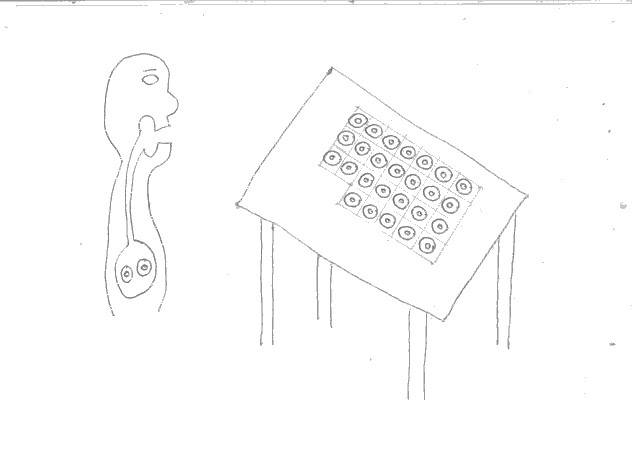
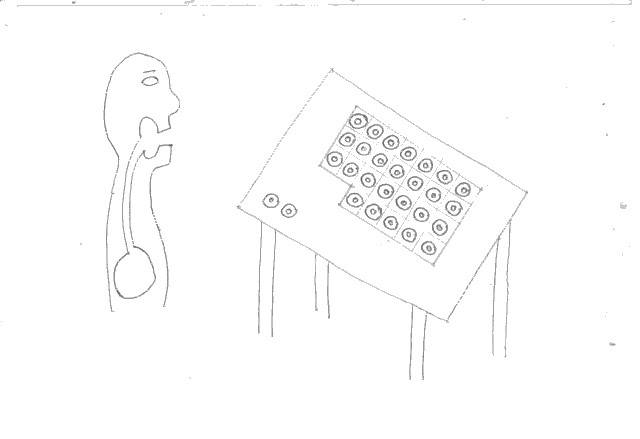
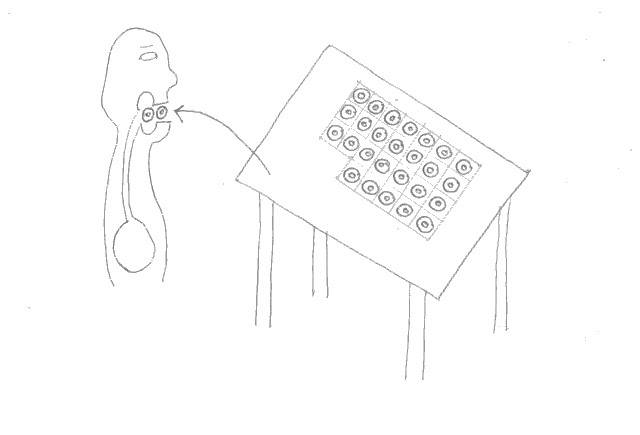
In fig a there are 28 polos (mint sweets) on a table. In fig b two of the polos have moved from the table to the person's mouth. In fig c the two polos have been swallowed and are now in the person's stomach. My question is there an easy way of turning this into a simple animated cartoon with online software?

fig a.jpg

fig b.jpg

fig c.jpg
 
Computer science news on Phys.org
As an aside, VOX did this video on the history of early animation:

 
  • Like
Likes Drakkith
Thanks @jedishrfu. I was wondering in particular if there is software where I can start with my drawing and then take an individual polo and simply drag it along a path from one position to another, creating a sequence of frames, and then for the software to then render it as a smooth motion. I shall explore! But if somebody already knows of software that can do what I want that would be good.
 
If you want to minimize the number of frames you want to draw, you can draw a comet tail or fitt lines behind the moving polo. With that you ought to need maybe six frames to get the polo into the mouth. The tails will need to accurately show the unseen path from one frame to the next, and look ethereal enough to not be mistaken for something real in the scene. But it is doable.

But the best advice is to keep trying different things and decide for yourself what works. Don't get discouraged if your first four attempts come out confusing. And be sure to check if other people understand what you are trying to convey with you animation.
 
  • Like
Likes julian
Blender 2.91 has a 2 D animation tool that can be used for this. It just took me a little bit of time to do a quick example.
test1.gif

Drew a rough table and figure
Created new grease pencil object to draw the simple "polo' on the table.( you need a new one so you can select it as a separate object in the next step)
Go from "draw" to "object" mode.
Select the polo. press "i", and choose location in the drop down menu ( this assigns the polo to this position for the first frame.
Go down to the timeline bar, move the slider to the frame number in which you want the polo to reach the mouth. (24 frames/sec) With the polo still selected, press "g". You can now move the polo around with your mouse.
Position it in the mouth, and press "i" and choose location again.
If you move the time bar back to the beginning and hit play, you will see the polo move from table to mouth.
I repeated this for the polo, advancing a few frames, putting it into the back for the throat, and then from there to the stomach.
This can then be rendered directly as an animation or as a series on images that can be assembled into an animation.
The good thing is, for as powerful as it is, Blender is totally free.
 
  • Like
Likes Wrichik Basu, BillTre, Ibix and 3 others
I thought he might have to do a gif animation or use gdi graphics.
 
Janus said:
Blender 2.91 has a 2 D animation tool that can be used for this. It just took me a little bit of time to do a quick example.
View attachment 275701
Drew a rough table and figure
Created new grease pencil object to draw the simple "polo' on the table.( you need a new one so you can select it as a separate object in the next step)
Go from "draw" to "object" mode.
Select the polo. press "i", and choose location in the drop down menu ( this assigns the polo to this position for the first frame.
Go down to the timeline bar, move the slider to the frame number in which you want the polo to reach the mouth. (24 frames/sec) With the polo still selected, press "g". You can now move the polo around with your mouse.
Position it in the mouth, and press "i" and choose location again.
If you move the time bar back to the beginning and hit play, you will see the polo move from table to mouth.
I repeated this for the polo, advancing a few frames, putting it into the back for the throat, and then from there to the stomach.
This can then be rendered directly as an animation or as a series on images that can be assembled into an animation.
The good thing is, for as powerful as it is, Blender is totally free.
This is just what I need! Thanks so much!
 
  • Like
Likes BillTre

Similar threads

  • · Replies 62 ·
3
Replies
62
Views
12K
  • · Replies 17 ·
Replies
17
Views
3K
  • · Replies 22 ·
Replies
22
Views
860
Replies
10
Views
5K
  • · Replies 6 ·
Replies
6
Views
3K
  • · Replies 3 ·
Replies
3
Views
2K
  • · Replies 25 ·
Replies
25
Views
5K
  • · Replies 24 ·
Replies
24
Views
3K
  • · Replies 5 ·
Replies
5
Views
2K
  • · Replies 6 ·
Replies
6
Views
2K