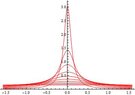
No Animation: Plotting Polar Function $p(r,\theta)$

Click For Summary
SUMMARY

The discussion focuses on animating a polar function defined by the equation $$p(r,\theta) = \frac{1}{2\pi}\left[\frac{1 - r^2}{1 - 2r\cos\theta + r^2}\right]$$ using Mathematica. Users encountered issues with the animation not functioning despite the absence of errors. Key solutions included defining the function u as u[r_, \theta_] to ensure it accepts two variables and utilizing the Manipulate function for interactive plotting.

PREREQUISITES
  • Familiarity with Mathematica syntax and functions
  • Understanding of polar coordinates and functions
  • Knowledge of plotting functions in Mathematica
  • Experience with animation in Mathematica
NEXT STEPS
  • Learn how to define multi-variable functions in Mathematica
  • Explore the Manipulate function for interactive visualizations
  • Study the differences between Plot and Plot3D in Mathematica
  • Investigate advanced animation techniques in Mathematica
USEFUL FOR

Mathematics educators, data visualizers, and anyone using Mathematica for plotting and animating mathematical functions.

Dustinsfl
Messages
2,217
Reaction score
5
$$
p(r,\theta) = \frac{1}{2\pi}\sum_{n = -\infty}^{\infty}r^{|n|}e^{in\theta} = \frac{1}{2\pi}\left[\frac{1 - r^2}{1 - 2r\cos\theta + r^2}\right].
$$
So I produced the graph but it won't animate.

Code:
MyR = Table[r, {r, 0, 1, .1}];

u[\[Theta]_] = 1/(2*Pi)*((1 - r^2)/(1 - 2*r*Cos[\[Theta]] + r^2));
Plot[u[MyR, \[Theta]], {\[Theta], -Pi/2, Pi/2}, 
 PlotRange -> {0, 3.25}, PlotStyle -> {Red}, AspectRatio -> 2/3]
View attachment 378

Code:
Animate[Plot[u[\[Theta]], {\[Theta], -Pi/2, Pi/2}, 
  PlotRange -> {0, 3.25}, GridLines -> Automatic, Frame -> True, 
  PlotStyle -> {Thick, Red}], {r, 0, 1, 0.1}, 
 AnimationRunning -> False]
This code doesn't produce any errors or Mathematica complaining but nothing happens when I hit play.
 

Attachments

  • Poissons kernel.jpg
    Poissons kernel.jpg
    8.3 KB · Views: 102
Last edited:
Physics news on Phys.org
dwsmith said:
$$
p(r,\theta) = \frac{1}{2\pi}\sum_{n = -\infty}^{\infty}r^{|n|}e^{in\theta} = \frac{1}{2\pi}\left[\frac{1 - r^2}{1 - 2r\cos\theta + r^2}\right].
$$
So I produced the graph but it won't animate.

Code:
MyR = Table[r, {r, 0, 1, .1}];

u[\[Theta]_] = 1/(2*Pi)*((1 - r^2)/(1 - 2*r*Cos[\[Theta]] + r^2));
Plot[u[MyR, \[Theta]], {\[Theta], -Pi/2, Pi/2}, 
 PlotRange -> {0, 3.25}, PlotStyle -> {Red}, AspectRatio -> 2/3]
View attachment 378

Code:
Animate[Plot[u[\[Theta]], {\[Theta], -Pi/2, Pi/2}, 
  PlotRange -> {0, 3.25}, GridLines -> Automatic, Frame -> True, 
  PlotStyle -> {Thick, Red}], {r, 0, 1, 0.1}, 
 AnimationRunning -> False]
This code doesn't produce any errors or Mathematica complaining but nothing happens when I hit play.

Hi dwsmith, :)

I don't use Mathematica but seeing this question go unanswered I posted this in the Google Mathematica group. Here are the replies.

Kind Regards,
Sudharaka.Reply 1:

myR = Table[r, {r, 0, 1, .1}];

u[r_, \[Theta]_] = 1/(2*Pi)*((1 - r^2)/
(1 - 2*r*Cos[\[Theta]] + r^2));

Plot[Evaluate[
Tooltip[u[#, \[Theta]], #] & /@ myR],
{\[Theta], -Pi/2, Pi/2},
PlotRange -> {0, 3.25},
AspectRatio -> 2/3,
Frame -> True,
Axes -> False]

Plot3D[u[r, \[Theta]],
{\[Theta], -Pi/2, Pi/2},
{r, 0, 1},
PlotRange -> {0, 4},
AspectRatio -> 2/3,
ClippingStyle -> None]

Animate[
Plot[u[r, \[Theta]], {\[Theta], -Pi/2, Pi/2},
PlotRange -> {0, 3.25},
GridLines -> Automatic,
Frame -> True,
PlotStyle -> {Thick, Red}],
{r, 0, 1, 0.1},
AnimationRunning -> False]

Manipulate[
Plot[u[r, \[Theta]], {\[Theta], -Pi/2, Pi/2},
PlotRange -> {0, 3.25},
GridLines -> Automatic,
Frame -> True,
PlotStyle -> {Thick, Red}],
{r, 0, 1, 0.01, Appearance -> "Labeled"}]


Reply 2:


You need to define u as a function of two variables.

u[r_,theta_]= ...
as in

MyR = Table[r, {r, 0, 1, .1}];

u[r_ ,\[Theta]_] = 1/(2*Pi)*((1 - r^2)/(1 - 2*r*Cos[\[Theta]] + r^2));
Plot[u[MyR, \[Theta]], {\[Theta], -Pi/2, Pi/2},
PlotRange -> {0, 3.25}, PlotStyle -> {Red}, AspectRatio -> 2/3]Then

Animate[Plot[u[r,\[Theta]], {\[Theta], -Pi/2, Pi/2}, PlotRange -> {0, 3.25}, GridLines -> Automatic, Frame -> True, PlotStyle -> {Thick, Red}], {r, 0, 1, 0.1}, AnimationRunning -> False]
 

Similar threads

  • · Replies 1 ·
Replies
1
Views
2K
  • · Replies 2 ·
Replies
2
Views
2K
Replies
5
Views
2K
  • · Replies 1 ·
Replies
1
Views
2K
  • · Replies 6 ·
Replies
6
Views
2K
  • · Replies 1 ·
Replies
1
Views
3K
  • · Replies 1 ·
Replies
1
Views
2K
  • · Replies 19 ·
Replies
19
Views
2K
  • · Replies 3 ·
Replies
3
Views
2K
  • · Replies 1 ·
Replies
1
Views
8K