Plotting a Function in Gnuplot with Range: 0<z<3, -5<x<5, -5<y<5

  • Thread starter Thread starter Pessoa
  • Start date Start date
  • Tags Tags
    Gnuplot Plotting
Click For Summary
SUMMARY

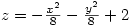
The discussion focuses on plotting a function in Gnuplot with specified ranges for the variables z, x, and y. The correct commands to set the ranges are set xrange [-5:5], set yrange [-5:5], and set zrange [0:3]. The function to be plotted is splot -x*x/8.0 - y*y/8.0 + 2. Users are encouraged to refer to the Gnuplot help file for additional syntax details.

PREREQUISITES
  • Basic understanding of Gnuplot syntax
  • Familiarity with 3D plotting concepts
  • Knowledge of mathematical functions and their graphical representation
  • Experience with command-line interfaces
NEXT STEPS
  • Explore Gnuplot's documentation on 3D plotting
  • Learn about Gnuplot's set range command in detail
  • Investigate advanced plotting techniques in Gnuplot
  • Practice plotting different mathematical functions using Gnuplot
USEFUL FOR

Mathematicians, data analysts, and engineers who need to visualize functions in three dimensions using Gnuplot.

Pessoa
I want to plot in gnuplot the function , with the range being:
c06a7dd2d438f9fbfc5e2fd7b939cd73.gif


0<z<3
-5<x<5
-5<y<5

What is the command?

Thanks in advance, fellows.
 
Computer science news on Phys.org
I think it is the set range command. I'm not sure of the syntax, but it's something like set xrange [-5:5]. You might want to check that in the help file.
 
Last edited:
set xrange[-5:5]
set yrange[-5:5]
set zrange[0:3]
splot -x*x/8.0 - y*y/8.0 + 2
 

Similar threads

  • · Replies 2 ·
Replies
2
Views
3K
  • · Replies 9 ·
Replies
9
Views
2K
  • · Replies 1 ·
Replies
1
Views
1K
  • · Replies 9 ·
Replies
9
Views
3K
Replies
10
Views
6K
  • · Replies 2 ·
Replies
2
Views
3K
Replies
4
Views
4K
Replies
2
Views
2K
  • · Replies 4 ·
Replies
4
Views
3K
  • · Replies 2 ·
Replies
2
Views
2K