Setting up an FCC lattice in a simulation

Click For Summary
SUMMARY

This discussion focuses on setting up a face-centered cubic (FCC) lattice for a Monte Carlo simulation of N hard spheres using C++. The user outlines the lattice vectors necessary for defining the structure and shares a C++ routine to generate the coordinates of FCC lattice sites based on a specified lattice constant and dimensions. The provided code efficiently writes the coordinates to an output file, demonstrating a systematic approach to generating the lattice configuration.

PREREQUISITES
  • Understanding of FCC lattice structure and its properties
  • Proficiency in C++ programming, including file I/O operations
  • Familiarity with Monte Carlo simulation techniques
  • Basic knowledge of 3D coordinate systems and vector mathematics
NEXT STEPS
  • Learn about advanced C++ techniques for optimizing simulation performance
  • Explore Monte Carlo methods specific to hard sphere simulations
  • Research lattice structures beyond FCC, such as body-centered cubic (BCC)
  • Investigate visualization tools for 3D lattice structures in simulations
USEFUL FOR

Researchers and developers in computational physics, particularly those involved in simulations of particle systems, as well as C++ programmers looking to implement lattice structures in their projects.

SchroedingersLion
Messages
211
Reaction score
56
Greetings,

for a Monte Carlo simulation of N hard spheres, I want to set up the initial configuration as a fcc lattice. I am thinking about how to do it most efficiently.

Here is the lattice structure:
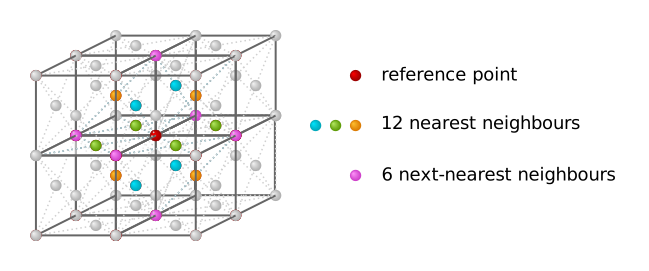
fcc-coordination-number-nearest-neighbours.svg


The 3 lattice vectors, each one pointing to a different type of the 12 nearest neighbors (see colors in picture), are given by
$$\vec a_{1}=\frac a 2 \begin{pmatrix} 0 \\ 1 \\ 1 \end{pmatrix},
\vec a_{2}=\frac a 2 \begin {pmatrix} 1 \\ 0 \\ 1 \end {pmatrix},
\vec a_{3}=\frac a 2 \begin {pmatrix} 1 \\ 1 \\ 0 \end {pmatrix}
$$

How would you do this most easily in C++?

My first idea was to simply set up the nearest neighbors. First, I use the three lattice vectors separately to set up the first 3 nearest neighbors. Then I combine two of them to get the other 9. Then I combine all 3 to get the next-nearest neighbors.

But what then? I have to repeat these steps with different pre-factors in the linear combinations, but I don't know how to do it systematically in a loop.Regards,
SL
 
Technology news on Phys.org
Ok, in case someone needs this as well, here is my routine:

Code:
#include <fstream>
#include <string>

//function that writes the coordinates of fcc lattice sites with given
//lattice constant, numbers of rows, columns and layers to an output file

using namespace std;

void generate_fcc(double a, int rows, int columns, int layers){

ofstream fcc("fcc_coordinates_a=" + to_string(a) + "_" +
             to_string(rows) + "rows_" + to_string(columns) + "columns_" + to_string(layers) + "layers.dat");

//necessary initializations to get coordinates of 1st particle after incrementations at beginning of loops
double x0=-a, y0=-a, z0=-a, x1, y1, z1=-a/2;

// print coordinates, layer by layer, columns by columns, row by row
for (int i=0; i<layers; i++){
        z0+=a;
        z1+=a;

        x0=-a;

        for (int j=0; j<columns; j++){
            x0+=a;
            x1=x0 + a/2;

            y0=-a;

            for (int k=0; k<rows; k++){
                y0+=a;
                y1=y0 + a/2;

                fcc << x0 << "\t" << y0 << "\t" << z0 << endl;
                fcc << x1 << "\t" << y1 << "\t" << z0 << endl;
                fcc << x0 << "\t" << y1 << "\t" << z1 << endl;
                fcc << x1 << "\t" << y0 << "\t" << z1 << endl;
            }
        }
}

fcc.close();
}
 

Similar threads

  • · Replies 1 ·
Replies
1
Views
2K
  • · Replies 9 ·
Replies
9
Views
2K
  • · Replies 0 ·
Replies
0
Views
1K
  • · Replies 8 ·
Replies
8
Views
2K
  • · Replies 8 ·
Replies
8
Views
3K
  • · Replies 2 ·
Replies
2
Views
2K
  • · Replies 6 ·
Replies
6
Views
6K
  • · Replies 30 ·
2
Replies
30
Views
2K
  • · Replies 8 ·
Replies
8
Views
3K
Replies
9
Views
2K