Trouble using PythonTex variables in Latex file

Click For Summary
SUMMARY

The discussion focuses on troubleshooting the integration of PythonTeX with LaTeX in Visual Studio Code. Users encountered issues with rendering variables, specifically receiving double question marks when attempting to use the \py{myvar} command. Solutions proposed include using the \pyc{print(myvar)} command and generating multiple LaTeX files from Python using a template. The correct compilation sequence for PythonTeX is emphasized: running pdflatex, followed by pythontex, and then pdflatex again to resolve missing autoprint content errors.

PREREQUISITES
  • Familiarity with LaTeX document preparation
  • Basic understanding of Python programming
  • Knowledge of Visual Studio Code or similar text editors
  • Experience with command-line operations for compiling LaTeX documents
NEXT STEPS
  • Research the PythonTeX documentation for detailed usage instructions
  • Learn how to configure Visual Studio Code for PythonTeX integration
  • Explore template engines like Jinja for generating LaTeX documents
  • Investigate error handling in LaTeX, specifically regarding missing autoprint content
USEFUL FOR

Educators, researchers, and developers looking to automate the generation of LaTeX documents using PythonTeX, as well as anyone troubleshooting LaTeX variable rendering issues.

SamRoss
Gold Member
Messages
256
Reaction score
36
TL;DR
I defined a variable myvar = "hi" but I can't get it to render correctly in the pdf when I use \py{myvar}.
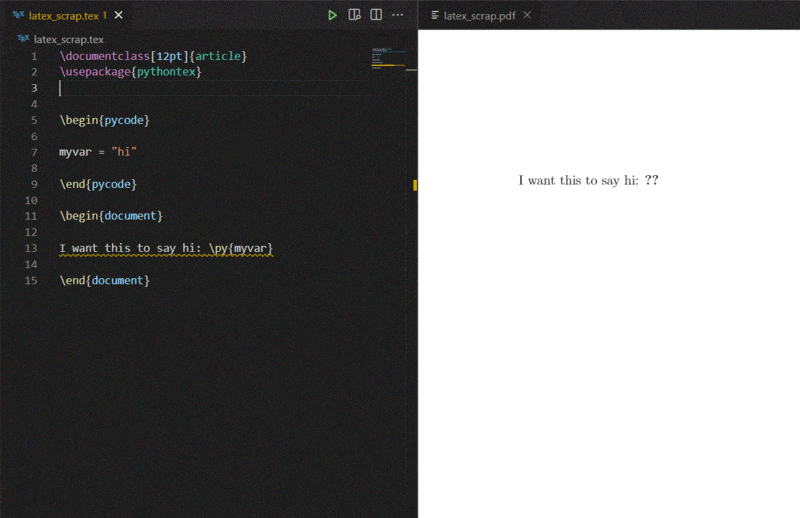
I'm using Visual Studio Code as my text editor. My ultimate goal is to use PythonTex in a Latex file so that I can generate multiple versions of the same worksheet for my class. As a test, I defined a variable myvar = "hi" but I can't get it to render correctly in the pdf when I use \py{myvar}. It just shows me double question marks.

latex.GIF


When I hover over \py{myvar}, it says "Missing autoprint content". I have no idea what that means. Any help would be greatly appreciated. Thanks!
 
Physics news on Phys.org
jedishrfu said:
Since that doesn’t seem to work, I saw an alternative that you could try:
Code:
\pyc{print(myvar)}

Good news and bad news. The good news is the question marks went away. The bad news is nothing took their place.
Capture.GIF
 
SamRoss said:
My ultimate goal is to use PythonTex in a Latex file so that I can generate multiple versions of the same worksheet for my class.
A more robust way to achieve your goal would be to generate multiple ## \LaTeX ## files from Python using a template, perhaps similar to this:
[CODE title="mark.tpl.tex"]
\documentclass{article}
\begin{document}
Hello \VAR{ name }, you got \VAR{ mark } out of 10.

Well done \VAR{name}!
\end{document}
[/CODE]

You can then iterate over the data for the students, either using simple code like this:
Python:
import re

infile = open('mark.tpl.tex')
template = infile.read()
infile.close()

students = {
    'alice.smith': {
        'name': 'Alice',
        'mark': 9,
    },
    'bob.jones': {
        'name': 'Bob',
        'mark': 7.5,
    },
    'charlie.robinson': {
        'name': 'Charlie',
        'mark': 8,
    },
}

for student, vars in students.items():
    result = template
    for key, value in vars.items():
        # Substitute variable, allowing for optional whitespace.
        result = re.sub('\\\\VAR{\\s*' + key + '\\s*}', str(value), result)

    # Here we create a .tex file for each student, we could use os.system()
    # to pipe the output through tex to create to .pdf files directly.
    outfile = open('mark-' + student + '.tex', 'w')
    outfile.write(result)
    outfile.close()

... or using a more advanced template engine like Jinja. Note that Jinja is designed for HTML so you have to make some configuration changes to avoid conflicts with ## \LaTeX ## markup. There are some notes here although I don't know if they work (I do a similar thing but using node.js and mustache templates).

Edit: this code works for creating PDF files on my system (just add it after the last line above), it may need to be changed to suit yours:
Python:
    os.system('pdflatex ' + 'mark-' + student + '.tex')
 
Last edited:
  • Like
Likes   Reactions: sysprog and SamRoss
Thank you for your response. This might be something for me to look into later, but right now it is beyond my meager skills. The immediate problem I'm trying to solve is to make those double question marks going away so I can define some variables and have latex render them correctly.
 
I was able to create a PDF containing the text 'Hello' from the following file
Code:
\documentclass[12pt,a4paper]{article}
\usepackage[utf8]{inputenc}
\usepackage{pythontex}

\begin{pycode}

foo = 'Hello'

\end{pycode}

\begin{document}

\py{foo}

\end{document}
using these steps:
Code:
> pdflatex test.tex
> pythontex test.tex
> pdflatex test.tex

After the first run of LaTeX I also had '??' in the output and a warning about missing autoprint text, but that is to be expected: '??' usually indicates that LaTeX is looking for something in a file which isn't there, usually because to create that file you must first run LaTeX on your document, then run some other tool which looks at the .aux file created by LaTeX in order to work out what it needs to do to create the file. Then you run LaTeX again.

BibTeX, MakeIndex and PythonTex all work this way.

Your LaTeX editor may not have a convenient way to run PythonTex, although you may be able to configure it to do so.
 
  • Like
Likes   Reactions: SamRoss and jedishrfu
Thanks very much. This seems to
pasmith said:
...using these steps:
Code:
> pdflatex test.tex
> pythontex test.tex
> pdflatex test.tex

Your LaTeX editor may not have a convenient way to run PythonTex, although you may be able to configure it to do so.
Thank you very much. I feel like I'm getting closer to solving this problem but I still have some questions. You said you used the steps pdflatex test.tex, pythontex test.tex, pdflatex test.tex. I'm not sure what you meant by that. Do you mean you converted the latex into pythontex and then back in latex? If so, how? Also, if my LaTeX editor does not have a convenient way to run PythonTex, how can I configure it to do so? Please bear in mind this is the first "configuring" I will have ever done so, if it is not too much trouble, a step-by-step explanation or a link to a webpage that explains it in a step-by-step manner would be very helpful. I tried searching for answers myself but was unsuccessful. Thanks again!
 
  • #10
SamRoss said:
The immediate problem I'm trying to solve is to make those double question marks going away so I can define some variables and have latex render them correctly.
If you can achieve that you will have slain one alligator but I think you will have a long way to go to produce multiple PDFs each containing multiple substitutions from that one tex file.

I would encourage you to take another look at the solution I posted (forget about Jinja for now, the simple search-and-replace code I used works fine). This should help you drain the swamp in one go.
 
  • Like
Likes   Reactions: SamRoss
  • #11
SamRoss said:
Thanks very much. This seems to

Thank you very much. I feel like I'm getting closer to solving this problem but I still have some questions. You said you used the steps pdflatex test.tex, pythontex test.tex, pdflatex test.tex. I'm not sure what you meant by that. Do you mean you converted the latex into pythontex and then back in latex? If so, how? Also, if my LaTeX editor does not have a convenient way to run PythonTex, how can I configure it to do so? Please bear in mind this is the first "configuring" I will have ever done so, if it is not too much trouble, a step-by-step explanation or a link to a webpage that explains it in a step-by-step manner would be very helpful. I tried searching for answers myself but was unsuccessful. Thanks again!

This stackexchange post explains how to get PythonTex to work with Visual Studio Code. It appears to require manually editing a JSON file in a couple of places.

I use TeXMaker. The user manual is here. Section 3 describes the basic process of compiling a document.

On the toolbar is a drop-down list of standard TeX-related tools, which can be run on the current document by pressing the button to the left.

Untitled1.png


PythonTeX is not one of these, but as you see I have set is up as the first user defined command. To do this, go to User > User Commands > Edit User Commands and complete the dialog as follows (setting up user commands is only mentioned in passing in the user manual):
Untitled3.png


To compile the document correctly, you must do the following:
- Run LaTeX or PDFLaTeX
- Run PythonTex
- Run PDFLaTeX again.
 
  • Like
Likes   Reactions: jedishrfu
  • #12
pasmith said:
This stackexchange post explains how to get PythonTex to work with Visual Studio Code. It appears to require manually editing a JSON file in a couple of places.To compile the document correctly, you must do the following:
- Run LaTeX or PDFLaTeX
- Run PythonTex
- Run PDFLaTeX again.
I did see that stackexchange post but when I tried copying and pasting the code, it didn't work. I downloaded TeXMaker and tried following your instructions but I'm still getting the same error. Here's what I did...

1. I entered the PythonTeX user command.
snip 1.GIF


2. I chose PDFLaTeX from the dropdown menu and then clicked on the arrow on the left.
snip 2.GIF


3. I chose PythonTex from the dropdown menu (the one I just created) and then clicked on the arrow on the left.
snip 3.GIF


4. I chose PDFLaTeX again and clicked the arrow.
snip 2.GIF


5. I clicked the arrow to the left of View PDF.
snip view pdf.GIF


Here is the result...
snip 4.GIF
I tried doing the same thing but with LaTeX instead of the first PDFLaTeX and I got the same result. Am I doing something wrong?
 

Attachments

  • snip 2.GIF
    snip 2.GIF
    2.2 KB · Views: 174
  • #13
pbuk said:
I would encourage you to take another look at the solution I posted (forget about Jinja for now, the simple search-and-replace code I used works fine). This should help you drain the swamp in one go.
I'm sure I will have use for it once I'm more comfortable doing some very simple things. Thank you again.
 

Similar threads

  • · Replies 23 ·
Replies
23
Views
3K
  • · Replies 4 ·
Replies
4
Views
2K
  • · Replies 12 ·
Replies
12
Views
3K
  • · Replies 5 ·
Replies
5
Views
3K
  • · Replies 8 ·
Replies
8
Views
3K
  • · Replies 5 ·
Replies
5
Views
3K
Replies
23
Views
2K
  • · Replies 8 ·
Replies
8
Views
12K
  • · Replies 7 ·
Replies
7
Views
2K
  • · Replies 1 ·
Replies
1
Views
3K