What is the Difference Between a TeX Distribution and a TeX Editor?

Click For Summary

Discussion Overview

The discussion revolves around the installation and usage of MikTeX, a TeX distribution, and the distinction between a TeX distribution and a TeX editor. Participants explore installation issues, the presence of previous installations, and the necessary tools for editing and compiling TeX documents.

Discussion Character

  • Technical explanation
  • Debate/contested
  • Homework-related

Main Points Raised

  • One participant encounters a problem during the installation of MikTeX and seeks assistance.
  • Another participant questions whether the installation is being performed with administrator rights and whether a previous installation of MikTeX exists.
  • There is a discussion about the presence of subfolders in the MikTeX directory, with participants trying to clarify if these are remnants of a previous installation.
  • It is suggested that if a previous installation exists, it should be uninstalled before attempting a new installation.
  • One participant expresses difficulty in locating the executable file for MikTeX and seeks advice on how to start it.
  • A distinction is made between a TeX distribution (MikTeX) and a TeX editor, with a recommendation for TexStudio as a suitable editor for working with TeX documents.
  • Participants discuss the general role of a TeX distribution as a set of programs and packages for processing TeX files, contrasting it with the function of a TeX editor or IDE as a user-friendly interface for creating and viewing documents.

Areas of Agreement / Disagreement

Participants generally agree on the need for both a TeX distribution and a TeX editor, but there are unresolved questions regarding installation issues and the specifics of using MikTeX effectively.

Contextual Notes

There are limitations regarding the clarity of installation steps and the specific configurations needed for different systems. Some participants mention dependencies on previous installations and the need for administrative rights, which may vary by user.

mech-eng
Messages
826
Reaction score
13
To learn LaTex, I want to install MikTex but in installing it, I come across with a problem.
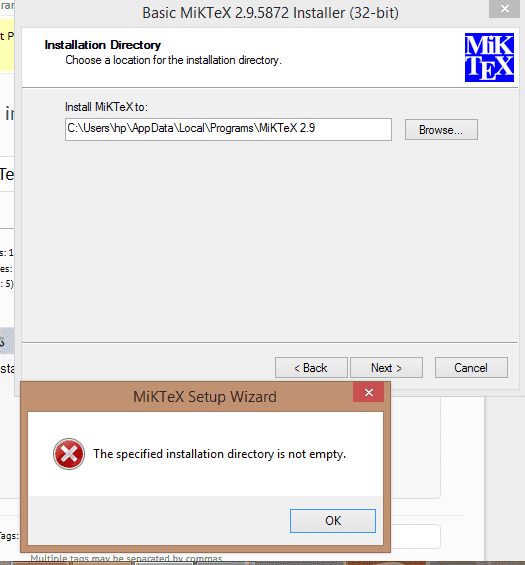
installation error.png


It appears when click next. What is the problem and how can I solve it?

Thank you.
 
Computer science news on Phys.org
First question is whether you install using administrator account. If you do, then have you another installation of MikTex there?
 
QuantumQuest said:
First question is whether you install using administrator account. If you do, then have you another installation of MikTex there?

There is folder named miktex under the folder Program Files (x86). But there are a lot of subfolder under miktex folder. So how will I proceed now?

Thank you.
 
mech-eng said:
There is folder named miktex under the folder Program Files (x86). But there are a lot of subfolder under miktex folder. So how will I proceed now?

From your answer, I assume that you use administrator rights - if you don't you have to do so. Now, what do you mean there are a lot of subfolders there? You are in the process of installing. Were these files created by the current installation process or they were already there i.e. there is a previous installation of MikTex on your machine?
 
QuantumQuest said:
From your answer, I assume that you use administrator rights - if you don't you have to do so. Now, what do you mean there are a lot of subfolders there? You are in the process of installing. Were these files created by the current installation process or they were already there i.e. there is a previous installation of MikTex on your machine?

Probably, yes there is a previous installation of MikTex on my machine as you suspected in #2.

Thank you.
 
mech-eng said:
Probably, yes there is a previous installation of MikTex on my machine as you suspected in #2.

If that's the case, then uninstall the previous version of MikTex, using the relevant section of the control panel and make sure that nothing is left in "Program Files" from the previous installation of MikTex. Then you have to do the installation for the version of MikTex you want, all over again.

EDIT: If you run Windows 10 you can uninstall programs by just using your start menu.
 
Last edited:
But if it is installed, isn't it better to use it, but I cannot start it orI cannot find its exe file to start. How I can try to start it?

Thank you.
 
mech-eng said:
But if it is installed, isn't it better to use it, but I cannot start it orI cannot find its exe file to start. How I can try to start it?

MikTex is a TeX distribution. In order to use it, you need a TeX editor or IDE to edit, compile and view TeX documents. I recommend TexStudio, which is a decent and free LaTeX IDE but there are other great TeX editors / IDEs as well. You can find it here. You can download and install it. It features syntax highlighting, autocompletion, inline spell and grammar checker and much more. It is best to install it having already a TeX distribution installation (like MikTex) on your machine, in order to be identified by TexStudio. If it won't, there is an easy configuration process you can easily find on the net.
 
  • Like
Likes   Reactions: mech-eng
  • #10
QuantumQuest said:
MikTex is a TeX distribution. In order to use it, you need a TeX editor or IDE to edit, compile and view TeX documents.

What is the difference between a TeX distribution and a TeX editor?

Thank you.
 
  • #11
mech-eng said:
What is the difference between a TeX distribution and a TeX editor?

Thank you.
The same as the difference between a compiler and an IDE in programming.

The distribution is the set of programs and packages that allow your computer to process a TeX file into a finished document. It can be used by issuing some commands in a terminal window (as was always the case before windowing came around). To create the TeX file, you need some kind of editor (anything from Notepad to emacs).

A TeX editor or IDE serves as a windowing front end and will include an editor to create your TeX file and will display the finshed result (e.g., the PDF file), with everything running with button clicks instead of command lines.
 
  • Like
Likes   Reactions: mech-eng

Similar threads

Replies
1
Views
2K
  • · Replies 4 ·
Replies
4
Views
2K
  • · Replies 5 ·
Replies
5
Views
2K
  • · Replies 14 ·
Replies
14
Views
5K
Replies
35
Views
10K
  • · Replies 1 ·
Replies
1
Views
2K
  • · Replies 7 ·
Replies
7
Views
2K
  • · Replies 25 ·
Replies
25
Views
4K
Replies
3
Views
2K
  • · Replies 1 ·
Replies
1
Views
9K