When is ordering not optional in index creation?

Click For Summary

Discussion Overview

The discussion centers on the creation of indexes in database tables, particularly focusing on when ordering is not optional and the implications of unique versus non-unique indexes. Participants explore examples and clarify concepts related to foreign key relationships, duplicate entries, and the specifics of index creation syntax.

Discussion Character

  • Technical explanation
  • Conceptual clarification
  • Debate/contested

Main Points Raised

  • One participant expresses confusion regarding a book's statement about index creation and foreign key relationships, questioning if it implies that indexes cannot be created in tables with such relationships.
  • Another participant notes that creating a unique index fails if the table contains duplicate entries, providing examples of data that may not be unique.
  • A participant seeks clarification on whether the discussion pertains to single tables and if "table" and "relations" are interchangeable terms in this context.
  • Questions arise about the possibility of creating non-unique indexes and the conditions under which unique indexes can be formed using combinations of fields.
  • There is a discussion about the optional nature of unique constraints in indexes, with one participant explaining that the brackets indicate optionality and that duplicates can exist without unique constraints.
  • Participants discuss the implications of ordering in index creation, with one questioning the significance of "Asc" and "Desc" in the index script and whether ordering is optional.
  • Another participant clarifies that while ordering is not optional, it defaults to ascending, and provides examples of how different orderings affect query performance.

Areas of Agreement / Disagreement

Participants express differing views on the implications of unique constraints and the role of ordering in index creation. There is no consensus on the interpretation of the book's statements or the specifics of index behavior in various scenarios.

Contextual Notes

There are unresolved questions regarding the definitions of terms used, the specific conditions under which unique indexes can be created, and the impact of ordering on index performance. Participants have not reached a definitive agreement on these points.

momentum
Messages
111
Reaction score
0
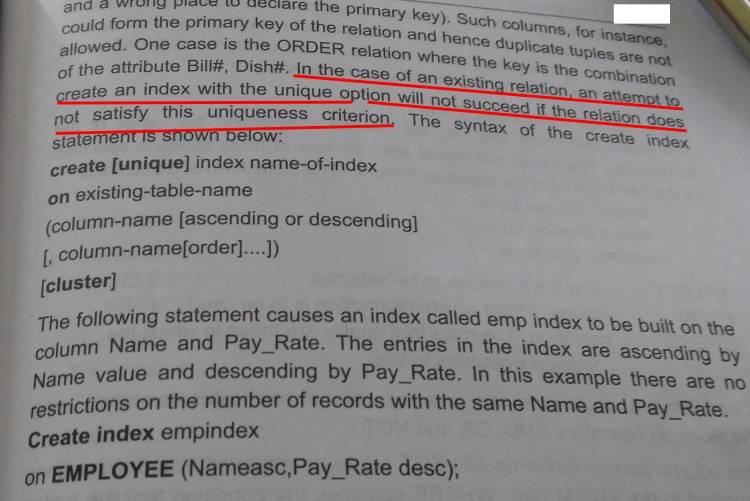
red marker part in my book is very confusing.
It says you will not succeed to create index by that.

Is it trying to say that if we have two tables and there is a FK relation in them , then I won't be able to create index in either table?

Can you please help with an example exactly when I won't be able to create index as per that red marker.
dCIE4w3.jpg
 

Attachments

  • dCIE4w3.jpg
    dCIE4w3.jpg
    47.8 KB · Views: 444
Last edited:
Technology news on Phys.org
If you have data in your table (relations) that has duplicate entries and you try to create a unique index using that key, you should not be able to.

For example you can have people with same names, dates of birth, address, department id, title, etc.

Example where it will fail: https://stackoverflow.com/questions...xisting-table-in-mysql-which-contains-records

You should choose something unique like SSN# or EmployeeID for unique index creation, i.e

likely to be a unique table:
EmployeeID FirstName LastName Title Department Salary

vs

unlikely to be unique:
FirstName Gender Department
 
.some confusions ...

cronxeh said:
If you have data in your table (relations) that has duplicate entries ..

1. Are we talking about single table here ? Yes/No?

2 .You wrote table(relations) ? are they same here ?

You should choose something unique like SSN# or EmployeeID for unique index creation
3. You said "unique index creation"...ok ..fine ... can we create non unique index also ?

4. An example,suppose, vehicle_state_code and registration_no combination will make unique tuples in my table.
Shall I be able to create unique index with these two fields? Is it okay?
 
Last edited:
The indexes are per specific table.

The “[unique]” in textbook means it’s optional and just adds more constraints. Whenever you see brackets that means it’s an optional specifier.

You can create index without unique constraints and have duplicate entries like second example below in that book where same name and same salary can exist in the table, for example interns with names like Dave/John/Andrew getting paid zero or minimum wage.

For vehicle state code and registration number question, it depends on the data, you can have same registration number but different vehicle state code, and same registration number if it’s been reused by that state. So given how dysfunctional governments are, you can bet there will be duplicates.
 
cronxeh said:
.

You can create index without unique constraints and have duplicate entries like second example below in that book where same name and same salary can exist in the table, for example interns with names like Dave/John/Andrew getting paid zero or minimum wage.

okay.

Please look at this script.

create index empindex
on EMPLOYEE(Name Asc,Pay_Rate Desc)

Its very confusing that there is Asc,Desc. What index does with this ordering? does ordering is optional ?
 
momentum said:
okay.

Please look at this script.

create index empindex
on EMPLOYEE(Name Asc,Pay_Rate Desc)

Its very confusing that there is Asc,Desc. What index does with this ordering? does ordering is optional ?

Your example is an index (name asc, pay_rate desc). This index will be used when it can be, but it's quite restrictive. For example, these will be quicker:

1. ORDER BY name
2. ORDER BY name, pay_rate desc
3. ORDER BY name desc, pay_rate

And these will be just as slow as before:

1. ORDER BY pay_rate desc
2. ORDER BY pay_rate desc, name
3. ORDER BY name, pay_rate

Ordering is not optional, it just defaults to ascending.
 

Similar threads

Replies
10
Views
2K
  • · Replies 5 ·
Replies
5
Views
3K
  • · Replies 3 ·
Replies
3
Views
2K
Replies
65
Views
5K
  • · Replies 4 ·
Replies
4
Views
2K
  • · Replies 4 ·
Replies
4
Views
2K
  • · Replies 5 ·
Replies
5
Views
2K
  • · Replies 1 ·
Replies
1
Views
1K
  • · Replies 1 ·
Replies
1
Views
3K
  • · Replies 14 ·
Replies
14
Views
4K