Windows 7 desktop freezing every now and then

Click For Summary
SUMMARY

The Windows 7 32-bit desktop is experiencing intermittent freezing issues, which began after replacing a faulty PSU. Symptoms include mouse pointer lag, typing delays, and WiFi tethering interruptions. The user has scanned for malware using Quick Heal and Malwarebytes, with no threats detected. Event Viewer logs indicate multiple errors related to the graphics adapter and IDE port, suggesting potential hardware issues, including improper seating of the graphics card and overheating due to inadequate thermal paste.

PREREQUISITES
  • Understanding of Windows 7 operating system and its Event Viewer tool
  • Basic knowledge of computer hardware components, including PSUs and graphics cards
  • Familiarity with driver installation and troubleshooting
  • Experience with temperature monitoring software for CPUs
NEXT STEPS
  • Investigate and resolve errors in Event Viewer, particularly those related to the graphics adapter and IDE port
  • Check the seating of the graphics card and apply thermal paste if necessary
  • Update or reinstall the graphics driver to ensure compatibility
  • Test the hard drive by reconnecting it to a different SATA port and using a different cable
USEFUL FOR

PC technicians, system administrators, and users troubleshooting performance issues on Windows 7 desktops experiencing hardware-related problems.

Wrichik Basu
Science Advisor
Insights Author
Gold Member
Messages
2,180
Reaction score
2,690
We fixed our Windows 7 32-bit desktop a few weeks back by buying a new PSU for it (see this thread for details). Now a new problem has started: the PC freezes every now and then.
1. When the PC is powered on, it works fine for some time. Then the problem starts​
2. Suppose I am moving the mouse pointer across the screen. Halfway through, the pointer gets stuck, and after a few seconds, it jumps to a new position.​
3. If I am typing something, the cursor stops blinking and the letters stop appearing. After some seconds, everything comes back to normal. All the letters typed during this period are visible on the screen suddenly.​
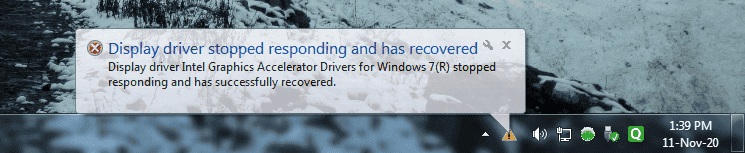
4. Often the monitor goes black, and then the display comes back, with the following notification:​

1605109507497.png

5. If I create a WiFi hotspot on the PC by creating a hostednetwork, then the tethering stops during this period, and any device connected to the hotspot disconnects.​
6. The problem recurs every few seconds.​

Already scanned the PC with Quick Heal antivirus and Malwarebytes, and both reported no threats.

Task manager reports only 30% of the RAM (4 GB total) is being used under normal circumstances.

I can confirm that this problem was not there before the previous PSU became faulty. When the PSU became faulty, I first mistook the motherboard to be faulty, and had it checked by one of my father's colleagues (who is a certified person in this field). He had cleaned every detachable component on the motherboard, including the CPU core. Is it possible that during this process, some dust particle has found a happy home on the microchip terminal, thereby causing all these problems? The PSU we bought is a very good one from a reputed company, so I guess that is not causing the problem.

It is becoming really difficult to work with this desktop. Any idea why this problem is occurring?
 
  • Like
Likes   Reactions: pbuk
Computer science news on Phys.org
Have you looked at Event Viewer? It's one of the Windows Admin tools.
EventViewer.png


Look for any events with a red circle that says "Error" or "Critical Error" that seem to have something to do with the graphics adapter. Besides the System logs, also look in the Application logs.

Hope that helps.
 
No specific order to this list; it's just a coredump!

It could be that the graphics board is not fully seated in its motherboard socket. Or since it occurs after a half hour, check the fan and heatsink on the graphics board.

Try re-installing the video driver - some of them are very fussy and prone to crashes. You could also see if there is a newer (or even older) version available.

Another possibility is some other recently installed software is not compatible the the specific video driver version.

And another possibility is there is some software (possibly, but not necessarily, malware) running in the background that is interfering. When the problem occurs, bring up the Task List and look for either something unusual or for something using most of the CPU time.

Good Luck. These things take some sleuthing.

Cheers,
Tom

p.s. I see I have failed at clicking "Post Reply" yesterday when I typed this.:cry:
 
  • Like
Likes   Reactions: sysprog
Mark44 said:
Look for any events with a red circle that says "Error" or "Critical Error" that seem to have something to do with the graphics adapter. Besides the System logs, also look in the Application logs.
I see the following errors and warnings that occurred on that day when the display went black:

System:

1605253724218.png

The above warning has been recorded at least eleven times that day, at a varying interval of a few seconds to few minutes.

1605253815382.png

The above error has been recorded only once.

Application:

1605254286592.png

The above warning has been recorded almost twelve-thirteen times that day.

What do these indicate? I searched for "Intel Management Engine Interface being reset", but couldn't find anything that tells what to do to solve the problem.
 
Tom.G said:
Or since it occurs after a half hour, check the fan and heatsink on the graphics board.
You've put forward an interesting point. I downloaded one of the programs listed here to find the CPU temperature. This is what it shows:

1605257257326.png

The temperature of the CPU decreases if no work is done and the PC is kept idle. For example, when I downloaded the software for the first time, the temperature was about 50°C. As I activated TeamViewer to control the PC from my laptop, the temperature started soaring, and reached 60°C. Then I left it idle for about half an hour, and now the temperature is 40-50°C.

The PSU cooling fan has it's outlet inside the CPU cabinet, so I have already installed a chassis fan. It is, however, possible that Dad's colleague did not put any thermal paste over the microchip before assembling the heat sink over it.
Tom.G said:
Try re-installing the video driver - some of them are very fussy and prone to crashes. You could also see if there is a newer (or even older) version available.
The problem is not only about the display freezing. As I have stated in the OP, even WiFi tethering stops, which implies the cause is something else.
Tom.G said:
Another possibility is some other recently installed software is not compatible the the specific video driver version.
No new software has been installed after we changed the PSU.
Tom.G said:
And another possibility is there is some software (possibly, but not necessarily, malware) running in the background that is interfering. When the problem occurs, bring up the Task List and look for either something unusual or for something using most of the CPU time.
Possible; I will keep an eye on the Task Manager when the problem occurs again.
 
Last edited:
The screen shots you have in posts 4 and 5 are too small for me to read. Is there a separate graphics card (like nVidia or other) or are graphics handled on the motherboard? If there is a separate card, many of them have their own fans to dissipate the heat they generate.
Wrichik Basu said:
As I activated TeamViewer to control the PC from my laptop, the temperature started soaring, and reached 60°C.
If this is the temperature of the processor, it's OK, but if this is the temperature inside the case, not the processor, it could be that the processor is getting too hot.
This website -- https://www.cputemper.com/maximum-and-normal-cpu-temperature/ -- says that the CPU temp at idle should be 45 - 55 deg C, and but shouldn't go beyond 70 - 80 deg C. Does your computer report the CPU temperature or are you just measuring the temp inside the case?
Wrichik Basu said:
It is, however, possible that Dad's colleague did not put any thermal paste over the microchip before assembling the heat sink over it.
If the temps you are seeing aren't the CPU temps, lack of thermal paste could be what's causing the problem. In any event, make sure that all case vents aren't plugged up with anything.
 
Mark44 said:
The screen shots you have in posts 4 and 5 are too small for me to read.
Clicking on them should open them in the full size. It works that way at least on my laptop and Android phone. Doesn't it work for you?
Mark44 said:
Is there a separate graphics card (like nVidia or other) or are graphics handled on the motherboard?
No separate graphics card.
Mark44 said:
Does your computer report the CPU temperature or are you just measuring the temp inside the case?
I am using a software program to find the temperature; I am not measuring it directly. In Windows, the BIOS reports the temperature, but a separate program is needed to read it — Windows does not itself show the temperatures.
 
Wrichik Basu said:
Clicking on them should open them in the full size. It works that way at least on my laptop and Android phone. Doesn't it work for you?
Yes, it works for me. I forgot that you can click on embedded pictures to display them a bit larger.

The EventViewer error is the one that is of most concern, warnings less so. Ideport0 is, I believe, the port used to communicate with the first (or possibly only) hard drive. I did a web search for "ideport0" error, and got several hits, one of which was this one - https://thegeekpage.com/the-driver-detected-a-controller-error-on-deviceideideport0/

Its recommended potential fixes are:
  • Update drivers - not very helpful if you don't know which drivers to update
  • Reconnect the HD cables
  • Update the BIOS
The page in the link above gives some recommendations for possible fixes.
 
  • Like
Likes   Reactions: Wrichik Basu
Mark44 said:
Reconnect the HD cables
I did a Google search with "controller error on device ide ideport0", and came up with many results, most of them saying that this error mostly indicates hardware problems. Our motherboard has six SATA ports if I remember correctly, so I will try plugging in the hard disk into a different port tomorrow. I would have tried a different SATA cable too, but at the moment I do not have a spare cable.

By the way, all data on the HDD is already backed up, so even if it crashes, I won't have a problem.
 
  • Like
Likes   Reactions: sysprog and jim mcnamara
  • #10
Wrichik Basu said:
I would have tried a different SATA cable too, but at the moment I do not have a spare cable.
To see whether the cable is the culprit when you don't have a spare, you can swap cables with one that's being used for a non-faulty device, and see whether that relocates the problem.
 
  • Like
Likes   Reactions: Wrichik Basu
  • #11
I haven't yet plugged in the HDD into a different port (nor swapped the SATA cable), but today some new system errors were thrown:

1. The PC was working fine for quite some time today.​
2. When Dad got up from the computer and came back around 20 minutes later (the PC was running during this time), he saw that the PC had restarted itself. Event Viewer showed the logs in the following order:​
  • At 10:57:38 AM, a \Device\Ide\Ideport0 error was reported.
  • Time stamps from 10:58 AM to 11:06 AM are missing in the Event Viewer.
  • At 11:07:47 AM, the following critical error was logged:
1605334222654.png

There were no power cuts, so apparently the OS crashed due to some reason.​
  • At 11:07:54 AM, the following error was shown:
1605334394404.png

  • At the same time, another error was logged:
1605334565381.png

  • At 11:09 AM, reported twice:
1605334954260.png

The details of the above error:​
XML:
- <Event xmlns="http://schemas.microsoft.com/win/2004/08/events/event">
- <System>
  <Provider Name="Microsoft-Windows-WHEA-Logger" Guid="{C26C4F3C-3F66-4E99-8F8A-39405CFED220}" />
  <EventID>18</EventID>
  <Version>0</Version>
  <Level>2</Level>
  <Task>0</Task>
  <Opcode>0</Opcode>
  <Keywords>0x8000000000000000</Keywords>
  <TimeCreated SystemTime="2020-11-14T05:39:30.598600400Z" />
  <EventRecordID>1670914</EventRecordID>
  <Correlation ActivityID="{96F653C2-8092-4972-AD28-64EBA26DC3D5}" />
  <Execution ProcessID="1648" ThreadID="4504" />
  <Channel>System</Channel>
  <Computer>xyz-PC</Computer>
  <Security UserID="S-1-5-19" />
  </System>
- <EventData>
  <Data Name="ErrorSource">3</Data>
  <Data Name="ApicId">0</Data>
  <Data Name="MCABank">5</Data>
  <Data Name="MciStat">0xfe00000000800400</Data>
  <Data Name="MciAddr">0x970bc708</Data>
  <Data Name="MciMisc">0x0</Data>
  <Data Name="ErrorType">5</Data>
  <Data Name="TransactionType">256</Data>
  <Data Name="Participation">256</Data>
  <Data Name="RequestType">256</Data>
  <Data Name="MemorIO">256</Data>
  <Data Name="MemHierarchyLvl">256</Data>
  <Data Name="Timeout">256</Data>
  <Data Name="OperationType">256</Data>
  <Data Name="Channel">256</Data>
  <Data Name="Length">928</Data>
  <Data Name="RawData">435045521002FFFFFFFF03000100000002000000A00300002C2505000E0B14140000000000000000000000000000000000000000000000000000000000000000BDC407CF89B7184EB3C41F732CB57131FE6FF5E89C91C54CBA8865ABE14913BB04E9494248BAD60102000000000000000000000000000000000000000000000058010000C00000000102000001000000ADCC7698B447DB4BB65E16F193C4F3DB0000000000000000000000000000000001000000000000000000000000000000000000000000000018020000800000000102000000000000B0A03EDC44A19747B95B53FA242B6E1D0000000000000000000000000000000001000000000000000000000000000000000000000000000098020000080100000102000000000000011D1E8AF94257459C33565E5CC3F7E800000000000000000000000000000000010000000000000000000000000000000000000000000000570100000000000000000800000000005506020000000000000000000000000000000000000000000000000000000000000000000000000000000000000000000000000000000000000000000000000000000000000000000000000000000000000000000000000000000000000000000000000000000000000000000000000000000000000000000000000000000000000000000000000000000000000000000000000000000000000000000000000000000000000000000000000000000000070000000000000000000000000000005506020000081000BDE39A00FFFBEBBF0000000000000000000000000000000000000000000000000000000000000000577FAB4834DC6C4FA7D3B0B5B0A74314030000000000000027009D000000000008C70B97000000000000000000000000000000000000000000000000000000000100000001000000E4D3AF4648BAD60100000000000000000000000000000000000000000500000000048000000000FE08C70B970000000000000000000000000000000000000000000000000000000000000000000000000000000000000000000000000000000000000000000000000000000000000000000000000000000000000000000000000000000000000000000000000000000000000000000000000000000000000000000000000000000000000000000000000000000000000000000000000000000000000000000000000000000000000000000000000000000000000000000000000000000000000000000000000000000000000000000000000000000000000000</Data>
  </EventData>
  </Event>

No one was attending the PC during this period, so we do not exactly know how it was behaving.
 
  • #12
My grandson had a similar problem with his PC. I could not see any errors, so I told him to tell me when the error was present. And - sure enough - the PC was stuck, and I could not even revive it by using RESET. Turning the PSU off and on again made the PC boot, but it stuck at the login prompt. This looked suspiciously like a PSU failure, so I changed it. The error disappeared and has not occurred since then.
 
  • #13
Svein said:
My grandson had a similar problem with his PC. I could not see any errors, so I told him to tell me when the error was present. And - sure enough - the PC was stuck, and I could not even revive it by using RESET. Turning the PSU off and on again made the PC boot, but it stuck at the login prompt. This looked suspiciously like a PSU failure, so I changed it. The error disappeared and has not occurred since then.
The PSU was changed very recently. And this time we bought from a good brand (Corsair CV 650). Not sure if it can get damaged within few weeks, unless there is some manufacturing defect.
 
  • #14
This link may be of some use as a documentation starting point.
https://docs.microsoft.com/en-us/search/?terms=WHEA error codes

Your error report of 11:09 AM reported twice is probably either a power problem of some sort or a CPU problem, either may be thermal. That statement is based on the report stating the error was in the internal CPU timer; with power being much more likely.

First step is make sure the CPU fan is running, without any bearing noise. Also check for a dirty CPU heatsink, clean with 'canned air' and/or with pipe cleaners. (Pipe cleaner = those fuzzy twisty things used to clean a tobacco pipe.) If using canned air, be careful not to get any fans spinning too fast, over-speeding them can quickly damage the bearings.

Then, if you have some 'canned air', blow dust out of the power supply. If canned air is not available, you could use the exhaust of a vacuum cleaner, if available. (kind of clumsy getting that big hose near a CPU cooler.) Careful about fan speed.

Next step would be unplug and re-plug all of the power connections, making sure they are fully seated. If available, try another, known good, power supply (known good = does it work in a different computer?)

Unplug and replug any cards and the memory sticks.

Power errors are usually from the power supply, or occasionally from noisy incoming power. There is a possibility that the CPU voltage regulator that is on the motherboard has a problem, but that is rare on decent quality motherboards these days. (Several years ago, one of the electrolytic capacitor manufacturers had a problem and several board makers ended up with Many short-lived boards in the field. Everyone seems to have learned their lesson by now.)Leave these steps to the experienced, you don't want to practice here!
Next would be make sure the CPU is fully seated in its socket. Unless you are familiar and comfortable with socketing a CPU, I recommend turning that over to someone that has successfully done several; many things to watch out for.

Although rare, the motherboard itself may just be dirty. I had one computer that washing the motherboard and the graphics card cured several strange problems. (the problems were more random than what you are reporting.) It was used for several years in the environment of a central city near a major seaport with all the diesel exhaust, etc.

These following errors you reported are likely second-order effects of the above.
Following extracted from file 'WinError.h'
//
// MessageId: ERROR_STACK_OVERFLOW
//
// MessageText:
//
// Recursion too deep; the stack overflowed.
//
#define ERROR_STACK_OVERFLOW 1001L
===================
//
// MessageId: ERROR_NOT_EXPORT_FORMAT
//
// MessageText:
//
// The specified file is not in the defined EFS export format.
//
#define ERROR_NOT_EXPORT_FORMAT 6008L

Cheers,
Tom
 
  • Like
Likes   Reactions: Wrichik Basu
  • #15
I did a Google search with "internal timer error machine check exception", and found some websites stating that this should be either a hardware fault (faulty cpu, etc.) or buggy driver. Is there any good software that can check and update drivers for free? A Google search brings up many such softwares, and I am sure not all of them are trustworthy.
 
  • #16

Similar threads

  • · Replies 25 ·
Replies
25
Views
14K
Replies
1
Views
2K
  • · Replies 92 ·
4
Replies
92
Views
9K
  • · Replies 12 ·
Replies
12
Views
4K
  • · Replies 37 ·
2
Replies
37
Views
7K
  • · Replies 1 ·
Replies
1
Views
5K
  • · Replies 14 ·
Replies
14
Views
3K
  • · Replies 3 ·
Replies
3
Views
5K
  • · Replies 43 ·
2
Replies
43
Views
5K
  • · Replies 13 ·
Replies
13
Views
908