ANSYS - Maxwell, current distribution plot?

Click For Summary
The discussion focuses on modeling current distribution in a conductor using ANSYS Maxwell, specifically analyzing the current density vector, ##\vec J##. The user observes that while the current distribution appears logical, the highest current density does not align with expectations regarding the applied potential difference. Despite increasing the current from 250A to 250kA, the distribution remains confusing, particularly at the edges of the conductor. A suggestion is made to adjust the plot setup by customizing the minimum and maximum values to improve clarity and avoid misleading representations. Proper adjustments to the plot settings can enhance the interpretation of current density data in simulations.
PhiowPhi
Messages
203
Reaction score
8
I was modeling current distribution in a component:
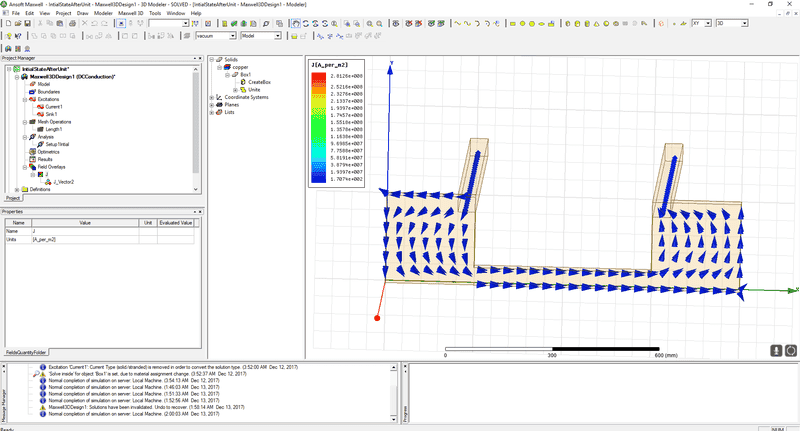
AnalysisHelp1.png


And I plotted the ##\vec J## to simulate & understand the current distribution throughout the conductor, all the flows make sense, however, at the edge of the conductor like so:
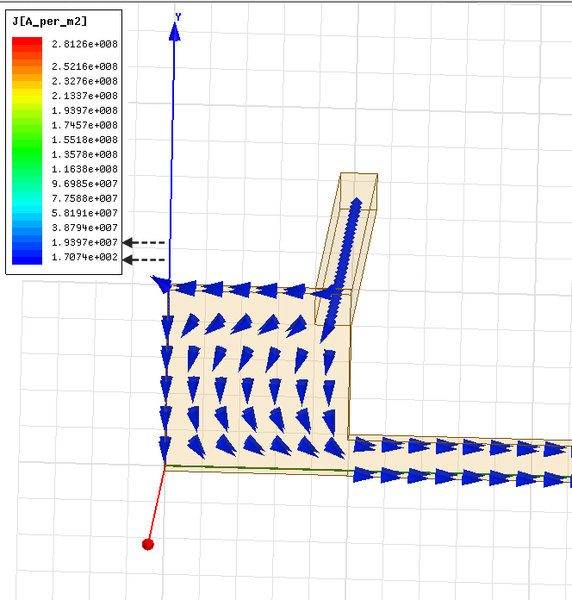
AnalysisHelp2.jpg

Current would distribute all around the area, which is expect. However, one would initially assume that the highest ##\vec J## would be going towards the potential difference applied(which is the lower right bar extending to the right of the page) which I would assume is ##1.93 \times 10^7##, and over the furthest left edges possibly low distribution at ##1.71 \times 10^2##, but I'm not sure. Is there a way I could figure this out through ANSYS?

Even when I apply really higher currents(From 250##A## to 250##kA##) the diagram would change to this distribution:
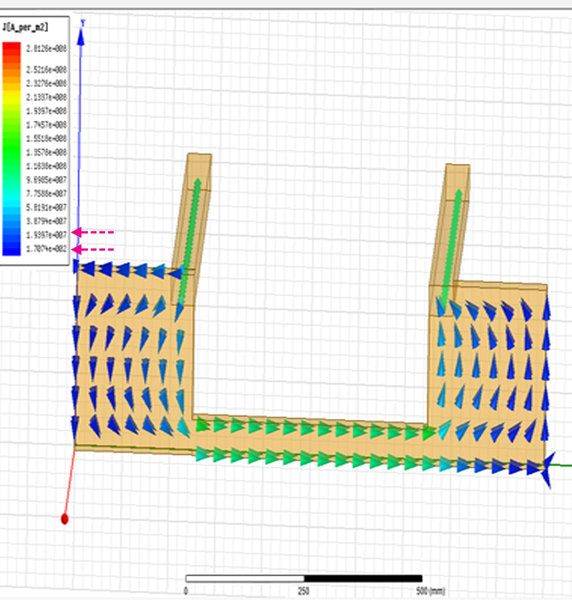
AnalysisHelp3.jpg


Which leads to the same problem, dark blue being a range of [##1.73 \times 10^2##,##1.93 \times 10^7##] My initial assumption is the least amount of current in that scale list is towards the edges in dark-blue.
 

Attachments

  • AnalysisHelp1.png
    AnalysisHelp1.png
    49.1 KB · Views: 1,880
  • AnalysisHelp2.jpg
    AnalysisHelp2.jpg
    46.5 KB · Views: 1,595
  • AnalysisHelp3.jpg
    AnalysisHelp3.jpg
    50.9 KB · Views: 1,188
Engineering news on Phys.org
Please note, that you're plotting a current density. Let's analyze this (from the top left, counter clockwise along the conduction path):
1) Thin conductor (high density, uniform as this is DC).
2) Wide copper plate connected to source and drain on it's corners top and bottom (non uniform current distribution, higher amount of current flows to the right side.. as it's closer to the drain. The more to the left the higher is the resistance as the path length between source and drain gets longer).
3) Thin conductor. Higher current density on the top portion - the same reasons as above.
4) The remaining part is symmetrical to already discussed one.

The problem is in your plot setup - it's the Maxwell's default one. Try to not using it as it may be misleading. Double click on it and set minimal values to zero and maximum as some expected value (adjust it so you'd not reach the peak values on your plot). That way you use all the resolution of the scale plus you will avoid misleading numbers.
 
Thread 'I thought it was only Amazon that sold unsafe junk'
I grabbed an under cabinet LED light today at a big box store. Nothing special. 18 inches in length and made to plug several lights together. Here is a pic of the power cord: The drawing on the box led me to believe that it would accept a standard IEC cord which surprised me. But it's a variation of it. I didn't try it, but I would assume you could plug a standard IEC cord into this and have a double male cord AKA suicide cord. And to boot, it's likely going to reverse the hot and...

Similar threads

Replies
10
Views
5K
  • · Replies 8 ·
Replies
8
Views
9K
  • · Replies 10 ·
Replies
10
Views
2K
  • · Replies 2 ·
Replies
2
Views
2K
  • · Replies 2 ·
Replies
2
Views
2K
Replies
44
Views
4K
  • · Replies 3 ·
Replies
3
Views
2K
  • · Replies 4 ·
Replies
4
Views
3K
  • · Replies 9 ·
Replies
9
Views
4K
  • · Replies 8 ·
Replies
8
Views
2K