Calculate dimensions of floating laptop stand

Click For Summary
SUMMARY

To construct a DIY laptop stand using a 6mm acrylic sheet, it is essential to calculate the dimensions L1, L2, and L3 to ensure stability under a maximum load of 2kg (20N). The calculations should focus on determining the Center of Gravity along the X-axis and ensuring that it remains within the footprint of the base to prevent tipping. Additionally, incorporating internal vertical bracing will enhance rigidity, while extending the base beyond the keyboard area will support downward forces during use. Adding no-slip feet will further prevent sliding on surfaces.

PREREQUISITES
  • Understanding of basic physics principles, specifically forces and moments
  • Knowledge of geometry for calculating dimensions and areas
  • Familiarity with acrylic material properties and construction techniques
  • Experience with design software for sketching and modeling (e.g., CAD tools)
NEXT STEPS
  • Research how to calculate the Center of Gravity for irregular shapes
  • Learn about the principles of stability and tipping in structural design
  • Explore methods for enhancing rigidity in acrylic structures, such as bracing
  • Investigate effective materials for no-slip feet and their installation techniques
USEFUL FOR

This discussion is beneficial for DIY enthusiasts, engineers, and designers interested in creating custom laptop stands, as well as anyone looking to understand the principles of stability and material properties in structural design.

cdasjdnas
Messages
2
Reaction score
0
TL;DR
For a DIY acrylic laptop stand (made from 1 bent acrylic sheet), the dimensions need to be found in order to hold a 2kg laptop.
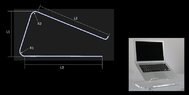
I am planning to build my own laptop stand with an acrylic sheet. The final product should look like the one in the attached image (bottom right)

Material: most laptop stands are made with 6mm acrylic thickness, hence this is what I will use. Also I already have this material at home.

I am stuck on how to calculate the necessary dimensions for the stand. The stand is in contact with the table only via the bottom side aka. the floor side. What lengths L1, L2 and L3 do I need to ensure that the stand does not fall forwards when a laptop of max. 2kg is placed on it?

I am not asking for somebody to calculate it for me. I am asking for somebody to guide me through the steps so that I can calculate it myself.

I have a rough idea on what is needed, however do not know how to start with the calculation process.
The laptop max weight is 20N which is acting downwards. Then there is the friction force acting up along the laptop stand surface where the laptop is placed on.
 

Attachments

  • idea.jpg
    idea.jpg
    17.5 KB · Views: 228
Engineering news on Phys.org
It seems to me you need to determine the Center of Gravity along the X axis for the most severe positions of the lid first. Then make sure it never falls outside the foot-print of the base.
 
Welcome to PF.

cdasjdnas said:
Summary:: For a DIY acrylic laptop stand (made from 1 bent acrylic sheet), the dimensions need to be found in order to hold a 2kg laptop.

I am planning to build my own laptop stand with an acrylic sheet. The final product should look like the one in the attached image (bottom right)

I think you will need to add some internal vertical bracing to make it more rigid. As drawn, it looks like it will be way too flexible and annoying to type on.
 
Last edited:
For tipping stability, be sure to account for pushing (typing) on the keyboard! It would be sufficient to have the part that rests on the table extend slightly beyond the keyboard. That ensures that the downward force on the keyboard is always supported.

Have Fun!
Tom

p.s. You may want some no-slip feet on the bottom to prevent sliding on the table. These could be the common stick-on ones (that always seem to come un-stuck), some rubber electrical tape (hard to find the stuff though), or just some silicone rubber adhesive smeared on.
 
thanks for all the replies! I'm going to calculate the center of gravity later on, I've already divided my sketch into triangles and rectangles.

the stand will only be used as a stand - no typing on it. I have planned on adding a layer of glue with my glue gun on the bottom side and on the surface where the laptop is placed on to have a gap between laptop and stand. Is this useful? for like air convection and cooling...
 

Similar threads

Replies
3
Views
2K
  • · Replies 3 ·
Replies
3
Views
3K
Replies
5
Views
3K
  • · Replies 11 ·
Replies
11
Views
3K
  • · Replies 1 ·
Replies
1
Views
4K
Replies
1
Views
3K
  • · Replies 17 ·
Replies
17
Views
5K
  • · Replies 2 ·
Replies
2
Views
3K
  • · Replies 2 ·
Replies
2
Views
2K
Replies
10
Views
2K