Chrome has a strange affinity to PF

  • Thread starter Thread starter Wrichik Basu
  • Start date Start date
  • Tags Tags
    Chrome Strange
Click For Summary
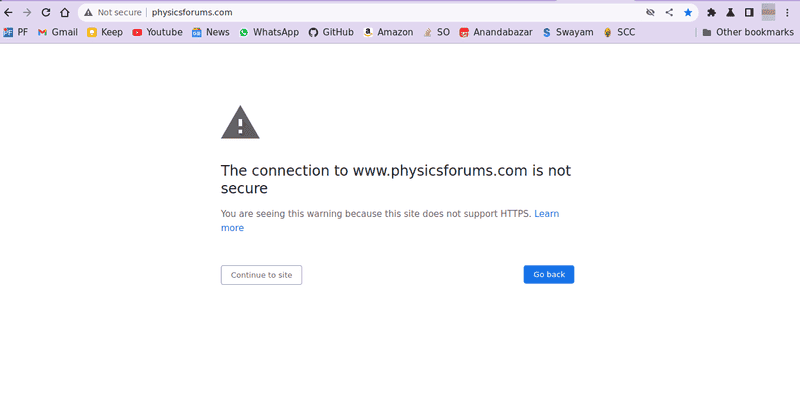
Users are experiencing persistent issues with Chrome redirecting to Physics Forums (PF) regardless of the intended website. Clearing the browser cache and reinstalling Chrome did not resolve the problem, which appears to be specific to Chrome as Firefox does not exhibit the same behavior. Potential causes discussed include incorrect DNS settings, proxy configurations, or even malware, though the user has not changed these settings recently. The user modified their bookmark to include "https://" which has temporarily alleviated some issues, but the underlying cause remains unclear. Further investigation into network settings and configurations is recommended to fully resolve the problem.
Wrichik Basu
Science Advisor
Insights Author
Gold Member
Messages
2,180
Reaction score
2,720
There are some weird things happening with my browser. These started quite some months back; don't remember exactly when.

First and foremost, whenever I want to visit PF, I get this screen:
1661608011548.png

Next, and the more irritating issue: Regardless of which website I intend to visit, Chrome will often bring me to PF instead. I click on the link for Stack Overflow, and PF opens up. I want to go to GitHub, again PF comes up. I am searching something, and as soon as I press Enter, the search is not executed, and instead, PF opens up. If I type "w" on the address bar, Wordle comes up as a suggestion. I press Enter, and land in PF. I click on the bookmark to my college website, and guess what! It's PF, again.

I have already tried clearing my browser cache, but the issue continues. It's erratic. Sometimes it keeps on happening two or three times before resolving temporarily.

I am posting this here because I believe these issues are with my browser rather than PF.

Any idea how this can be resolved? I like visiting PF, but every time PF popping up seems a bit irritating.
 
Computer science news on Phys.org
I get that message about once per week on different sites. I interpret out as slow convection.
 
I get a message like that when connecting to public wifi where I haven't accepted the terms yet.
 
  • Like
Likes pinball1970
anorlunda said:
I get that message about once per week on different sites. I interpret out as slow convection.
My internet is 30 Mbps. That is slow, but I have never seen this message when I visit other websites, unless the website is really "less secure" (does not use HTTPS). Other websites include Stack Overflow, Academia SE, GitHub, YouTube, Gmail, some online course websites and so on.
russ_watters said:
I get a message like that when connecting to public wifi where I haven't accepted the terms yet.
I am on my home WiFi.
 
Are the DNS settings on your system correct? Is it possible your router has been compromised?
 
vela said:
Are the DNS settings on your system correct?
They should be correct because I never changed them.
vela said:
Is it possible your router has been compromised?
But I have not been able to reproduce the issues in my phone, which is connected to the same WiFi network. Contacting the ISP to raise an issue would probably be very difficult because the operator on the other side will either have no idea what I am talking about, or will ask for strong evidence.
 
Wrichik Basu said:
They should be correct because I never changed them.
Have you looked? Maybe something else changed them.

Another possibility is that perhaps some proxy settings got changed, so your system is trying to route all the traffic through a proxy.

Are you using now or in the past a VPN? Maybe the VPN changed some settings and didn't cleanly restore everything when you turned it off.
 
vela said:
Have you looked? Maybe something else changed them.
It's possible, but I don't know what they were before, so I can't make out the difference, if any.
vela said:
Another possibility is that perhaps some proxy settings got changed, so your system is trying to route all the traffic through a proxy.
Many months back, when we were living in our relative's house for a few months, I had to use a proxy to connect through their WiFi. But currently, it is disabled.
vela said:
Are you using now or in the past a VPN?
No, I have never used a VPN.
 
Wrichik Basu said:
It's possible, but I don't know what they were before, so I can't make out the difference, if any.
If you haven't messed with them before, it will typically be the local IP address of the router. You could probably just look at the network settings your phone gets. The only difference should be the actual IP address assigned to your computer.

Wrichik Basu said:
Many months back, when we were living in our relative's house for a few months, I had to use a proxy to connect through their WiFi. But currently, it is disabled.
I'd probably start looking here. It sounds like it didn't get completely disabled.
 
  • #10
I hesitate to mention malware especially since you clicked on one site and it brought to another site that indicates some kind of software filter and redirect.
 
  • #11
vela said:
If you haven't messed with them before, it will typically be the local IP address of the router. You could probably just look at the network settings your phone gets. The only difference should be the actual IP address assigned to your computer.
I can confirm that. Also checked that DNS is set to automatic.
vela said:
I'd probably start looking here. It sounds like it didn't get completely disabled.
1661619558496.png

jedishrfu said:
I hesitate to mention malware especially since you clicked on one site and it brought to another site that indicates some kind of software filter and redirect.
I, too, was thinking about that. But why would it re-direct me to PF? Moreover, the problem doesn't arise when I use Firefox or Opera.

Maybe I should simply purge Chrome and re-install it. Let's see if that solves the issue.
 
  • #12
Update: Re-installed Chrome. It's the same issue again. :frown:
 
  • #13
I am using Firefox for some time to visit PF, and I am often getting something similar to the "Site is less secure" screen on Chrome:

1661630886494.png


But the other, more irritating issue is not present in Firefox, at least till now.
 
  • #14
  • #15
vela said:
If you run dig www.physicsforums.com at the command line, what do you get?
Code:
; <<>> DiG 9.18.1-1ubuntu1.1-Ubuntu <<>> www.physicsforums.com
;; global options: +cmd
;; Got answer:
;; ->>HEADER<<- opcode: QUERY, status: NOERROR, id: 19509
;; flags: qr rd ra; QUERY: 1, ANSWER: 3, AUTHORITY: 0, ADDITIONAL: 1

;; OPT PSEUDOSECTION:
; EDNS: version: 0, flags:; udp: 65494
;; QUESTION SECTION:
;www.physicsforums.com.        IN    A

;; ANSWER SECTION:
www.physicsforums.com.    299    IN    A    104.26.14.132
www.physicsforums.com.    299    IN    A    104.26.15.132
www.physicsforums.com.    299    IN    A    172.67.68.135

;; Query time: 0 msec
;; SERVER: 127.0.0.53#53(127.0.0.53) (UDP)
;; WHEN: Sun Aug 28 03:23:09 IST 2022
;; MSG SIZE  rcvd: 98
 
  • #16
Does Chrome have a "safe mode" ? ie: no add-ons.
 
  • #17
Addresses 127.0.0.0 thru 127.255.255.255 is a Reserved Address range which refers to localhost... that is, it is the current device that accessed the network.

To put it more bluntly, the computer is talking to itself!

It has been too long since I have had to configure a connection, but as I recall, it should be talking to your router asking it to assign an address for the machne. If you have a router, you can enter 192.168.0.1 or 10.0.0.1 in the browser address field to connect to the router configuration screens.

If you do not have a router, it should be talking directly to your network provider.

Overall, it sounds like the network configuration in the computer got scrambled up. Another possibility is your in-house network is scrambled/intermittent/something and the computer is using a default fallback condition.

For a list of reserved IP addresses see:
https://en.wikipedia.org/wiki/Reserved_IP_addresses

A Google search shows reveals more tidbits:
https://www.google.com/search?&q=internet+reserved+ip+addresses

Have Fun!
Tom
 
  • #18
Tom.G said:
To put it more bluntly, the computer is talking to itself!
Which may be because he's running a DNS server on his system. In any case, physicsforums.com is resolving to the right IP addresses, so DNS is not likely the culprit.
 
  • Like
Likes Wrichik Basu
  • #19
hmmm27 said:
Does Chrome have a "safe mode" ? ie: no add-ons.
Yes, Incognito, or private window. I have tried there too. Same issue.
 
  • #20
The answer is possibly in your screenshot.
Chrome doesn't trust links to sites that are just http://example.com
It prefers links to https://example.com
So either you have a bookmark without the S that you are using, or you are typing it and your previous attempts without the S are being pushed as the nearest to what you want, you click on the suggestion, and then it is being rejected. Type the correct full url like this
https://www.physicsforums.com/threads/chrome-has-a-strange-affinity-to-pf.1045104/
After a while it will have learned that name proerly and suggest the https version first.

Or its a DNS thing, as suggested earlier.
 
  • Like
Likes I like Serena and Wrichik Basu
  • #21
You can use the manage bookmarks to check what urls are used. There should also be a way to clear any history so that the "complete the bad url" behavior won't happen.
 
  • #22
DrJohn said:
The answer is possibly in your screenshot.
Chrome doesn't trust links to sites that are just http://example.com
It prefers links to https://example.com
So either you have a bookmark without the S that you are using, or you are typing it and your previous attempts without the S are being pushed as the nearest to what you want, you click on the suggestion, and then it is being rejected. Type the correct full url like this
https://www.physicsforums.com/threads/chrome-has-a-strange-affinity-to-pf.1045104/
After a while it will have learned that name proerly and suggest the https version first.
I don't think this is the problem. The site automatically redirects visitors to the secure URL.
 
  • Like
Likes Greg Bernhardt
  • #23
A few questions/thoughts:
  • Why are you running a local DNS?
  • Is it configured properly?
  • How do you know it is configured properly?
  • Are you using a dodgy internet connection where you share a router with other subscribers?
  • Can you change the router's DNS server to 1.1.1.1 (Cloudflare) or 8.8.8.8 (Google)?
  • Can you reinstall a clean OS (already suggested in another thread), and browsers with no plugins to make sure there is nothing there that shouldn't be?
 
  • Like
Likes Greg Bernhardt and Tom.G
  • #24
Have you tried this?
To clear the DNS cache on Microsoft Windows, follow these steps:
  1. Open a DOS command window. To do this, click Start, click Run, type cmd, and then press Enter.
  2. At the command prompt, type the following command and then press Enter: Copy ipconfig /flushdns.
  3. The DNS cache is now clear.
Then, of course, test to see if your problem is still happenning.
 
  • #25
DrJohn said:
So either you have a bookmark without the S that you are using
Good catch. The bookmark was just www.physicsforums.com; I modified it by adding https://. The "Less secure site" in Chrome and "Connection timed out" in Firefox seems to have gone for now, and PF loads faster.
pbuk said:
  • Why are you running a local DNS?
  • Is it configured properly?
  • How do you know it is configured properly?
No idea. All I have is the DNS set to automatic, and I haven't messed with that settings.
pbuk said:
Are you using a dodgy internet connection where you share a router with other subscribers?
No. We have our own router with a strong password.
pbuk said:
Can you change the router's DNS server to 1.1.1.1 (Cloudflare) or 8.8.8.8 (Google)?
Unfortunately, no. The router is not a TP-Link router and was supplied by the ISP. I checked their options and there is no option to change the DNS. The DNS is, in fact, configured as follows:

1661939536414.png

I have, however, changed the DNS settings in my OS as follows:

1661939893375.png


1661939955496.png

pbuk said:
Can you reinstall a clean OS (already suggested in another thread), and browsers with no plugins to make sure there is nothing there that shouldn't be?
Sorry, but presently, I can't do this. I have been, however, using Firefox for quite some time, and the issue of clicking on some bookmark and coming to PF instead is not present. So, this should be a Chrome-specific issue.

DrJohn said:
To clear the DNS cache
I am on Ubuntu. I cleared the DNS cache using sudo resolvectl flush-caches. Will update how Chrome behaves now.
 
  • #26
Nice catch with the bookmark issue.

Did you type it in?

Usually if you drag and drop it to the bar it gets the full url.
 
  • #27
I still don't think the bookmark is the problem, unless Chrome and Firefox on Linux behaves differently than they do on mac OS and Windows. There's something else going on here that's preventing the automatic redirect to the secure site.

Can you tell us the contents of the files hosts and nsswitch.conf in /etc?
 
  • Like
Likes Wrichik Basu
  • #28
pbuk said:
Can you change the router's DNS server to 1.1.1.1 (Cloudflare) or 8.8.8.8 (Google)?
You can download as an app too https://1.1.1.1/
 
  • Like
Likes Wrichik Basu
  • #29
Greg Bernhardt said:
You can download as an app too https://1.1.1.1/
That's Cloudflare WARP which is a slightly different (or entirely different, depending on your viewpoint) thing.
 
  • Informative
Likes Wrichik Basu and Greg Bernhardt
  • #30
jedishrfu said:
Nice catch with the bookmark issue.

Did you type it in?
I really don't remember, to be honest. But I second what @vela said: if www.physicsforums.com can't automatically add the https:// in the front, then something is wrong somewhere.
vela said:
Can you tell us the contents of the files hosts and nsswitch.conf in /etc?
Sure, here they are:

[CODE title="Hosts file"]127.0.0.1 localhost
127.0.1.1 Knowledge-PC

# The following lines are desirable for IPv6 capable hosts
::1 ip6-localhost ip6-loopback
fe00::0 ip6-localnet
ff00::0 ip6-mcastprefix
ff02::1 ip6-allnodes
ff02::2 ip6-allrouters[/CODE]

[CODE title="/etc/nsswitch.conf"]# /etc/nsswitch.conf
#
# Example configuration of GNU Name Service Switch functionality.
# If you have the `glibc-doc-reference' and `info' packages installed, try:
# `info libc "Name Service Switch"' for information about this file.

passwd: files systemd
group: files systemd
shadow: files
gshadow: files

hosts: files mdns4_minimal [NOTFOUND=return] dns
networks: files

protocols: db files
services: db files
ethers: db files
rpc: db files

netgroup: nis[/CODE]

Greg Bernhardt said:
You can download as an app too https://1.1.1.1/
Didn't know about this, thanks for the information. Installed and running on my laptop as well as Android devices.

One thing I wanted to point out: in post #25, I had said this:
Wrichik Basu said:
PF loads faster
This is mostly not true. Although initially, it seemed to load faster, currently reaching PF takes more time compared to Stack Overflow, GitHub, and others. But the "less secure site" screens are no longer there.
 
Last edited:

Similar threads

  • · Replies 4 ·
Replies
4
Views
4K
  • · Replies 5 ·
Replies
5
Views
2K
  • · Replies 16 ·
Replies
16
Views
2K
  • · Replies 1 ·
Replies
1
Views
5K
  • · Replies 3 ·
Replies
3
Views
2K
  • · Replies 5 ·
Replies
5
Views
2K
  • · Replies 12 ·
Replies
12
Views
3K
  • · Replies 6 ·
Replies
6
Views
2K
  • · Replies 5 ·
Replies
5
Views
3K
  • · Replies 20 ·
Replies
20
Views
6K