Convert rise and run (slope) to degrees using simple formulas

Click For Summary

Discussion Overview

The discussion revolves around converting rise and run (slope) to degrees using the Ruby programming language. Participants explore the use of trigonometric functions, specifically the Arc Tangent function, to achieve this conversion, while addressing potential issues with angle measurement conventions and output formatting.

Discussion Character

  • Technical explanation
  • Conceptual clarification
  • Debate/contested

Main Points Raised

  • One participant seeks assistance in converting slope to degrees using Ruby, providing specific values for rise (e) and run (d).
  • Another participant suggests that the initial result is in radians and recommends multiplying by 180 / Math::PI to convert to degrees.
  • A different participant emphasizes the importance of consistent axis labeling and suggests using modulo to ensure positive angles measured counterclockwise.
  • The original poster clarifies that their axis labeling aligns with their drafting program's conventions and expresses satisfaction with the formula provided.
  • The original poster notes an issue with a long decimal angle being altered to "eÂ" in their post, seeking insight into the cause of this change.

Areas of Agreement / Disagreement

Participants generally agree on the need to convert radians to degrees, but there are differing views on angle labeling conventions and the implications of these conventions for the calculations.

Contextual Notes

There are unresolved questions regarding the formatting of numerical outputs and the specific conventions used in angle measurement, which may affect the interpretation of results.

Alaskan Son
Messages
13
Reaction score
0
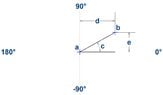
I'm looking for a little help here. I'm just a relatively regular Joe here though, so any complicated formulas are likely to go right over my head. What I'm trying to do is use the Ruby programming language to convert rise and run (slope) to degrees. See the attached screenshot...

View attachment 8617

Assume x and y-axis are constant and that point a is always at 0,0. I want to use dimension d and e to obtain an angle in degrees. In this example:

d = 334.385384
e = 187.413131

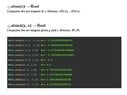
I happen to know that angle c = approx. e° due to some tools I have available in my CAD program, but I really want to be able to plug d and e into a formula so I can get some automated feedback using some Ruby scripting. Ruby has an Arc Tangent function...

View attachment 8618

...but I'm really not sure how to use it. I tried using atan(e/d) but that results in 0.5108463979434283

I'd love if someone could help me understand what I'm doing wrong. Thanks.
 

Attachments

  • Degrees.jpg
    Degrees.jpg
    20.6 KB · Views: 166
  • atan.jpg
    atan.jpg
    30.4 KB · Views: 151
Physics news on Phys.org
Alaskan Son said:
I'm looking for a little help here. I'm just a relatively regular Joe here though, so any complicated formulas are likely to go right over my head. What I'm trying to do is use the Ruby programming language to convert rise and run (slope) to degrees. See the attached screenshot...
Assume x and y-axis are constant and that point a is always at 0,0. I want to use dimension d and e to obtain an angle in degrees. In this example:

d = 334.385384
e = 187.413131

I happen to know that angle c = approx. e° due to some tools I have available in my CAD program, but I really want to be able to plug d and e into a formula so I can get some automated feedback using some Ruby scripting. Ruby has an Arc Tangent function...
...but I'm really not sure how to use it. I tried using atan(e/d) but that results in 0.5108463979434283

I'd love if someone could help me understand what I'm doing wrong. Thanks.
Hi Alaskan Son,

I presume your problem is that you want the angle in degrees?

You are getting the result in so called radians.
To get degrees you need to multiply by [m]180 / Math::PI[/m].
So for instance [m]atan2(1,1) * 180 / Math::PI[/m] = 45.
 
Just as an aside, I recommend that you be consistent with the way you label your axis. For instance, moving counter clockwise from axis labelled 0 degrees in your diagram, we go to +90, +180, +270 (not -90) and then +360 = 0. This might not be an issue now, but later on it might make things a little awkward. In general, it's good to fix any conventions/rules from the beginning.

I usually go one step further when dealing with this situation and modulo the output of atan2 such that the result is a positive angle measured counterclockwise.
 
Klaas van Aarsen said:
Hi Alaskan Son,

I presume your problem is that you want the angle in degrees?

You are getting the result in so called radians.
To get degrees you need to multiply by [m]180 / Math::PI[/m].
So for instance [m]atan2(1,1) * 180 / Math::PI[/m] = 45.

Awesome! Thanks : )

- - - Updated - - -

Joppy said:
Just as an aside, I recommend that you be consistent with the way you label your axis. For instance, moving counter clockwise from axis labelled 0 degrees in your diagram, we go to +90, +180, +270 (not -90) and then +360 = 0. This might not be an issue now, but later on it might make things a little awkward. In general, it's good to fix any conventions/rules from the beginning.

I usually go one step further when dealing with this situation and modulo the output of atan2 such that the result is a positive angle measured counterclockwise.

Thanks you, but I purposely labeled them like that. Those are the way angles are used in my drafting program and my goal is to have angles that report in those exact formats. Now that I have the proper formula, I think I can make it work.

Actually, upon further investigation, the following formula results in exactly what I was looking for...

(Math.atan2(y_position,x_position)*180)/Math::PI

Thanks again guys.

- - - Updated - - -

Alaskan Son said:
...I happen to know that angle c = approx. e° ...

Just curious. I actually entered a long decimal angle number in my post yesterday. It was automatically changed after I posted it though and I didn't realize it until now. Do you guys happen to know why my number might have been changed to "eÂ"??
 

Similar threads

Replies
4
Views
6K
Replies
9
Views
3K
  • · Replies 2 ·
Replies
2
Views
2K
  • · Replies 6 ·
Replies
6
Views
3K
  • · Replies 16 ·
Replies
16
Views
9K
  • · Replies 16 ·
Replies
16
Views
3K
  • · Replies 24 ·
Replies
24
Views
2K
  • · Replies 18 ·
Replies
18
Views
3K
  • · Replies 5 ·
Replies
5
Views
2K
  • · Replies 2 ·
Replies
2
Views
15K