garthenar
- 35
- 8
Homework Statement:: None. This is part of implementing a project and not an actual question. It's a technical problem or equipment failure.
Relevant Equations:: The Code I get is;
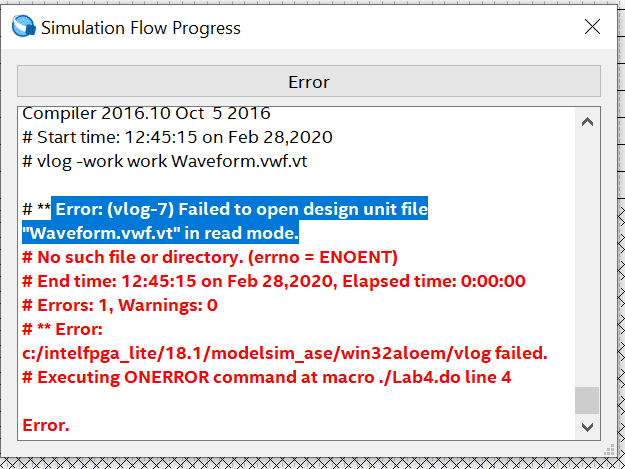
Error: (vlog-7) Failed to open design unit file "Waveform.vwf.vt" in read mode.
[Mentor Note -- moved to the technical Programming forum for better views]
I am not able to see the answer in the quick start guide.
https://www.intel.com/content/dam/www/programmable/us/en/pdfs/literature/ug/ug_gs_msa_qii.pdf
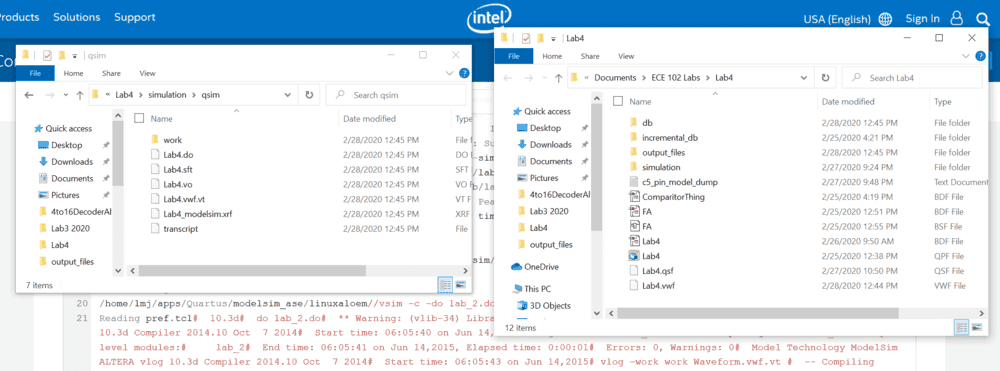
The file is not named Waveform, it's named Lab4 in both the source file and testbench
First, I would like to state that before coming here I've been reading through technical guides, manuals and the Intel forums looking for an answer. Now I'm resorting to posting on this forum.
I'm trying to run a functional system but it's failing and from what I can tell it's trying to open a different file thant the one I'm having it create. I can't figure out where I can change whatever setting is causing this.
I may have to create a new project and copy my .bdf files into it as I have had that work before. However, I am genuinely interested in this software even beyond the scope of my class and would like to learn how to fix this problem in the future.
Also, This is my first project where I've created a .bsf file to create a component in my top level design (A full adder). I don't know if I messed that up in some way but it's the only difference I know of between this and previous projects.
Eddit
I have tested this circuits on my DEO-CV CycloneV and it works fine as a 8bit 2's complement binary adder/subtractor.
This is error I get in the test window after atempting to run the simulation.
Testbench Generation Comand (pathing)
quartus_eda --gen_testbench --tool=modelsim_oem --format=verilog --write_settings_files=off Lab4 -c Lab4 --vector_source="C:/Users/xgp15a2/Documents/ECE 102 Labs/Lab4/Lab4.vwf" --testbench_file="C:/Users/xgp15a2/Documents/ECE 102 Labs/Lab4/simulation/qsim/Lab4.vwf.vt"
I have fixed pathing in previous projects and have checked to make sure the pathing is correct as can be seen below.
Netlist Generation Command (all i know is this generates a Netlest, I don't know what the Netlist is)
quartus_eda --write_settings_files=off --simulation --functional=on --flatten_buses=off --tool=modelsim_oem --format=verilog --output_directory="C:/Users/xgp15a2/Documents/ECE 102 Labs/Lab4/simulation/qsim/" Lab4 -c Lab4
Modelsim Script
onerror {exit -code 1}
vlib work
vlog -work work Lab4.vo
vlog -work work Waveform.vwf.vt
vsim -novopt -c -t 1ps -L cyclonev_ver -L altera_ver -L altera_mf_ver -L 220model_ver -L sgate_ver -L altera_lnsim_ver work.Lab4_vlg_vec_tst
vcd file -direction Lab4.msim.vcd
vcd add -internal Lab4_vlg_vec_tst/*
vcd add -internal Lab4_vlg_vec_tst/i1/*
proc simTimestamp {} {
echo "Simulation time: $::now ps"
if { [string equal running [runStatus]] } {
after 2500 simTimestamp
}
}
after 2500 simTimestamp
run -all
quit -f
Relevant Equations:: The Code I get is;
Error: (vlog-7) Failed to open design unit file "Waveform.vwf.vt" in read mode.
[Mentor Note -- moved to the technical Programming forum for better views]
I am not able to see the answer in the quick start guide.
https://www.intel.com/content/dam/www/programmable/us/en/pdfs/literature/ug/ug_gs_msa_qii.pdf
The file is not named Waveform, it's named Lab4 in both the source file and testbench
First, I would like to state that before coming here I've been reading through technical guides, manuals and the Intel forums looking for an answer. Now I'm resorting to posting on this forum.
I'm trying to run a functional system but it's failing and from what I can tell it's trying to open a different file thant the one I'm having it create. I can't figure out where I can change whatever setting is causing this.
I may have to create a new project and copy my .bdf files into it as I have had that work before. However, I am genuinely interested in this software even beyond the scope of my class and would like to learn how to fix this problem in the future.
Also, This is my first project where I've created a .bsf file to create a component in my top level design (A full adder). I don't know if I messed that up in some way but it's the only difference I know of between this and previous projects.
Eddit
I have tested this circuits on my DEO-CV CycloneV and it works fine as a 8bit 2's complement binary adder/subtractor.
This is error I get in the test window after atempting to run the simulation.
Testbench Generation Comand (pathing)
quartus_eda --gen_testbench --tool=modelsim_oem --format=verilog --write_settings_files=off Lab4 -c Lab4 --vector_source="C:/Users/xgp15a2/Documents/ECE 102 Labs/Lab4/Lab4.vwf" --testbench_file="C:/Users/xgp15a2/Documents/ECE 102 Labs/Lab4/simulation/qsim/Lab4.vwf.vt"
I have fixed pathing in previous projects and have checked to make sure the pathing is correct as can be seen below.
Netlist Generation Command (all i know is this generates a Netlest, I don't know what the Netlist is)
quartus_eda --write_settings_files=off --simulation --functional=on --flatten_buses=off --tool=modelsim_oem --format=verilog --output_directory="C:/Users/xgp15a2/Documents/ECE 102 Labs/Lab4/simulation/qsim/" Lab4 -c Lab4
Modelsim Script
onerror {exit -code 1}
vlib work
vlog -work work Lab4.vo
vlog -work work Waveform.vwf.vt
vsim -novopt -c -t 1ps -L cyclonev_ver -L altera_ver -L altera_mf_ver -L 220model_ver -L sgate_ver -L altera_lnsim_ver work.Lab4_vlg_vec_tst
vcd file -direction Lab4.msim.vcd
vcd add -internal Lab4_vlg_vec_tst/*
vcd add -internal Lab4_vlg_vec_tst/i1/*
proc simTimestamp {} {
echo "Simulation time: $::now ps"
if { [string equal running [runStatus]] } {
after 2500 simTimestamp
}
}
after 2500 simTimestamp
run -all
quit -f
Last edited by a moderator: