How can I connect my PC to my TV for movie streaming?

  • Thread starter Thread starter leroyjenkens
  • Start date Start date
  • Tags Tags
    pc
Click For Summary

Discussion Overview

The discussion revolves around connecting a computer to a TV for movie streaming, focusing on the types of connections available and the necessary adapters or hardware. Participants explore various options including HDMI, DisplayPort, and VGA connections, as well as potential hardware upgrades.

Discussion Character

  • Exploratory
  • Technical explanation
  • Debate/contested
  • Mathematical reasoning

Main Points Raised

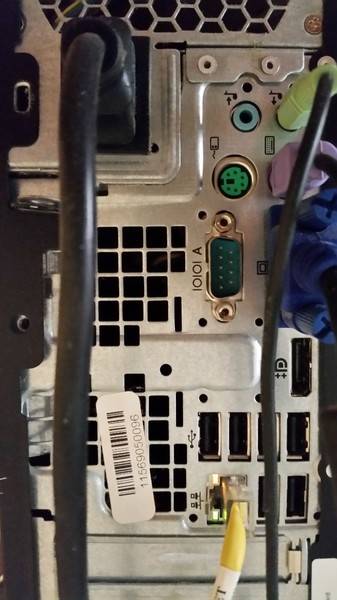
  • One participant expresses uncertainty about a connection labeled with "++P," suggesting it may not be a Thunderbolt slot as previously indicated.
  • Another participant proposes purchasing a new graphics card with HDMI output as a straightforward solution.
  • There is a suggestion to use an HDMI to VGA cable, though concerns about compatibility and quality are raised.
  • A participant identifies the "++P" connection as DisplayPort, recommending a DisplayPort to HDMI adapter.
  • Concerns are expressed about the potential compatibility issues of using a DisplayPort to HDMI adapter versus a dedicated HDMI output from a graphics card.
  • One participant shares their experience with using a 4K DisplayPort to HDMI adapter and mentions the need for high-speed HDMI cables for optimal resolution.
  • Another participant suggests considering a wireless display adapter as an alternative method for connecting the computer to the TV.

Areas of Agreement / Disagreement

Participants do not reach a consensus on the best solution for connecting the computer to the TV. Multiple competing views are presented regarding the use of adapters, the necessity of hardware upgrades, and the viability of wireless solutions.

Contextual Notes

Some participants note the limitations of VGA as an obsolete technology compared to digital connections like HDMI and DisplayPort. There are also mentions of potential resolution limitations when using certain adapters.

Who May Find This Useful

This discussion may be useful for individuals seeking to connect their computers to TVs, particularly those unfamiliar with the various connection types and potential hardware requirements.

leroyjenkens
Messages
616
Reaction score
49
Hello, I just got a TV for the first time in about a decade, so I'm unfamiliar with TV's that hook up to computers, but this is the only way I'll be able to watch anything on this TV.
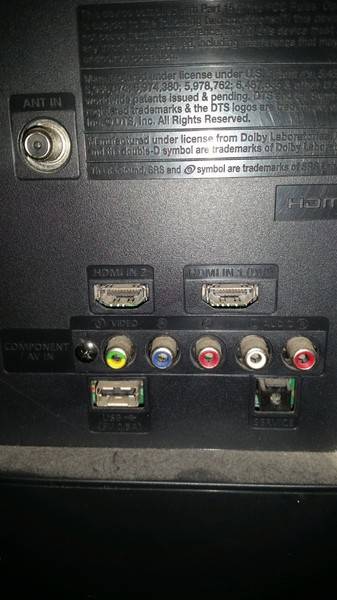
The first is a picture of the connections I have on the back of the TV. The second one is the connections I have on the back of the computer.
20180420_122508.jpg


20180420_122135.jpg


I have the HDMI cable, but no connection for it on the computer. I went to Best Buy and the guy said that one plug I have on my computer with the 2 plus signs and the P is a thunderbolt slot. I did some research and I don't think that's a thunderbolt slot.
My goal is to simply watch movies from my computer on my TV. What would be the best plug or adapter to get? Thank you.
 

Attachments

  • 20180420_122508.jpg
    20180420_122508.jpg
    29.6 KB · Views: 704
  • 20180420_122135.jpg
    20180420_122135.jpg
    31.9 KB · Views: 643
Computer science news on Phys.org
leroyjenkens said:
I did some research and I don't think that's a thunderbolt slot.
My goal is to simply watch movies from my computer on my TV. What would be the best plug or adapter to get?
Agreed, looks too wide for thunderbolt. No idea what it is though. Maybe someone else can figure that one out. I'd just go and buy a new graphics card that has HDMI output. Even cheap ones these days have them :)
 
Perhaps you need a HDMI to VGA cable.
 
The ++P is actually ++D, and it's Displayport. You need Displayport to HDMI.
 
  • Like
Likes   Reactions: Greg Bernhardt
I suppose I could try an HDMI to VGA cable, but it makes me wonder how compatible the two devices will be if I need an adapter for them, i.e. will the video and audio look and sound as good as it could if I just had a graphics card with an HDMI port?
I think I'll go ahead and just purchase a graphics card with an HDMI port. Now I have to find out what my computer can support, and I have to find out if my computer case is big enough. I know some of these graphics cards are huge.
Thanks for the help.

Edit: So Displayport to HDMI adapter? Is that usually a good solution, or does that often come with compatibility issues? Thank you.
 
leroyjenkens said:
Displayport to HDMI adapter? Is that usually a good solution, or does that often come with compatibility issues?

The ++ indicates the adapter is actually putting out HDMI, but of course you need the adapter to be right mechanically. Me, I'd try the $7 adapter before the $45 video card.
 
  • Like
Likes   Reactions: russ_watters, robphy, Tom.G and 1 other person
Most TV's these days have a VGA input socket.
You can use the TV screen same as you plug your PC video output into a normal smaller monitor screen,
I am doing that right now.
The only other thing you have to do is use the channel changer gadget to tell the TV screen that the input is from the PC (the VGA socket) instead of the TV receiver.
 
Last edited:
rootone said:
Most TV's these days have a VGA input socket.
While this may be true, the OP's TV doesn't have such a port (from the given photo of the back the TV).
 
  • Like
Likes   Reactions: davenn
  • #10
Apparently so if that photo shows all of the inputs.
I am a bit surprised that a modern TV with no VGA input is even a marketable product.
 
  • #11
I see two HDMI input ports in that TV. There are standard DP to HDMI cables that will connect DisplayPort to HDMI, however you will get 2K (1920 X 1080) resolution at best.

I am using a 40" 4K TV (3840 X 2160 resolution) for my computer monitor. In order to make it work at that resolution, I had to get a 4K DisplayPort to HDMI adapter, then a high speed HDMI cable. Figuring all that out took multiple technical support calls to the monitor, computer, and graphics card manufacturers.

VGA is considered obsolete. It's analog, while DP and HDMI are digital.
 
  • #12
Why not get a wireless card and use a wireless display adapter plugged into the HDMI port?

Something like Screenbeam, Miracast, etc... Hereor here ?
 

Similar threads

  • · Replies 3 ·
Replies
3
Views
2K
  • · Replies 18 ·
Replies
18
Views
2K
  • · Replies 5 ·
Replies
5
Views
2K
Replies
5
Views
2K
  • · Replies 12 ·
Replies
12
Views
3K
  • · Replies 13 ·
Replies
13
Views
1K
  • · Replies 22 ·
Replies
22
Views
3K
Replies
12
Views
3K
  • · Replies 12 ·
Replies
12
Views
3K
  • · Replies 8 ·
Replies
8
Views
3K