How to combine two lines in one in mechanical sketches

  • Thread starter Thread starter mech-eng
  • Start date Start date
  • Tags Tags
    Lines Mechanical
Click For Summary
To combine two lines into one in Ansys's DesignModeler, users can utilize tools similar to those in AutoCAD for joining lines. The discussion highlights that while CAD systems offer various options for manipulating lines, for simple tasks, it may be easier to delete the existing lines and create a new one. Participants express a desire to understand the specific command or constraint used for this operation. The conversation emphasizes the importance of exploring the software's interface for learning purposes. Ultimately, mastering these tools can enhance efficiency in CAD design tasks.
mech-eng
Messages
825
Reaction score
13
Would somebody explain how to combine two lines into one? I think this is a CAD question. It's from Ansys's DesignModeler, Geometry Engine.

I would like to make lines 1 which is at the right hand side like 2 which is left hand side of the L-shape object.

In that program there are options like in AutoCAD.
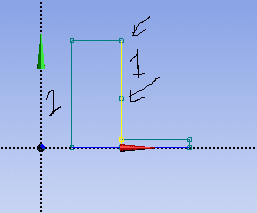
line problem.png


Thank you.
 
Engineering news on Phys.org
mech-eng said:
Would somebody explain how to combine two lines into one? I think this is a CAD question. It's from Ansys's DesignModeler, Geometry Engine.

I would like to make lines 1 which is at the right hand side like 2 which is left hand side of the L-shape object.

In that program there are options like in AutoCAD.

View attachment 204238

Thank you.
When you say "combine", do you mean "group" like in Visio? Does AutoCAD have a "group" function?
 
berkeman said:
When you say "combine", do you mean "group" like in Visio? Does AutoCAD have a "group" function?

I cannot explain it properly. I mean they are two lines added end to end but I want to make them one line. How can I get rid of that thing to which arrow is pointing?

Is it O.K now?

Thank you.
 
Unselect the line?
 
Oh I see...

Probably easier just to delete them and replace with one new line.
 
  • Like
Likes mech-eng
CWatters said:
Probably easier just to delete them and replace with one new line.

+1

CAD systems do normally have a comprehensive range of tools for joining and splitting lines . Very useful sometimes but not really needed for this simple task .

eg

FEA systems usually have specific tools for adding , deleting and moving nodes .
 
Last edited:
  • Like
Likes mech-eng
Nidum said:
+1

CAD systems do normally have a comprehensive range of tools for joining and splitting lines . Very useful sometimes but not really needed for this simple task .

eg

FEA systems usually have specific tools for adding , deleting and moving nodes .

Yes, it might not need but for exploring the interface and operation, I would like to learn it.

But that command or constraint, I do not know how I can call, probably have a common symbol or or name. Would you explain it?

Thank you.
 

Similar threads

  • · Replies 1 ·
Replies
1
Views
3K
  • · Replies 4 ·
Replies
4
Views
3K
  • · Replies 16 ·
Replies
16
Views
3K
  • · Replies 1 ·
Replies
1
Views
3K
Replies
21
Views
2K
  • · Replies 1 ·
Replies
1
Views
843
Replies
4
Views
2K
  • · Replies 0 ·
Replies
0
Views
1K
  • · Replies 5 ·
Replies
5
Views
3K
Replies
0
Views
2K