How to combine two lines in one in mechanical sketches

  • Thread starter Thread starter mech-eng
  • Start date Start date
  • Tags Tags
    Lines Mechanical
Click For Summary

Discussion Overview

The discussion revolves around combining two lines into one within the context of CAD software, specifically Ansys's DesignModeler. Participants explore the methods and tools available for manipulating lines in CAD environments, with references to similar functionalities in AutoCAD and other software.

Discussion Character

  • Technical explanation
  • Debate/contested
  • Exploratory

Main Points Raised

  • Some participants inquire about the meaning of "combine," suggesting it may refer to "grouping" as seen in other software like Visio.
  • One participant clarifies that they want to merge two lines that are end-to-end into a single line, seeking a method to eliminate the gap between them.
  • Another participant suggests that it might be easier to delete the existing lines and create a new one instead of combining them.
  • Some participants note that CAD systems typically offer a variety of tools for joining and splitting lines, which can be useful but may not be necessary for simple tasks.
  • There is a request for clarification on the specific command or constraint used for combining lines, indicating a desire to understand the terminology used in CAD software.

Areas of Agreement / Disagreement

Participants express differing views on the necessity of combining lines versus simply creating a new line. There is no consensus on the best approach or the specific terminology for the action being discussed.

Contextual Notes

Participants have not reached a resolution on the specific tools or commands available in Ansys's DesignModeler for combining lines, and there are references to functionalities in other CAD software that may not directly apply.

mech-eng
Messages
826
Reaction score
13
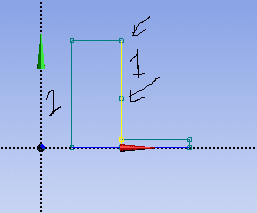
Would somebody explain how to combine two lines into one? I think this is a CAD question. It's from Ansys's DesignModeler, Geometry Engine.

I would like to make lines 1 which is at the right hand side like 2 which is left hand side of the L-shape object.

In that program there are options like in AutoCAD.
line problem.png


Thank you.
 
Engineering news on Phys.org
mech-eng said:
Would somebody explain how to combine two lines into one? I think this is a CAD question. It's from Ansys's DesignModeler, Geometry Engine.

I would like to make lines 1 which is at the right hand side like 2 which is left hand side of the L-shape object.

In that program there are options like in AutoCAD.

View attachment 204238

Thank you.
When you say "combine", do you mean "group" like in Visio? Does AutoCAD have a "group" function?
 
berkeman said:
When you say "combine", do you mean "group" like in Visio? Does AutoCAD have a "group" function?

I cannot explain it properly. I mean they are two lines added end to end but I want to make them one line. How can I get rid of that thing to which arrow is pointing?

Is it O.K now?

Thank you.
 
Unselect the line?
 
Oh I see...

Probably easier just to delete them and replace with one new line.
 
  • Like
Likes   Reactions: mech-eng
CWatters said:
Probably easier just to delete them and replace with one new line.

+1

CAD systems do normally have a comprehensive range of tools for joining and splitting lines . Very useful sometimes but not really needed for this simple task .

eg

FEA systems usually have specific tools for adding , deleting and moving nodes .
 
Last edited:
  • Like
Likes   Reactions: mech-eng
Nidum said:
+1

CAD systems do normally have a comprehensive range of tools for joining and splitting lines . Very useful sometimes but not really needed for this simple task .

eg

FEA systems usually have specific tools for adding , deleting and moving nodes .

Yes, it might not need but for exploring the interface and operation, I would like to learn it.

But that command or constraint, I do not know how I can call, probably have a common symbol or or name. Would you explain it?

Thank you.
 

Similar threads

  • · Replies 1 ·
Replies
1
Views
3K
  • · Replies 4 ·
Replies
4
Views
3K
  • · Replies 4 ·
Replies
4
Views
3K
  • · Replies 16 ·
Replies
16
Views
3K
  • · Replies 1 ·
Replies
1
Views
3K
Replies
21
Views
2K
  • · Replies 1 ·
Replies
1
Views
1K
Replies
4
Views
2K
  • · Replies 5 ·
Replies
5
Views
3K
  • · Replies 0 ·
Replies
0
Views
2K