How to open an STL Mesh file in Linux

  • Thread starter Thread starter JD_PM
  • Start date Start date
  • Tags Tags
    File Linux Mesh
Click For Summary
SUMMARY

The discussion focuses on opening and editing STL mesh files in Linux, specifically addressing issues with binary STL files. Users recommend using Blender for visualization and editing, as it supports STL file imports. Additionally, converting binary STL files to ASCII format is suggested for easier text processing and viewing in text editors like vi. ParaView is also mentioned as a suitable tool for editing STL files directly.

PREREQUISITES
  • Familiarity with STL file formats (binary and ASCII)
  • Basic knowledge of Linux terminal commands
  • Understanding of mesh generation tools like blockMesh and snappyHexMesh
  • Experience with visualization software such as Blender or ParaView
NEXT STEPS
  • Install Blender via apt for STL file visualization and editing
  • Research methods to convert binary STL files to ASCII format
  • Explore the capabilities of ParaView for editing STL files
  • Learn about mesh generation and manipulation using blockMesh and snappyHexMesh
USEFUL FOR

This discussion is beneficial for engineers, developers, and researchers working with 3D mesh files, particularly those using Linux for computational modeling and visualization tasks.

JD_PM
Messages
1,125
Reaction score
156
TL;DR
I want to figure out how to open a STL file in Linux
I am building up a mesh via defining a background mesh (using blockMesh) and snappyHexMesh

I am dealing with the STL 2D Mesh surface (I cannot uploaded because PF doesn't accept zip files nor STL).

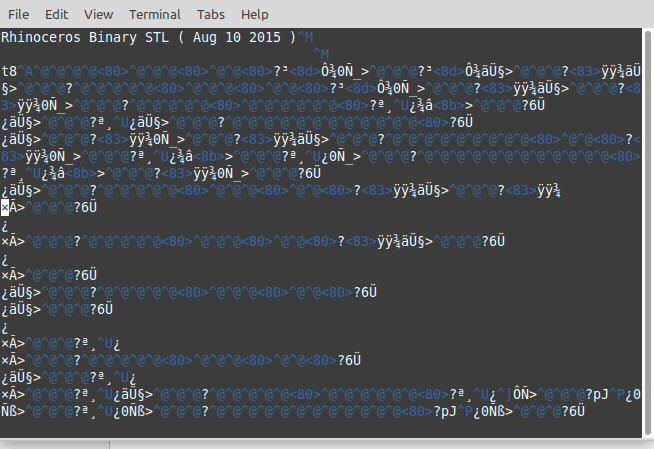
My issue comes when I want to open it. When I run vi constant/triSurface/river.stl in the linux terminal I get the following messy output
BugWhenOpeningSTLfile.png


This might be because I do not have an installed software (in Linux) to open the file. I looked up how to fix the problem (introducing the commands recommended in the most upvoted answer here: https://askubuntu.com/questions/247398/what-software-should-i-install-for-opening-stl-files) but it did not work.

Any help is appreciated :)
 
Technology news on Phys.org
Vi doesn't show you anything helpful because the STL is a binary file, not a text file.

What do you want to do with the mesh? If you want to view and edit it then, as one of the askubuntu replies notes, Blender ought to be able to import it. Install it (it's free software and you can get it via apt/aptitude/whatever package manager you like) and go to File -> Import and one of the options should be STL. Be aware that Blender has a fairly steep learning curve.
 
  • Like
Likes   Reactions: JD_PM
Google says there's plenty of ways to convert .stl files from binary to ascii.
 
hmmm27 said:
Google says there's plenty of ways to convert .stl files from binary to ascii.
But converting a binary file to ascii might not be any help at all.
 
Mark44 said:
But converting a binary file to ascii might not be any help at all.
gotta work better than vi .
 
That's why I asked what OP wants to do.

There are both binary and ASCII STL formats, and converting the file to ASCII would allow text processing tools to modify it and allow direct manual viewing and editing in vi. It's only really practical for very simple meshes, but it can be done. Opening in Blender or similar would allow visualisation and editing.
 
Ibix said:
Vi doesn't show you anything helpful because the STL is a binary file, not a text file.

What do you want to do with the mesh?

The main aim is not to visualize it (to do so I use paraView) but to check the text associated to it (yellow box).

437297987348274NNDNDJ732784.png


The point of this is that, later in the tutorial, I split the STL file, open the generated STL file and compare it to the first

437297987348274NNDNDJ732784.png
 
The problem is that there are both binary and ASCII formats for STL files. You have a binary file but the notes assume you have an ASCII file. You either need to tell the software that produced the file to produce an ASCII STL instead of a binary one (assuming that's possible in your program), or get a program to convert binary STLs to ASCII.
 
  • Like
Likes   Reactions: JD_PM
Thank you Ibix, I got it! :biggrin:

Ibix said:
get a program to convert binary STLs to ASCII.

I used paraView, did this, run vi constant/triSurface/river.stl and it worked!
 
  • #10
Ibix said:
You either need to tell the software that produced the file to produce an ASCII STL instead of a binary one (assuming that's possible in your program), or get a program to convert binary STLs to ASCII.
Or do the editing in paraView itself - that is what it is for.
 

Similar threads

Replies
5
Views
2K
  • · Replies 1 ·
Replies
1
Views
2K
Replies
4
Views
5K
  • · Replies 1 ·
Replies
1
Views
1K
  • · Replies 4 ·
Replies
4
Views
7K
  • · Replies 3 ·
Replies
3
Views
2K
Replies
10
Views
2K
  • · Replies 18 ·
Replies
18
Views
2K
  • · Replies 4 ·
Replies
4
Views
5K
  • · Replies 2 ·
Replies
2
Views
3K