How to use mdata file data output by mesh card in mcnp software?

  • Thread starter Thread starter chengmo
  • Start date Start date
  • Tags Tags
    Mcnp Section
Click For Summary
SUMMARY

To utilize the mdata file output by the mesh card in MCNP software, first convert the mdata file using the gridconv.exe tool. After conversion, the data can be used to identify the section graph for the xyz axis, which is arranged according to the specified mesh grid in the input file. The x, y, and z coordinates are in the first three columns, followed by corresponding data values. For visualization, plot the data using a graphing tool, ensuring the mesh grid is appropriately defined for detailed results.

PREREQUISITES
  • Understanding of MCNP software and its functionalities
  • Familiarity with the gridconv.exe conversion tool
  • Knowledge of plotting data using graphing software
  • Basic comprehension of mesh grid concepts in computational modeling
NEXT STEPS
  • Learn how to effectively use gridconv.exe for data conversion
  • Explore graphing tools compatible with MCNP data visualization
  • Research advanced mesh grid configurations in MCNP for detailed outputs
  • Consult the MCNP user manual for in-depth operational guidance
USEFUL FOR

This discussion is beneficial for computational physicists, MCNP users, and anyone involved in data visualization and analysis of mesh grid outputs in simulation software.
chengmo
Messages
9
Reaction score
0
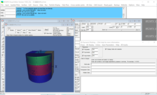
How to use mdata file data output by mesh card in mcnp software? I converted the mdata data using gridconv.exe, but I don't know how to use the data to identify the section graph for the xyz axis? Does anyone know how it's arranged?
 

Attachments

  • 49G1O$ALT1[5~@A_@`C@CFY_tmb.png
    49G1O$ALT1[5~@A_@`C@CFY_tmb.png
    40.5 KB · Views: 162
Engineering news on Phys.org


To use the mdata file data output by the mesh card in MCNP software, you will need to follow certain steps. First, you will need to convert the mdata file using the gridconv.exe tool, as you have already done. This tool converts the data into a format that can be read by MCNP.

Once the data is converted, you can then use the data to identify the section graph for the xyz axis. The data is arranged in a way that corresponds to the mesh grid that was specified in the input file. The x, y, and z coordinates are listed in the first three columns, followed by the corresponding data values for each point in the mesh grid.

To identify the section graph, you will need to plot the data using a graphing tool or software. You can plot the data for each axis separately or combine them into one graph. The data points will be connected by lines, creating a visual representation of the section graph for the xyz axis.

It is important to note that the mdata file data is only output for the mesh grid points that were specified in the input file. If you need a more detailed or refined section graph, you may need to adjust the mesh grid in the input file and repeat the process.

I hope this helps clarify how to use the mdata file data output by the mesh card in MCNP software. If you have any further questions or difficulties, I suggest consulting the MCNP user manual or reaching out to the software support team for assistance.
 

Similar threads

Replies
4
Views
3K
  • · Replies 4 ·
Replies
4
Views
2K
  • · Replies 0 ·
Replies
0
Views
1K
  • · Replies 4 ·
Replies
4
Views
3K
  • · Replies 1 ·
Replies
1
Views
3K
  • · Replies 2 ·
Replies
2
Views
2K
  • · Replies 1 ·
Replies
1
Views
2K
  • · Replies 4 ·
Replies
4
Views
2K
  • · Replies 0 ·
Replies
0
Views
623
  • · Replies 5 ·
Replies
5
Views
3K