Zalajbeg
- 77
- 3
Hi everyone,
In the past I learned very good things about electronics and PIC controller in this forum. After that I have decided to design a circuit with a PIC micro-controller and simulated it in Proteus. However it doesn't work. Could you have a look and tell me what I am missing?
The circuit scheme is that:
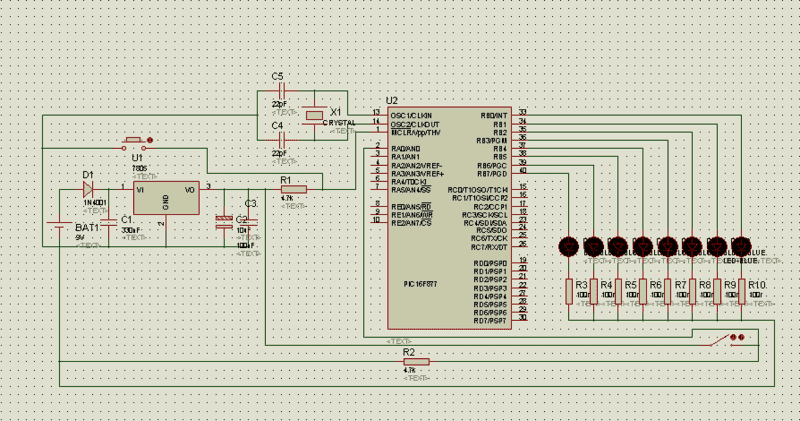
My code is below:
I want to get output when I close the switch which gives input to RA0. If I delete this condition from my codes the circuit works. However I couldn't do this with an input. Could you explain me what is happening?
Edit: The input pin show as (WHI) Weak High Input. However the LEDs seems as (WLO) Weak Low Output.
Edit 2: When I use D pins instead of A pins it works perfect. However if you can explain why it doesn't work with A pins I will be happy to read.
In the past I learned very good things about electronics and PIC controller in this forum. After that I have decided to design a circuit with a PIC micro-controller and simulated it in Proteus. However it doesn't work. Could you have a look and tell me what I am missing?
The circuit scheme is that:
My code is below:
Code:
#include <pic.h>
#include <delay.c>
#include <stdio.h>
#define magnet RA0

int main(void)
{
	char n=1;
	unsigned int i;
	unsigned char birth[]={
		0x84, 0x84, 0xFD, 0x84, 0x84, 0x00,
		0x01, 0x02, 0xFC, 0x02, 0x01, 0x00,
		0x84, 0x84, 0xFD, 0x84, 0x84, 0x00,
		0x00, 0x00, 0x00, 0x00, 0x00, 0x00,
		0xFF, 0x18, 0x24, 0x42, 0x81, 0x00,
		0x84, 0x84, 0xFD, 0x84, 0x84, 0x00,
		0x00, 0x00, 0x00, 0x00, 0x00, 0x00,
		0xFF, 0x81, 0x81, 0x42, 0x3C, 0x00,
		0x7E, 0x81, 0x81, 0x81, 0x7E, 0x00,
		0x79, 0x85, 0xA5, 0xA5, 0x69, 0x00,
		0xFF, 0x81, 0x81, 0x42, 0x3C, 0x00,
		0x7F, 0x80, 0x80, 0x80, 0x7F, 0x00,
		0xFF, 0x06, 0x18, 0x60, 0xFF, 0x00,
		0x00, 0x00, 0x00, 0x00, 0x00, 0x00
		};
	unsigned char name[]={
		0x01, 0x02, 0xFC, 0x02, 0x01, 0x00,
		0x81, 0x81, 0xFF, 0x81, 0x81, 0x00,
		0xFF, 0x80, 0x80, 0x80, 0x80, 0x80,
		0xFF, 0x81, 0x81, 0x42, 0x3C, 0x00,
		0x81, 0x81, 0xFF, 0x81, 0x81, 0x00,
		0xC1, 0xA1, 0x99, 0x85, 0x83, 0x00,
		0x00, 0x00, 0x00, 0x00, 0x00, 0x00
		};

		TRISA=0x01; TRISB=0;
		PORTA=0; PORTB=0;
		for(;;){
			while(n){
				if(magnet==1){
					for(i=0;i<112;i++){
						PORTB=birth[i];
						DelayMs(1000);
						}
				n=0;
					}
				}

		n=1;
			while(n){
				if(magnet==1){
					for(i=0;i<56;i++){
						PORTB=name[i];
						DelayMs(1000);
						}
				n=0;
					}
				}
		n=1;
		}
		}
I want to get output when I close the switch which gives input to RA0. If I delete this condition from my codes the circuit works. However I couldn't do this with an input. Could you explain me what is happening?
Edit: The input pin show as (WHI) Weak High Input. However the LEDs seems as (WLO) Weak Low Output.
Edit 2: When I use D pins instead of A pins it works perfect. However if you can explain why it doesn't work with A pins I will be happy to read.
Last edited: