Matlab Power Fit on Graph-Codes

  • Context: MATLAB 
  • Thread starter Thread starter Arman777
  • Start date Start date
  • Tags Tags
    Fit Matlab Power
Click For Summary

Discussion Overview

The discussion revolves around the use of MATLAB for performing a power fit on a dataset and displaying the results on a graph. Participants are seeking assistance with coding and troubleshooting related to the MATLAB environment.

Discussion Character

  • Technical explanation, Debate/contested, Homework-related

Main Points Raised

  • One participant requests help with MATLAB code for power fitting and graphing data.
  • Another participant inquires whether the original poster has the Curve Fitting Toolbox, suggesting its necessity for the 'fit' function.
  • A later reply confirms the absence of the Curve Fitting Toolbox, indicating a limitation in accessing certain functions.
  • Some participants assert that the 'fit' function is part of the toolbox and not included in standard MATLAB, while also noting that there are other fitting functions available.
  • There is a suggestion that while the toolbox may not be available, alternative fitting methods might exist.

Areas of Agreement / Disagreement

Participants generally agree that the 'fit' function requires the Curve Fitting Toolbox, but there is uncertainty regarding alternative methods for power fitting without it. The discussion remains unresolved regarding how to proceed without the toolbox.

Contextual Notes

Limitations include the dependency on the availability of the Curve Fitting Toolbox and the potential lack of alternative fitting methods within standard MATLAB. There are unresolved questions about how to achieve the desired power fit without access to specific functions.

Arman777
Insights Author
Gold Member
Messages
2,163
Reaction score
191
I have some data and I need power fit.And display it on the graph.But I couldn't find the right codes for it.(I need codes)
Here my graph,
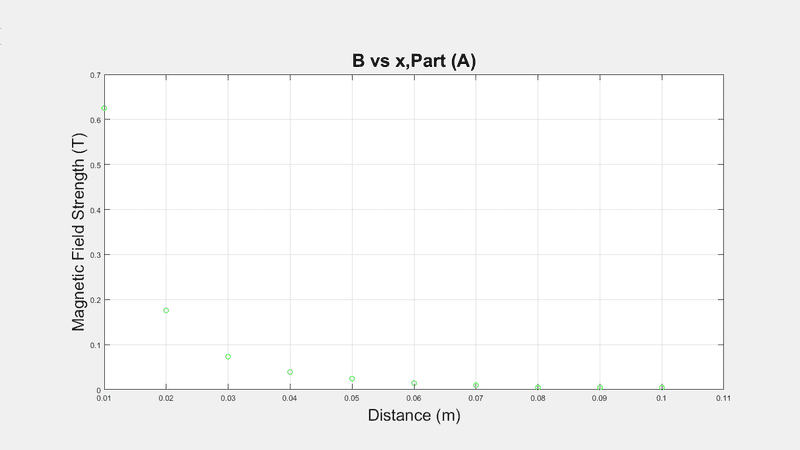
Part A.png


Here my codes,
>> x=BN(:,2);
>> B=BN(:,1);
>> plot(x,B,'go')
>> plot(x,B,'go')
>> hold on
>> xlabel('Distance (m)','Fontsize',21);
>> ylabel('Magnetic Field Strength (T)','Fontsize',21)
>> title('B vs x,Part (A)','Fontsize',23)
>> grid on
>>

I tried ,
>> f = fit(x,B,'power1')
but says,
Undefined function 'fit' for input arguments of type 'double'.

Thanks
 
Physics news on Phys.org
Dr Transport said:
do you have the curve fit toolbox?
Nope sadly
 
I think fit is a part of the toolbox and not part of MATLAB in general...
 
Dr Transport said:
I think fit is a part of the toolbox and not part of MATLAB in general...
there's fit things but not power fit.
 

Similar threads

  • · Replies 2 ·
Replies
2
Views
8K
  • · Replies 5 ·
Replies
5
Views
3K
  • · Replies 8 ·
Replies
8
Views
3K
  • · Replies 2 ·
Replies
2
Views
3K
  • · Replies 5 ·
Replies
5
Views
3K
  • · Replies 5 ·
Replies
5
Views
3K
  • · Replies 12 ·
Replies
12
Views
7K
  • · Replies 9 ·
Replies
9
Views
5K
  • · Replies 5 ·
Replies
5
Views
3K
  • · Replies 9 ·
Replies
9
Views
4K