My Solution Explorer Changed Again - What Did I Do?

  • Thread starter Thread starter yungman
  • Start date Start date
Click For Summary

Discussion Overview

The discussion revolves around issues related to the Solution Explorer in a programming environment, specifically concerning the visibility and organization of project files, as well as the compiler's ability to locate header files. Participants are exploring potential solutions and clarifications regarding project structure and file management.

Discussion Character

  • Technical explanation
  • Debate/contested
  • Exploratory

Main Points Raised

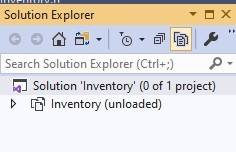
  • One participant reports that their Solution Explorer shows "Inventory(unloaded)" and that previously organized files are now missing, prompting a request for assistance.
  • Another participant provides a link to documentation regarding filtered solutions, suggesting that the issue may relate to how files are organized within the Solution Explorer.
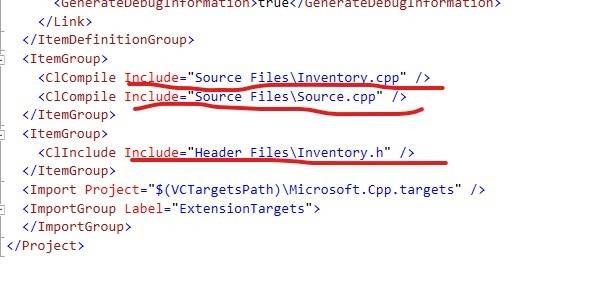
  • A follow-up response reiterates the documentation link while also asking about the specific issue of the compiler not finding Inventory.h, despite it being listed in the project file.
  • A participant shares their experience of moving Inventory.h from the Header Files folder to the Source Files folder, noting that this change resolved the issue of the compiler not finding the header file, although errors still persist.
  • The same participant expresses confusion about why the compiler could not locate Inventory.h when it was in the Header Files folder, questioning the appropriateness of their solution.

Areas of Agreement / Disagreement

Participants do not appear to reach a consensus on the best organizational structure for header files versus source files, and there is uncertainty regarding the underlying reasons for the compiler's behavior.

Contextual Notes

There are limitations in understanding the specific configurations of the project and the implications of file organization on the compiler's functionality. The discussion does not resolve the reasons behind the compiler's inability to locate Inventory.h in its original folder.

Who May Find This Useful

Programmers and developers working with Visual Studio or similar IDEs who are experiencing issues with project file organization and compiler errors related to header files.

yungman
Messages
5,741
Reaction score
291
I was working on a program and for whatever reason my Solution Explorer change again. Now when I toggle to Inventory.sln, this is what I have:
Solution Explorer sln.jpg
It said Inventory(unloaded). I had Header Files and Source Files with all the files in them, now it's gone.

When I toggle to the other view, the files are still there:
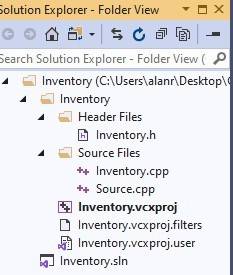
Solution Explorer other.jpg


I don't know what I did to make it like this and I don't know how to get it back. Please help.Also I created the project Inventory, I use Add-->New to add Inventory.h, Inventory.cpp and source.cpp. But it still it complains it cannot fine Inventory.h. Here is the printout of part of the Inventory.vcxproj that show they are all there:
Inventory.vcxproj.jpg

Please advice.

Thanks
 
Technology news on Phys.org
I have been experiment and reading, I have not seen any objection to put the header file Inventory.h in Source Files folder instead of Header Files folder. So I deleted the Inventory.h from the Header Files folder and Add-->New to create Inventory.h into Source Files folder. It seem to work ( of cause I still have errors, but it doesn't complain not finding the Inventory.h anymore).

Anything wrong with this? I have no idea why the compiler cannot find Inventory.h when it was in Header Files folder.

Thanks
 

Similar threads

Replies
10
Views
2K
  • · Replies 10 ·
Replies
10
Views
2K
  • · Replies 9 ·
Replies
9
Views
2K
Replies
6
Views
1K
  • · Replies 54 ·
2
Replies
54
Views
5K
Replies
7
Views
2K
Replies
12
Views
4K
  • · Replies 4 ·
Replies
4
Views
3K
Replies
1
Views
4K
  • · Replies 5 ·
Replies
5
Views
4K