Obtaining the noise level of a camera

  • Context: Graduate 
  • Thread starter Thread starter Gifty01
  • Start date Start date
  • Tags Tags
    Camera Noise
Click For Summary
SUMMARY

This discussion focuses on methods to subtract camera noise from images, specifically in the context of calculating the center of gravity of a diffracted spot. The process involves capturing multiple dark images without opening the shutter to create an average dark signal, which helps estimate noise. While noise cannot be directly subtracted, consistent unwanted signals like bias levels and dark currents can be removed. The discussion also highlights the importance of averaging multiple images to reduce noise and provides a MATLAB code snippet for calculating the average and standard deviation of image stacks.

PREREQUISITES
  • Understanding of camera sensor noise and dark current
  • Familiarity with image processing concepts
  • Basic knowledge of MATLAB programming
  • Experience with statistical methods for noise estimation
NEXT STEPS
  • Learn MATLAB image processing functions for noise reduction
  • Research techniques for dark frame subtraction in imaging
  • Explore advanced noise reduction algorithms in image processing
  • Study the impact of shot noise on image quality
USEFUL FOR

Photographers, optical engineers, and image processing enthusiasts looking to improve image quality by effectively managing camera noise.

Gifty01
Messages
11
Reaction score
0
How can I subtract the camera noise from my real image? Basically, I want to calculate the center of gravity of a diffracted spot without the influence of my camera noise. I will be glad to know how this can be done.
 
Astronomy news on Phys.org
Typically you take dark images without opening the shutter. Ideally you take a number of these, then the average of these is the dark signal and the standard deviation gives you an estimate of the noise.
 
  • Like
  • Informative
Likes   Reactions: Twigg, russ_watters and berkeman
Gifty01 said:
How can I subtract the camera noise from my real image?
You can measure the noise, but you cannot subtract the noise. What you can subtract is the bias level of the camera sensor, the accumulated dark current, and anything else that adds a consistent unwanted signal to your image. Unfortunately the measuring and subtraction process inevitably adds additional noise to the final image, but with proper dark subtraction the amount of noise introduced in insignificant. The exact number of dark images you should takes depends on how much noise you are comfortable introduce. The more dark frames, the less noise.
 
  • Like
Likes   Reactions: Twigg and phyzguy
To give you a little math for this, the total signal on a given camera pixel might look like $$I = I_{signal} + I_{background}$$ ##I_{signal}## is the intensity of the image you're looking for, while ##I_{background}## is undesirable light that gets into your image. The noise on the pixel's intensity is given by the quadrature sum of signal shot noise, background shot noise, and detector noise: $$\sigma_I = \sqrt{I_{signal} + I_{background} + \sigma_{I,det}^2}$$
You can subtract out the background (you cannot subtract the noise) by taking another image in which you block the intended image and only measure the background. Then you have an image containing ##I'=I_{background}## only, with noise ##\sigma_{I'}=\sqrt{I_{background} + \sigma_{I,det}^2}##. You then subtract these two images in software, and you get $$\Delta = I - I' = I_{signal}$$ with noise $$\sigma_\Delta = \sqrt{\sigma_I ^2 + \sigma_{I'}^2} = \sqrt{I_{signal} + 2I_{background} + 2\sigma_{I,det}^2}$$
The difference of images has only the intended signal on average, but is noisier than the original.

This doesn't tell you anything about the camera's noise. If you want to get rid of noise, take a boatload of images and average them.
 
  • Like
Likes   Reactions: Drakkith
Drakkith said:
You can measure the noise, but you cannot subtract the noise. What you can subtract is the bias level of the camera sensor, the accumulated dark current, and anything else that adds a consistent unwanted signal to your image. Unfortunately the measuring and subtraction process inevitably adds additional noise to the final image, but with proper dark subtraction the amount of noise introduced in insignificant. The exact number of dark images you should takes depends on how much noise you are comfortable introduce. The more dark frames, the less noise.
Thanks for your response
 
phyzguy said:
Typically you take dark images without opening the shutter. Ideally you take a number of these, then the average of these is the dark signal and the standard deviation gives you an estimate of the noise.
Thanks for your response. Is there a software in which I can just import the images and calculate the average as well as the std. Or I need to write a code? normally, I am not really good in coding. and I am newly learning how to use matlab. If it requires some code, I will be glad if an example can be sent to me. Thanks.
 
[CODE lang="matlab" title="Matlab Image Averaging"]filenames = {'image1.png','image2.png'}; %replace these with whatever image files you have
% make sure the image files are in the same directory as your MATLAB script

for n = 1:numel(filenames)
image_stack(:,:,n) = imread(filenames{n});
end

image_average = mean(image_stack,3);
image_variance = var(image_stack,0,3);
image_deviation = image_variance.^(1/2);

figure(1); clf;
surf(image_average);
shading interp
view(2)

figure(2); clf;
surf(image_deviation);
shading interp
view(2)
[/CODE]

That should do it. I can't test it for you because my personal PC is allergic to MATLAB since R2020a. Sorry
 
  • Like
Likes   Reactions: PhysicoRaj
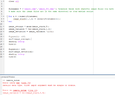
Thanks for your response. Kindly find attached the error that occurred.
 

Attachments

  • Capture1.PNG
    Capture1.PNG
    27.5 KB · Views: 189
Just replace line 5 with

image_stack(:,:,n) = double(imread(filenames{n}));
 
  • #10
Thanks a lot twigg. I really appreciate.
 

Similar threads

  • · Replies 3 ·
Replies
3
Views
1K
  • · Replies 11 ·
Replies
11
Views
3K
  • · Replies 2 ·
Replies
2
Views
1K
  • · Replies 39 ·
2
Replies
39
Views
7K
  • · Replies 5 ·
Replies
5
Views
803
  • · Replies 0 ·
Replies
0
Views
849
  • · Replies 4 ·
Replies
4
Views
2K
  • · Replies 24 ·
Replies
24
Views
4K
  • · Replies 43 ·
2
Replies
43
Views
12K
  • · Replies 4 ·
Replies
4
Views
3K