Programs used for creating scientific diagrams/illustrations

Join the discussion
Ask a follow-up here, or get your own question answered by working scientists, mathematicians and engineers — people, not an autocomplete.
Real named experts · corrections over time · the nuance an AI answer skips
10 replies · 5K views
down to earth
Messages
5
Reaction score
3
Would anyone happen to know what programs out there could be used to make this type of diagram/illustration?
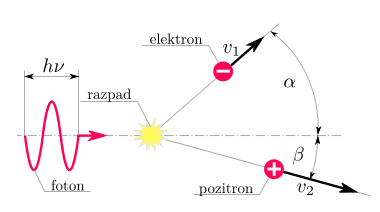
9ioBXTq.png

(image was found on this thread, btw)

I've been wondering for a while as to how people make stuff like this, like the graphs they have in my math and science textbooks. I think knowing how to make these types of things would be helpful for me if I ever want to illustrate a point when discussing science-y stuff with others.

I'm guessing Adobe Illustrator or Photoshop could be used, but maybe there are programs out there made specifically for creating scientific diagrams? Like ones that allow you to create sine waves and write math equations out easily, etc. Apologies in advance for my ignorance, any help would be appreciated :confused:
 
Physics news on Phys.org
Inkscape is a program you can use.
 
  • Like
Likes   Reactions: down to earth
Illustrator or Inkscape would be my choice to produce a figure like that. Inkscape is somewhat clunkier than Illustrator, but it does have the benefit of being free.

ETA: I *wouldn't* use photoshop or GIMP, however. Illustrator and Inkscape are designed for vector graphics, whereas photoshop is designed for raster images.

ETA2: As far as I've seen inkscape or illustrator would be the choice of most of my colleagues, so I'll be keen to see if there are any other choices.
 
  • Like
Likes   Reactions: down to earth
StevieTNZ said:
*snip*
e.bar.goum said:
*snip*

I've messed with both Illustrator and Inkscape for making vector graphics before, but I didn't know they'd be ideal for this type of thing. I'll look into it again (seriously this time :rolleyes:). Thank you both! :smile:
 
Whats a razpad?

And, AutoCAD is the best. You can make 2D images with it really quickly.
 
  • Like
Likes   Reactions: down to earth
For simple graphics in a LaTeX file I usually used tikz.
For the picture you showed it would work very well.

The caveat is that it takes some time to get used to it. The advantage is that you can create new commands to quickly build images.
The manual has some very cool stuff in it, http://www.texample.net/media/pgf/builds/pgfmanualCVS2012-11-04.pdf
Take for example a look at section 6 (page 71-85), it shows how the usage of commands can help you.
Once those commands are defined you can use them every time you do something similar.
 
  • Like
Likes   Reactions: down to earth
Powerpoint is surprisingly good for creating some simple scientific diagrams. For figures that actually make it into papers, however, I mostly use Illustrator (sometimes creating the first draft of the diagram in powerpoint then copy-pasting into Illustrator).
 
  • Like
Likes   Reactions: harborsparrow and down to earth
JorisL said:
For simple graphics in a LaTeX file I usually used tikz.
For the picture you showed it would work very well.

The caveat is that it takes some time to get used to it. The advantage is that you can create new commands to quickly build images.
The manual has some very cool stuff in it, http://www.texample.net/media/pgf/builds/pgfmanualCVS2012-11-04.pdf
Take for example a look at section 6 (page 71-85), it shows how the usage of commands can help you.
Once those commands are defined you can use them every time you do something similar.

Oh! I've heard of tikz before, sounds like exactly what I need. (I was suspecting that the sample image I posted was made with LaTeX because of the font the labels are in.) Thanks!
 
down to earth said:
Oh! I've heard of tikz before, sounds like exactly what I need. (I was suspecting that the sample image I posted was made with LaTeX because of the font the labels are in.) Thanks!

Just for the record, you can use the LaTeX font (cmr) anywhere if you have it installed on your system. You can either make a figure normally, or with something like inkscape, you can output a pdf with the text in a .tex file.
 
  • Like
Likes   Reactions: down to earth