Programs used for creating scientific diagrams/illustrations

Click For Summary

Discussion Overview

The discussion revolves around the various software programs that can be utilized for creating scientific diagrams and illustrations. Participants explore options suitable for producing vector graphics, as well as tools that integrate with LaTeX for typesetting mathematical content.

Discussion Character

  • Exploratory
  • Technical explanation
  • Debate/contested
  • Mathematical reasoning

Main Points Raised

  • Some participants suggest Adobe Illustrator and Inkscape as suitable programs for creating scientific diagrams, noting that Inkscape is free but may be less user-friendly than Illustrator.
  • One participant mentions that Photoshop and GIMP are not ideal for this purpose, as they are designed for raster images rather than vector graphics.
  • Another participant recommends AutoCAD for quickly making 2D images, indicating it as a strong option.
  • Several participants advocate for using TikZ within LaTeX for creating graphics, highlighting its capability to define new commands for efficiency, though they note it has a learning curve.
  • PowerPoint is mentioned as a surprisingly effective tool for simple diagrams, with one participant stating they often draft in PowerPoint before finalizing in Illustrator.
  • MS Visio is also proposed as an alternative option for creating diagrams.
  • There is a brief exchange about the term "razpad," with participants speculating on its meaning in the context of the discussion.

Areas of Agreement / Disagreement

Participants express a variety of opinions on the best software for creating scientific diagrams, with no clear consensus on a single preferred program. Multiple competing views remain regarding the effectiveness and usability of the suggested tools.

Contextual Notes

Some participants mention the learning curve associated with certain programs, particularly TikZ, and the potential for specific software to be better suited for different types of diagrams or user preferences.

Who May Find This Useful

This discussion may be useful for students, educators, and professionals in STEM fields looking for software recommendations for creating scientific diagrams and illustrations.

down to earth
Messages
5
Reaction score
3
Would anyone happen to know what programs out there could be used to make this type of diagram/illustration?
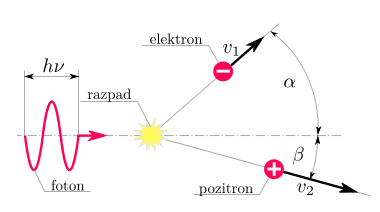
9ioBXTq.png

(image was found on this thread, btw)

I've been wondering for a while as to how people make stuff like this, like the graphs they have in my math and science textbooks. I think knowing how to make these types of things would be helpful for me if I ever want to illustrate a point when discussing science-y stuff with others.

I'm guessing Adobe Illustrator or Photoshop could be used, but maybe there are programs out there made specifically for creating scientific diagrams? Like ones that allow you to create sine waves and write math equations out easily, etc. Apologies in advance for my ignorance, any help would be appreciated :confused:
 
Computer science news on Phys.org
Inkscape is a program you can use.
 
  • Like
Likes   Reactions: down to earth
Illustrator or Inkscape would be my choice to produce a figure like that. Inkscape is somewhat clunkier than Illustrator, but it does have the benefit of being free.

ETA: I *wouldn't* use photoshop or GIMP, however. Illustrator and Inkscape are designed for vector graphics, whereas photoshop is designed for raster images.

ETA2: As far as I've seen inkscape or illustrator would be the choice of most of my colleagues, so I'll be keen to see if there are any other choices.
 
  • Like
Likes   Reactions: down to earth
StevieTNZ said:
*snip*
e.bar.goum said:
*snip*

I've messed with both Illustrator and Inkscape for making vector graphics before, but I didn't know they'd be ideal for this type of thing. I'll look into it again (seriously this time :rolleyes:). Thank you both! :smile:
 
Whats a razpad?

And, AutoCAD is the best. You can make 2D images with it really quickly.
 
  • Like
Likes   Reactions: down to earth
For simple graphics in a LaTeX file I usually used tikz.
For the picture you showed it would work very well.

The caveat is that it takes some time to get used to it. The advantage is that you can create new commands to quickly build images.
The manual has some very cool stuff in it, http://www.texample.net/media/pgf/builds/pgfmanualCVS2012-11-04.pdf
Take for example a look at section 6 (page 71-85), it shows how the usage of commands can help you.
Once those commands are defined you can use them every time you do something similar.
 
  • Like
Likes   Reactions: down to earth
OrangeDog said:
Whats a razpad?
I think in this context it means "decay" or more specifically "pair production".

http://en.pons.com/translate/slovenian-english/razpad

It might be some other Slavic language besides Slovenian. However, the first several hits in a Google search for the word are from from the Slovenian version of Wikipedia.
 
Powerpoint is surprisingly good for creating some simple scientific diagrams. For figures that actually make it into papers, however, I mostly use Illustrator (sometimes creating the first draft of the diagram in powerpoint then copy-pasting into Illustrator).
 
  • Like
Likes   Reactions: harborsparrow and down to earth
MS Visio is also an option
 
  • Like
Likes   Reactions: down to earth
  • #10
JorisL said:
For simple graphics in a LaTeX file I usually used tikz.
For the picture you showed it would work very well.

The caveat is that it takes some time to get used to it. The advantage is that you can create new commands to quickly build images.
The manual has some very cool stuff in it, http://www.texample.net/media/pgf/builds/pgfmanualCVS2012-11-04.pdf
Take for example a look at section 6 (page 71-85), it shows how the usage of commands can help you.
Once those commands are defined you can use them every time you do something similar.

Oh! I've heard of tikz before, sounds like exactly what I need. (I was suspecting that the sample image I posted was made with LaTeX because of the font the labels are in.) Thanks!
 
  • #11
down to earth said:
Oh! I've heard of tikz before, sounds like exactly what I need. (I was suspecting that the sample image I posted was made with LaTeX because of the font the labels are in.) Thanks!

Just for the record, you can use the LaTeX font (cmr) anywhere if you have it installed on your system. You can either make a figure normally, or with something like inkscape, you can output a pdf with the text in a .tex file.
 
  • Like
Likes   Reactions: down to earth

Similar threads

Replies
11
Views
4K
Replies
18
Views
9K
  • · Replies 9 ·
Replies
9
Views
4K
  • · Replies 6 ·
Replies
6
Views
1K
  • · Replies 7 ·
Replies
7
Views
2K
  • · Replies 19 ·
Replies
19
Views
4K
  • · Replies 1 ·
Replies
1
Views
3K
  • · Replies 1 ·
Replies
1
Views
11K
  • · Replies 1 ·
Replies
1
Views
1K
  • · Replies 2 ·
Replies
2
Views
2K