RecursionError at a place where I have defined no recursive function

Click For Summary

Discussion Overview

The discussion revolves around a Python programming issue where a user encounters a RecursionError in their code, despite not explicitly defining any recursive functions. The focus is on understanding the cause of the error, which relates to the naming of a user-defined function that conflicts with a built-in function. Participants explore the implications of naming conventions in programming, particularly in Python.

Discussion Character

  • Technical explanation
  • Debate/contested
  • Meta-discussion

Main Points Raised

  • One participant points out that the user-defined function named input() overrides the built-in input() function, leading to recursion when the user tries to call the built-in version.
  • Another participant suggests that using different naming conventions, such as camel case or hyphenated names, could prevent such conflicts.
  • Some participants share personal experiences of transitioning between programming languages and the challenges that arise from differing conventions and reserved keywords.
  • There are comments on the broader implications of using reserved words as variable or function names, with references to historical programming practices and potential misunderstandings.
  • A few participants engage in light-hearted banter about spelling and naming conventions in programming.
  • Some participants emphasize the importance of maintaining clarity in code to avoid confusion, especially when dealing with error messages and line numbers.

Areas of Agreement / Disagreement

Participants generally agree that naming conflicts with built-in functions can lead to unexpected behavior in Python. However, there is no consensus on the best practices for naming conventions, as opinions vary on how strictly to adhere to them.

Contextual Notes

Some participants mention the challenges of transitioning from other programming languages to Python, highlighting differences in function naming and reserved keywords. There are also references to specific versions of Python and their impact on code behavior.

Who May Find This Useful

This discussion may be useful for programmers transitioning to Python from other languages, those interested in best practices for naming conventions, and individuals encountering similar recursion issues in their code.

Wrichik Basu
Science Advisor
Insights Author
Gold Member
Messages
2,186
Reaction score
2,694
Here is the code that I wrote:
Python:
import numpy as np

global m, n, p, q, arr1, arr2def input():
    # Input for first matrix:
    print("Enter the number of rows of the first matrix: ", end="")
    globals()['m'] = int(input())
    print("Enter the number of columns of the first matrix: ", end="")
    globals()['n'] = int(input())
    print("\nEnter the first matrix: ")
    globals()['arr1'] = np.empty((m, n))
    for i in range(0, m):
        for j in range(0, n):
            print("Enter the element in cell [", i, " ][", j, "]: ", end="")
            arr1[i][j] = eval(input())

    print("\nThe first matrix is: ")
    printMatrix(arr1)

    # Input for second matrix:
    print("Enter the number of rows of the second matrix: ", end="")
    globals()['p'] = int(input())
    print("Enter the number of columns of the second matrix: ", end="")
    globals()['q'] = int(input())
    print("\nEnter the first matrix: ")
    globals()['arr2'] = np.empty((p, q))
    for i in range(0, p):
        for j in range(0, q):
            print("Enter the element in cell [", i, " ][", j, "]: ", end="")
            arr2[i][j] = eval(input())

    print("\nThe second matrix is: ")
    printMatrix(arr2)

    multiply_check()def printMatrix(arr: np.ndarray):
    passdef multiply_check():
    pass

input()
For simplicity, I have removed the code for functions multiply_check() and printMatrix().

As you can see, I am calling the static function input(). My program has been built such that input() will call the other functions.

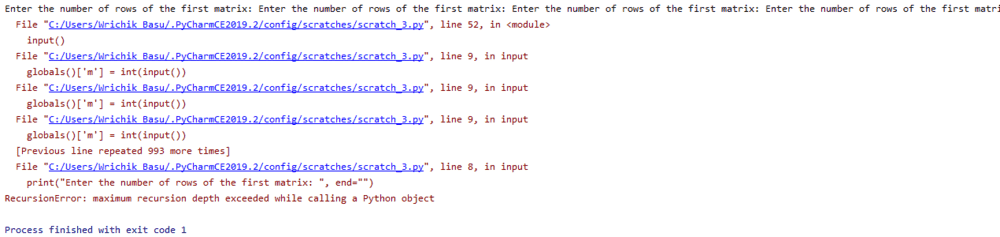
I get a RecursionError when I run this file:
1573716743845.png


There is no recursion anywhere in the program. I don't understand how line 8 is calling itself recursively.

If I enclose everything inside a class, including the declaration for global variables, the program executes properly. Also, if I remove the functions and write the program without functions, it works properly. (I do not prefer doing the latter, this was just for debugging).

I tried removing the global variables and then passing the local variables as parameters in function calls, but no luck. Same problem at the same point.

I faced the same problem a few days back with a different program in a different computer. I executed each line in the command line, and everything executed properly.

Any idea why this problem is occurring?

Python version: 3.7.4, Numpy version: 1.17.3
 
Technology news on Phys.org
You've defined a function called input() which uses a function called input(). You intend the latter to be the builtin input() function, but your definition of input() overrides that - so python calls your input() from within your input() and you have recursion.

I strongly recommend that you never, in any language, name a function the same as a builtin function or key word.

Edit: if you must do so for some reason, __builtins__ contains all the builtin functions, so __builtins__.input() will tell python you wanted to use its function. As I say, don't do this (it's asking for trouble) unless you absolutely must for some reason.
 
Last edited:
  • Like
Likes   Reactions: Dale, DEvens, phinds and 9 others
This is why programmers are often bad spellers or they use camel case or hyphenated names because its really bad to use a variable or function name matching a reserved word or builtin word. Dire consequences can result.

If you had renamed your function to in_put then it may work better.
 
  • Like
Likes   Reactions: sysprog and Ibix
jedishrfu said:
This is why programmers are often bad spellers
Wat ar yoo torking abowt? therz nuthing rong weeth mi speling orr capitalisashun.

More seriously, doing anything with wavelengths or affine parameters for orbits in GR is annoying in python, because they're both usually denoted ##\lambda## and lambda is a python keyword.
 
  • Haha
  • Like
Likes   Reactions: sysprog and anorlunda
Ibix said:
You've defined a function called input() which uses a function called input(). You intend the latter to be the builtin input() function, but your definition of input() overrides that - so python calls your input() from within your input() and you have recursion.
jedishrfu said:
This is why programmers are often bad spellers or they use camel case or hyphenated names because its really bad to use a variable or function name matching a reserved word or builtin word. Dire consequences can result.

If you had renamed your function to in_put then it may work better.

My bad, transition from Java to Python is taking a toll on me. In Java, I used to define functions with the name input(); I didn't have in mind that there is already a predefined function with that name in Python. :headbang:
 
  • Like
Likes   Reactions: sysprog and Ibix
We all go through this turmoil so there's nothing ro be ashamed of. I once ported code from to python and after some difficulties got it working only to find it needed to be v3.x python not v2.7.

The math broke with the change of the / to / and // in v3
 
  • Like
Likes   Reactions: sysprog, Wrichik Basu and Ibix
I spent a week bug-hunting in a MATLAB to C translation, only to find I'd fallen over an integer-divide bug. Every other thing I'd written was fine...
 
  • Like
Likes   Reactions: Wrichik Basu
From: IBM documentation
There are no reserved words in PL/I. However, using some keywords, for example, IF or THEN, as variable names might make a program needlessly hard to understand.
Maybe the second sentence would qualify as an understatement. :rolleyes:
 
  • Like
Likes   Reactions: Klystron
as variable names might make a program needlessly hard to understand

Hard to understand, I get. But needlessly hard to understand? Heck, there are even obfuscated source code contests out there.

I am told that one of the early Lisp machines allowed "zero" to be redefined. This did not always lead to a desirable outcome.
 
  • Haha
  • Like
Likes   Reactions: Wrichik Basu and sysprog
  • #10
Vanadium 50 said:
I am told that one of the early Lisp machines allowed "zero" to be redefined.
:oldeek:
Vanadium 50 said:
This did not always lead to a desirable outcome.
Are you saying "did not always" because you accidentally redefined "never" to mean something else?
 
  • Like
  • Haha
Likes   Reactions: Vanadium 50 and sysprog
  • #11
Vanadium 50 said:
But needlessly hard to understand?
Well, Prim's algorithm (for finding minimum-weight spanning trees) might be hard to understand, but here's a brief example of code that might render other parts of the code needlessly hard to understand:
Code:
PROC OPTIONS(MAIN);
DCL REAL EXTERNAL ENTRY OPTIONS(ASM,INTER,NOMAP);
DECLARE DECLARE FIXED BIN(31),
FIXED FIXED DEC(8),
DEC FIXED BIN(16);
I imagine that you get the gist. :oldwink:
 
  • #12
Another "knit-pick" unrelated to the solution to the recursion problem:
Please do not edit your code. That makes the line numbers in the error message wrong for the code that you post.
 
  • #13
FactChecker said:
Another "knit-pick" unrelated to the solution to the recursion problem:
Please do not edit your code. That makes the line numbers in the error message wrong for the code that you post.
Only one line number (47) didn't match with the error message (52), and clearly the problem was not occurring there but further inside the stack. So I didn't edit that one.
 
  • #14
jedishrfu said:
We all go through this turmoil so there's nothing ro be ashamed of. I once ported code from to python and after some difficulties got it working only to find it needed to be v3.x python not v2.7.

The math broke with the change of the / to / and // in v3
I like that IBM kept backward compatibility -- system code that I wrote in the '80s still runs on today's machines -- and some other (older) persons can say the same about their code from the '60s and '70s.
 
  • #15
Wrichik Basu said:
Only one line number (47) didn't match with the error message (52), and clearly the problem was not occurring there but further inside the stack. So I didn't edit that one.
Suite yourself. Some could say that that is exactly where the error was -- calling your own function that should have had a different name.
 
  • #16
FactChecker said:
exactly where the error was

Something about computers that people ask for help, get help, and then disregard the advice they just got. Don't understand this.

Many moons ago - around ten years - I was running some FORTRAN code. I needed some function that wasn't an intrinsic: maybe an inverse hyperbolic function or something similarly mathy. So I wrote a function and that was that. I moved on to other things.

Time passes.

The FORTRAN compiler is updated.

It now includes the function I wrote as an intrinsic. The code now compiles fine, but crashes when it runs, with an error message that makes no sense. (Maybe it was "string too long" on code that didn't use strings.) The root problem was having two identically named functions in the link table.
 
Last edited:
  • Like
  • Sad
Likes   Reactions: Wrichik Basu, sysprog and FactChecker
  • #17
How did you find it? Did the compiler flag it as being an intrinsic function? or was it much trickier?

One trick, I've done there is no error is to first review my changes. Sometimes commenting them out fixes the problem. Sometimes not.

Next I've used a debugger to isolate where the error might occur and backtrack from there.

Without a debugger, then you have to split the program using a sort of binary search approach. Does it fail on the first half or the second half? Second okay does it fail in first quarter of the second half or the second? ...

Sometimes, the problem may be an internal compiler error. In one fortran program I wrote, I noticed an nice pattern where i could index through the filecodes of the write statement ie have an array of filecodes and then index through the array as in write(fc(i),9) but the program mysteriously failed at the write with no explanation.

Later I found the compiler designers never considered that the filecode being passed to a write could ever be anything more than an integer constant. My hack was to create a set of if statements and write actions for each file I wanted to write to. Not as elegant but it got the job done.

Lastly, one example of an error occurring due to a coding mistake elsewhere. I wrote a C program that defined a local char array for a string and passed it to a subroutine who passed to another and another. One of the low level function overwrote the string size changing the stack at that spot since the local array was allocated on the stack. As the stack unraveled the program crashed at a crazy address. Adding print statements to track down the error masked the problem because they changed the stack. Once I changed to using malloc for the array then it went away ie the program didn't crash but the array still got overwritten by string data ruining another string but that's another story.

These stories stay with you as things to watch out for in the future. So many errors, so many stories its a wonder that anything works at all. Future AGI or ASI will save us, right?
 
  • Like
Likes   Reactions: Wrichik Basu and sysprog
  • #18
jedishrfu said:
How did you find it? Did the compiler flag it as being an intrinsic function? or was it much trickier?

It did not, and I just started commenting out chunks of code until the problem was obvious.

Even though the code was doing something stupid, it was reported as a bug. The senior technical guy, a Russian with an accent like Boris Badanov's, put it well: "Compiler should produce one of two things: working code, or error message."
 

Similar threads

  • · Replies 2 ·
Replies
2
Views
2K
  • · Replies 3 ·
Replies
3
Views
2K
  • · Replies 19 ·
Replies
19
Views
2K
  • · Replies 17 ·
Replies
17
Views
4K
  • · Replies 8 ·
Replies
8
Views
3K
  • · Replies 8 ·
Replies
8
Views
2K
  • · Replies 11 ·
Replies
11
Views
3K
  • · Replies 2 ·
Replies
2
Views
2K
  • · Replies 9 ·
Replies
9
Views
3K
  • · Replies 3 ·
Replies
3
Views
3K