Removing "Foreign" objects from Excel notebook file?

  • Thread starter Thread starter WWGD
  • Start date Start date
  • Tags Tags
    Excel File
Click For Summary
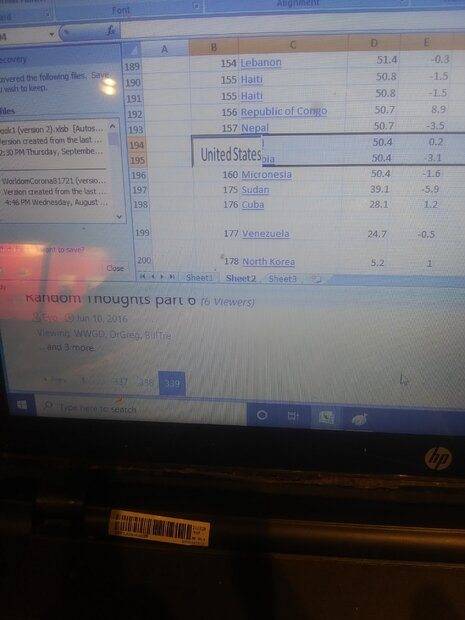
A user is experiencing difficulty removing a persistent "picture-like" object from an Excel file, specifically a white rectangle with the text "United StatesStates." Attempts to delete the row containing the object have been unsuccessful, and the user encountered a '403' error when trying to scrape data directly from a webpage into Excel. Suggestions include clicking on the image to delete it, but the user reports that right-clicking did not work. They ultimately copied previous rows into a new sheet for data cleaning. The discussion also touches on the benefits of using newer versions of Excel, particularly for data science, as they offer improved functionality and compatibility. Additionally, there is a mention of the British company Pivigo, which is noted for its corporate finance activities, although the user has not worked with them directly.
WWGD
Science Advisor
Homework Helper
Messages
7,751
Reaction score
12,969
TL;DR
Having trouble deleting "Foreign Object" picture-like from an Excel 2007 file.
Hi,
I'm having trouble dealing a "picture-like" object that I copied from a webpage (.html) file. It is the larger white rectangle in rows 194-195, that reads "United StatesStates"
IMG_20211209_190407_01.jpg

It just doesn't go away when I delet the the row. I tried to scrape the file directly into Excel from the site , but got a '403' error message (forbidden). How can I delete the row without affecting other files?
Thanks.
 
Computer science news on Phys.org
Try clicking on the picture and hitting delete.

Office 365 Family at GBP80 a year (not sure how much it is in US) is worth every penny to me.
 
pbuk said:
Try clicking on the picture and hitting delete.

Office 365 Family at GBP80 a year (not sure how much it is in US) is worth every penny to me.
Thank you, though I'm not sure I understand you. I'm using Excel 2007. You mean the newer versions
will (more likely) have a way of addressing this issue? And, sorry, r-clicking did not work. I just copied all previous rows into a new sheet. Hey, can't overdo the practice of data cleaning.

On a separate note, any chance you've heard of this British company Pivigo? Have you heard anything about it?
 
WWGD said:
Thank you, though I'm not sure I understand you. I'm using Excel 2007. You mean the newer versions
will (more likely) have a way of addressing this issue?
Probably not, but newer versions play a LOT better with all kinds of connections, as well as do a lot of other stuff better. If you are at all serious about data science (or anything really) on Excel you need to be on the current version.

WWGD said:
And, sorry, r-clicking did not work. I just copied all previous rows into a new sheet. Hey, can't overdo the practice of data cleaning.
Glad you got it sorted.

WWGD said:
On a separate note, any chance you've heard of this British company Pivigo? Have you heard anything about it?
Yes, haven't worked with them personally but I know they are doing stuff with clients I know. Looks like there was some corporate finance activity this Spring.
 
I’ve spent nearly my entire life online, and witnessed AI become integrated into our lives. It’s clear that AI is apart of us now whether we like it or not, unless your a anti tech cabin lover. AI has some form of control over your life. But what I’ve seen very recently is that people are loosing their ingenuity and deciding to use AI. I feel as if it’ll bleed into STEM which is kinda has already and, every idea or thought could become fully reliant on AI. Yeah AI makes life easier but at a...

Similar threads

  • · Replies 4 ·
Replies
4
Views
2K
  • · Replies 12 ·
Replies
12
Views
9K
  • · Replies 1 ·
Replies
1
Views
3K
Replies
52
Views
5K
  • · Replies 4 ·
Replies
4
Views
4K
  • · Replies 3 ·
Replies
3
Views
5K
  • · Replies 7 ·
Replies
7
Views
8K
  • · Replies 8 ·
Replies
8
Views
6K
Replies
4
Views
3K
Replies
43
Views
16K