Trouble Connecting to Default Instance in SQL Server 2017 (Win10)

  • Thread starter Thread starter WWGD
  • Start date Start date
  • Tags Tags
    2017 Server Sql
Click For Summary

Discussion Overview

The discussion revolves around troubleshooting connection issues with a default instance of SQL Server 2017 on a Windows 10 machine. Participants explore potential causes, including version compatibility between 32-bit and 64-bit installations, and consider various methods for accessing the database, including alternative connection protocols.

Discussion Character

  • Exploratory
  • Technical explanation
  • Debate/contested
  • Homework-related

Main Points Raised

  • One participant reports difficulty accessing the default instance of SQL Server and suspects a conflict between 32-bit and 64-bit versions installed on their 64-bit OS.
  • Another participant suggests treating the database as a remote database and using TCP, ODBC, or JDBC for connection, expressing uncertainty about the effectiveness of this approach.
  • There are inquiries about data transfer methods if the participant decides to replace their PC, with discussions on the necessity of reinstalling software and the implications of copying data versus applications.
  • Some participants argue that copying applications without reinstalling is inadvisable due to potential issues with broken installations and registry changes.
  • Several participants recommend uninstalling and reinstalling SQL Server, emphasizing the importance of tracking the correct version and installation options, while noting the challenges posed by the 32-bit and 64-bit differences.
  • One participant raises concerns about preserving databases during the uninstallation process, questioning how to detach databases if they cannot connect to the instance.
  • Another participant mentions that database files exist on the file system and suggests backing up the entire file area, while also noting the possibility of multiple files for a single database.

Areas of Agreement / Disagreement

Participants express a range of views on how to resolve the connection issue and manage data during potential reinstallation. There is no consensus on the best approach, and multiple competing views remain regarding the handling of SQL Server installations and data preservation.

Contextual Notes

Participants note limitations in their understanding of SQL Server configurations and the complexities involved in managing different versions. There are unresolved questions about the best practices for data backup and restoration, particularly when access to the SQL Server instance is compromised.

WWGD
Science Advisor
Homework Helper
Messages
7,795
Reaction score
13,095
Hi All,
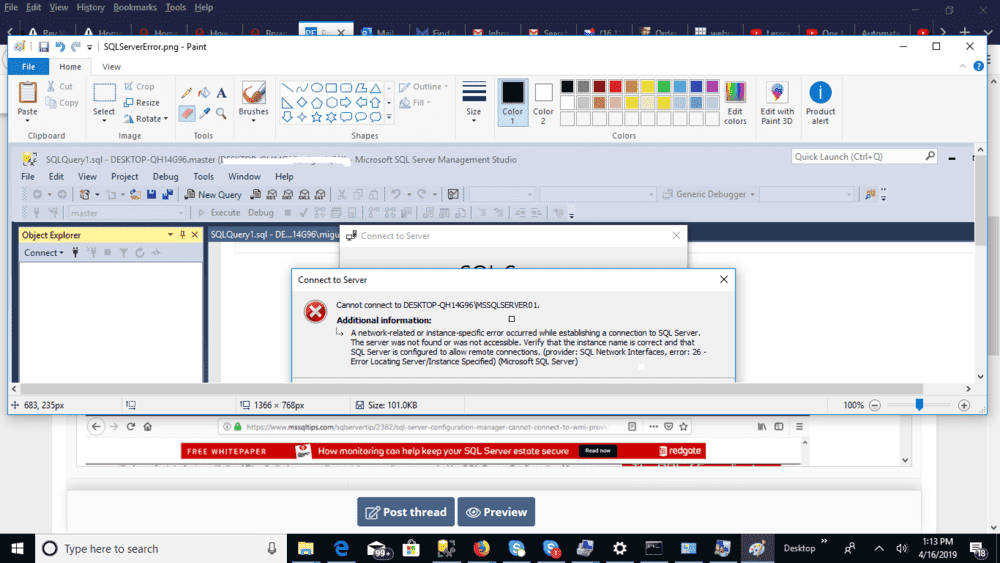
Trying to do some querying in my (local) SQL Server. Thing is I am having trouble accessing my default instance, though no trouble accessing the one named instance I have. I have been to Stack Overflow , read up, posted a few things, then told to read again after it all failed. I get a Network error message
error 26 :
241988
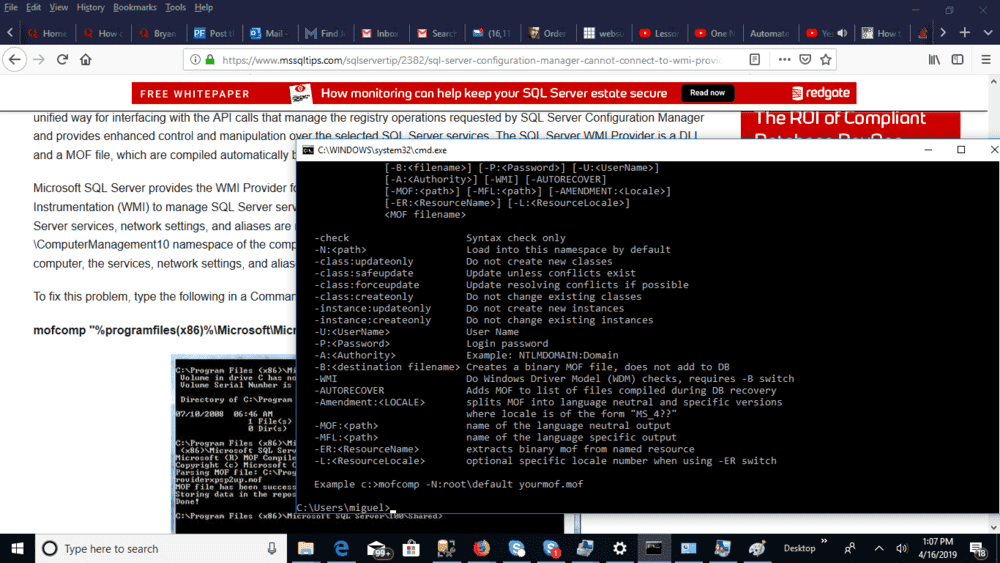
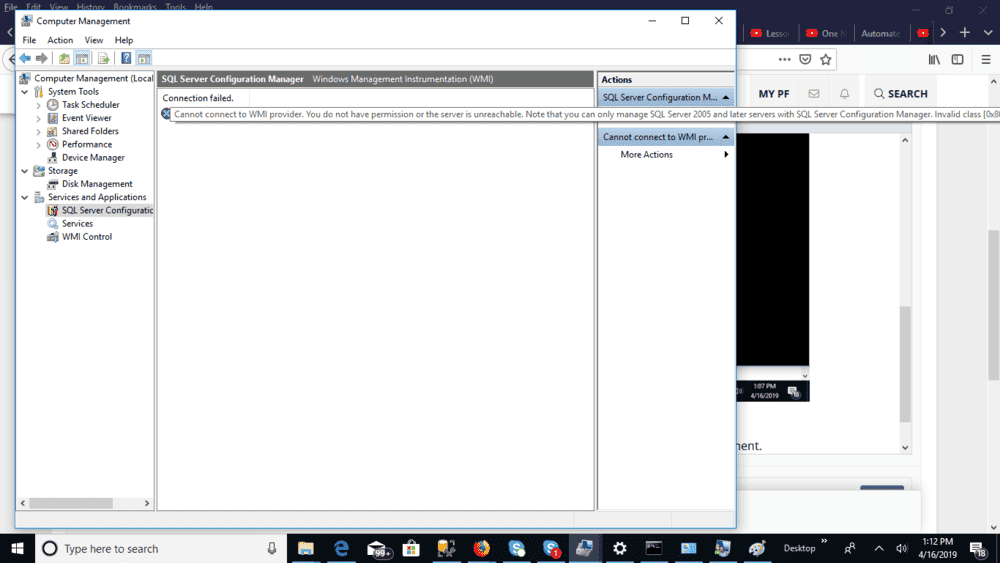
After further investigation, it seems the issue is with the VMI. I cannot connect to the VMI provider. It seems the issue is that one of my instances is of a 32-bit copy of SQL Server and one is a version of a 64-bit copy of SQL Server (My OS is 64-bit):

.microsoft.com/en-us/help/956013/error-message-when-you-open-sql-server-configuration-manager-in-sql-se

Now, I followed up on above:
241986
But I get the same error message and I am unable to access SQL Server Configuration Manager in Computer Management.
241987


Sorry for the overload, I have been at this for around a week...just to be able to do some querying.

I tried to double-check the versions installed, whether they were 32-bit or 64-bit...but I don't know how to do it ...since I cannot connect to one of the versions.
SERENITY NOW!
 
Computer science news on Phys.org
I did not want to overload the post with add-ons, but, just in case, here is the event log from today:

241991
 
Is there a way to treat it as a remote database and use tcp or odbc or jdbc to connect to it?
 
  • Like
Likes   Reactions: WWGD
jedishrfu said:
Is there a way to treat it as a remote database and use tcp or odbc or jdbc to connect to it?
I never tried that, will look it up. Given the crazyness of my PC, the act of posting here may magically solve the problem. Maybe my PC is entangled with PF ( Throwing around terms I know nothing about).
 
  • Like
Likes   Reactions: jedishrfu
Jedi, a probably dumb question. I am thinking on giving up on my PC. If I were to copy all my data , say in a flash drive or by using a SATA cable, would I have to reinstall all my software? I know files would travel and file structure would be preserved ( assuming we use the same OS in both).
 
WWGD said:
Jedi, a probably dumb question. I am thinking on giving up on my PC. If I were to copy all my data , say in a flash drive or by using a SATA cable, would I have to reinstall all my software? I know files would travel and file structure would be preserved ( assuming we use the same OS in both).
Generally, yes, because the programs are more than just the data and executables. When you install a program, it will usually make changes to the registry. I'm pretty sure you can't just copy the registry from one computer to another.
 
  • Like
Likes   Reactions: WWGD and jedishrfu
Mark44 said:
Generally, yes, because the programs are more than just the data and executables. When you install a program, it will usually make changes to the registry. I'm pretty sure you can't just copy the registry from one computer to another.
Any chance of using something like Norton ghost? Wouldn't that copy internal settings? Wonder if it includes programs though. I am basically reaching here, trying to avoid the hassle. It seems we may be able to copy the data files associated with the software and then install.
 
Even if it is possible to copy applications over without installing them it is not a good idea - you would just copy over all the things that are broken in your current installation!

You may be better off doing the opposite: reinstall Windows and all your existing applications on your existing hardware, you will probably find it works a lot better and quicker.

I usually reckon on 2 years between so-called "bare metal" installs for Windows, but I do install and uninstall a lot of software; for a more stable set up you could get away with longer.

I think you should ditch SQL Server though - the clue is in the name, it is designed to run on servers and will never be happy sitting alongside userland apps.
 
  • Like
Likes   Reactions: WWGD
pbuk said:
Even if it is possible to copy applications over without installing them it is not a good idea - you would just copy over all the things that are broken in your current installation!

You may be better off doing the opposite: reinstall Windows and all your existing applications on your existing hardware, you will probably find it works a lot better and quicker.

I usually reckon on 2 years between so-called "bare metal" installs for Windows, but I do install and uninstall a lot of software; for a more stable set up you could get away with longer.

I think you should ditch SQL Server though - the clue is in the name, it is designed to run on servers and will never be happy sitting alongside userland apps.
Thanks, but the issue with SQL Server is both that it is free and that I have spent many years training myself on it.
 
  • #10
Honestly, you might be better off uninstalling SQL Server, and then reinstalling and keeping better track to get the correct version for your OS and exactly what options you chose during the install.

I've lost weeks of my life to setting up SQL Server locally. Once you get it, it works wonderfully, but there are many choices. In my experience, the 32-bit and 64-bit difference is unbridgeable. Your PC actually has two different ODBC configuration programs, for example--one for 32 bit and another for 64 bit. Their graphical user interfaces look exactly the same when they run, but the .exe file name is different.

I would start over. In a few hours, you'd have a clean install that you better understand.
 
Last edited:
  • Like
Likes   Reactions: pbuk and WWGD
  • #11
harborsparrow said:
Honestly, you might be better off uninstalling SQL Server, and then reinstalling and keeping better track to get the correct version for your OS and exactly what options you chose during the install.

I've lost weeks of my life to setting up SQL Server locally. Once you get it, it works wonderfully, but there are many choices. In my experience, the 32-bit and 64-bit difference is unbridgeable. Your PC actually has two different ODBC configuration programs, for example--one for 32 bit and another for 64 bit. They look exactly the same when the run, but the .exe file name is different.

I would start over. In a few hours, you'd have a clean install that you better understand.
Is there a way I can keep the databases in the instance I am uninstalling? Problem is I cannot connect to the instance so that I can detach them and then reattach them. Hope I have a copy of them somewhere so I can attach them. My friend has a copy. I asked him to script it and send me the script by email but that didn't work out.
 
  • #12
Each database does exist as a file somewhere on the file system. But I've never tried to use one like that, so I don't know how. It will also have a log file that needs to be preserved. If you find those folders, just back up the whole file area.

I've always make a .bak file and then restored it, but surely it's possible to directly install the previous database files. You'd have to Google.

Note also that a database CAN exist as multiple files depending on how it was created.
 
  • Like
Likes   Reactions: WWGD

Similar threads

  • · Replies 1 ·
Replies
1
Views
2K
  • · Replies 8 ·
Replies
8
Views
3K
  • · Replies 8 ·
Replies
8
Views
2K
  • · Replies 18 ·
Replies
18
Views
4K
Replies
7
Views
2K
  • · Replies 15 ·
Replies
15
Views
2K
  • · Replies 3 ·
Replies
3
Views
8K
  • · Replies 13 ·
Replies
13
Views
3K
Replies
60
Views
18K