triley
- 15
- 1
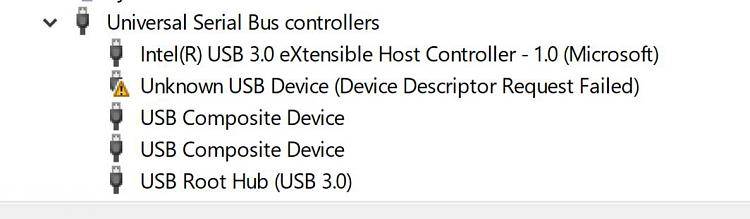
Problem: Tablet is not detectable by computers. Yet... it is noted as "Unknown USB Device (Device Descriptor Request Failed)" in the device manager under Universal Serial Bus controllers.
I have already done the basic 30 articles reading and tried the standard suggestions including:
In fact, disk manager does not see it.
The file recovery software does not see it.
The only thing that sees it is the USB Serial Bus controller; and that says "Unknown USB Device (Device Descriptor Request Failed)". So... it knows it exits, yet drive management tools can not seem to detect it. Today, after some months or year of 6th-letter-ing with this issue I've discovered an additional trick to try as seen below:
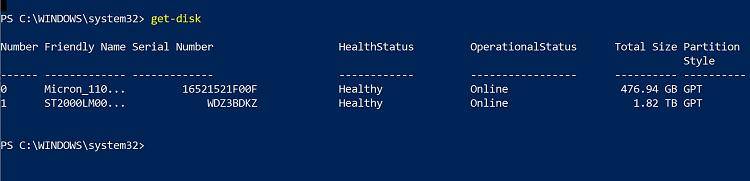
Neither of those is the tablet hardrive. One is C: drive SSD for windows, and the other SATA D: drive. Supposedly what we're looking for there is a 3rd drive which would have Partition Style: "RAW".
The device is not dead -- It is a Samsung Note 10.1 GT-N2013 -- I know this, because I can access oden mode, and until recently I could use it without USB connection. Because of all this, I did attempt to customize it by deleting some "Google" files via Superuser root file manager. So, before you ask, that is a separate issue which is now preventing any tablet side access. What I need is to fix the original USB problem, which has been ongoing for a very long time. I am only here asking now because I can no longer use it as a tablet and to fix I need to flash a ROM onto it -- which of course would require me to fix the original USB access issue.
I'd be happy with anything that helps get beyond the USB, to actually detecting the drive. I can upload my ROM via Oden mode IF I can get a computer to see that it has a drive. I did take it into the computer shop and that computer also could not access via USB.
It does see it as an incoming USB connection, and the tablet has a working drive -- but critical files were recently, after this problem, deleted. I'd be happy to reformat (or something) if only we could establish a connection.
Any ideas?
I have already done the basic 30 articles reading and tried the standard suggestions including:
- Try a new USB connection (wire, computer, etc).;
- uninstall the device,
- update drivers,
- download drivers,
- use disk manager to set a drive letter,
- use file recovery software.
In fact, disk manager does not see it.
The file recovery software does not see it.
The only thing that sees it is the USB Serial Bus controller; and that says "Unknown USB Device (Device Descriptor Request Failed)". So... it knows it exits, yet drive management tools can not seem to detect it. Today, after some months or year of 6th-letter-ing with this issue I've discovered an additional trick to try as seen below:
Neither of those is the tablet hardrive. One is C: drive SSD for windows, and the other SATA D: drive. Supposedly what we're looking for there is a 3rd drive which would have Partition Style: "RAW".
The device is not dead -- It is a Samsung Note 10.1 GT-N2013 -- I know this, because I can access oden mode, and until recently I could use it without USB connection. Because of all this, I did attempt to customize it by deleting some "Google" files via Superuser root file manager. So, before you ask, that is a separate issue which is now preventing any tablet side access. What I need is to fix the original USB problem, which has been ongoing for a very long time. I am only here asking now because I can no longer use it as a tablet and to fix I need to flash a ROM onto it -- which of course would require me to fix the original USB access issue.
I'd be happy with anything that helps get beyond the USB, to actually detecting the drive. I can upload my ROM via Oden mode IF I can get a computer to see that it has a drive. I did take it into the computer shop and that computer also could not access via USB.
It does see it as an incoming USB connection, and the tablet has a working drive -- but critical files were recently, after this problem, deleted. I'd be happy to reformat (or something) if only we could establish a connection.
Any ideas?
