Why Are My Strain Values Displayed Incorrectly on the X-Axis in Excel?

  • Thread starter Thread starter Saladsamurai
  • Start date Start date
Click For Summary

Discussion Overview

The discussion centers around issues related to plotting stress-strain diagrams in Excel, specifically addressing the incorrect display of strain values on the x-axis and methods for calculating the proportional yield point and work done on a specimen in the elastic region.

Discussion Character

  • Technical explanation
  • Homework-related
  • Mathematical reasoning

Main Points Raised

  • One participant reports that their strain values are displayed incorrectly on the x-axis of an Excel graph, suggesting a potential misunderstanding of how to input or format the data.
  • Another participant expresses frustration at the lack of responses regarding Excel usage, indicating a desire for more engagement on the topic.
  • There are inquiries about how to determine the approximate values of where the proportional yield occurs in the stress-strain graph, with suggestions to calculate the slope over the linear portion of the data.
  • One participant questions how to efficiently find where the slope deviates given a large dataset of 5600 values.
  • Another participant proposes that the area under the curve in the elastic region can be used to calculate the work done on the specimen, referencing Hooke's Law and the shape of the graph.
  • There is a query about the correct formulation of the force function F(x) in the context of Hooke's Law, with uncertainty expressed about the signs in the equation.

Areas of Agreement / Disagreement

The discussion reflects multiple competing views and uncertainties regarding the correct methods for plotting data in Excel, calculating yield points, and determining work done, with no consensus reached on these issues.

Contextual Notes

Participants mention limitations in their ability to visualize graphs due to external site restrictions and express uncertainty about specific Excel functions that may assist in their calculations.

Saladsamurai
Messages
3,009
Reaction score
7
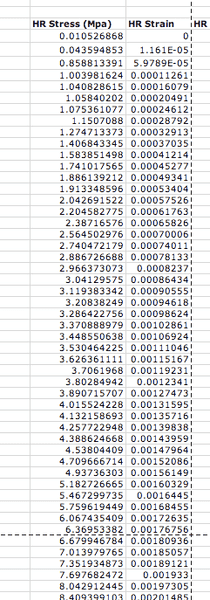
I am trying to plot s stress-strain diagram using the tabulated data in the accompanying diagram below.
Picture1-15.png


Now, notice that the values of strain (which will go on the x-axis) are very low--they range from 0.00001 to 0.23.

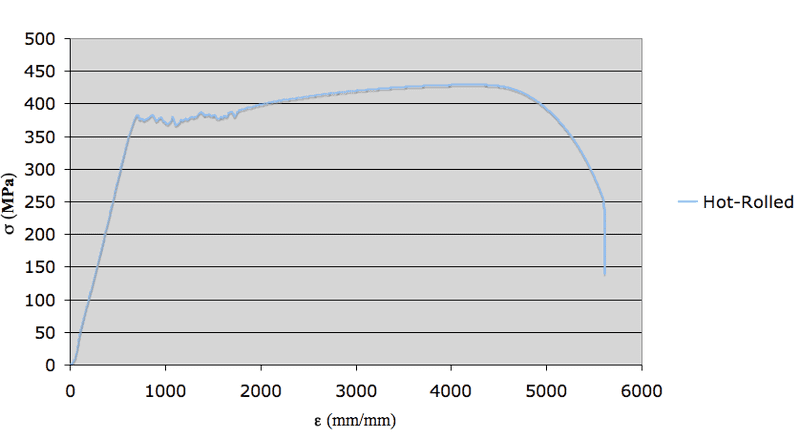
Now look at the graph ("I used an x-y scatter" with stress column as the Y data and strain as the X data) and you can see that the x-axis values are huge! (They range to 5500!)
Picture2-9.png


What am I doing wrong here?
 
Physics news on Phys.org
Really...no one knows how to use excel?
 
Casey, I can't see you graphs. Can you insert them in a post instead (my company blocks the site that hosts the links).

CS
 
I got it. But I have another quick question. If I have my stress-strain data plotted and I want to find approximate values of where the proportional yield is, i.e., where the graph stops being 'linear', is there a way to calculate that with excel rather than "eyeballing it" using the curve?
 
Saladsamurai said:
I got it. But I have another quick question. If I have my stress-strain data plotted and I want to find approximate values of where the proportional yield is, i.e., where the graph stops being 'linear', is there a way to calculate that with excel rather than "eyeballing it" using the curve?

I believe you can calculate the slope (based off of your table values) which should be constant over the linear portion. Then, when the slope deviates you'll be in the non-linear region.

CS
 
Right, but how can I efficiently find where it deviates? I have 5600 values for each substance.
 
Saladsamurai said:
Right, but how can I efficiently find where it deviates? I have 5600 values for each substance.

I'm not sure if Excel has a function for that. You would have to approximate where the non-linearity ends and use the SLOPE function to calculate it the slope over that region. I can't think of anything else at the moment. Do you have the data set in Excel already? If so, zip it and attach it and I'll see if I can find a function that might work.

CS
 
Thanks stewart. I just approximated it using the graph. I am pretty sure that is what he wants us to do... I was just being a.r. :)

Here's another one though!: If I am to find out how much WORK is done on a specimen up until the proportional limit (through the elastic region) how would I do that?

I know that [itex]W=\int F(x)dx[/itex] But how would I find out what F(x) is? It cannot be constant.

I know it is in the elastic region. So it must satisfy Hooke's Law. So I know that

[itex]F(x)=ax+c[/itex] and I have plenty of data... so I guess I DO have F(x)...

Just one thing though. Is it F(x)=ax+c or F(x)=-ax+c

Thanks for your help too!
 
Saladsamurai said:
Thanks stewart. I just approximated it using the graph. I am pretty sure that is what he wants us to do... I was just being a.r. :)

Here's another one though!: If I am to find out how much WORK is done on a specimen up until the proportional limit (through the elastic region) how would I do that?

I know that [itex]W=\int F(x)dx[/itex] But how would I find out what F(x) is? It cannot be constant.

I know it is in the elastic region. So it must satisfy Hooke's Law. So I know that

[itex]F(x)=ax+c[/itex] and I have plenty of data... so I guess I DO have F(x)...

Just one thing though. Is it F(x)=ax+c or F(x)=-ax+c

Thanks for your help too!

Since you have the stress and strain data the work will be equal to the area under the curve (in the elastic region). Take a look at your graph in the elastic region, it should look like a triangle. Then finding the area of the triangle is trivial. Alternatively, Hooke's law would apply to the elastic region and after integrating you would have W = 1/2*k*x^2.

Hope this helps.

CS
 

Similar threads

Replies
7
Views
3K
Replies
39
Views
8K
  • · Replies 5 ·
Replies
5
Views
3K
  • · Replies 4 ·
Replies
4
Views
3K
  • · Replies 4 ·
Replies
4
Views
2K
Replies
1
Views
2K
  • · Replies 6 ·
Replies
6
Views
6K
  • · Replies 4 ·
Replies
4
Views
2K
  • · Replies 6 ·
Replies
6
Views
2K
  • · Replies 1 ·
Replies
1
Views
2K