Why is a temporary directory created when using the Python library matplotlib?

  • Context: Python 
  • Thread starter Thread starter fog37
  • Start date Start date
  • Tags Tags
    Path Variable
Click For Summary

Discussion Overview

The discussion revolves around the creation of a temporary directory by the Python library matplotlib when the default configuration directory is not writable. Participants explore the implications of environment variables, particularly the MPLCONFIGDIR variable, and the differences in how environment variables are managed in Windows compared to Linux.

Discussion Character

  • Exploratory
  • Technical explanation
  • Debate/contested

Main Points Raised

  • One participant notes that matplotlib creates a temporary directory because it cannot write to the specified default path (H:\.matplotlib), which is write-protected.
  • Another participant explains that Windows has both system-level and user-level environment variables, which can lead to confusion when accessing them through different interfaces.
  • There is a suggestion that the MPLCONFIGDIR variable may not exist in the user's environment, leading to the use of a temporary directory instead.
  • A participant raises questions about the purpose of the temporary directory, wondering if it is used to store graphs and whether it is deleted later unless the graphs are saved.
  • Participants discuss the differences in environment variable handling between Windows and Linux, noting that certain directories may not appear without specific commands.
  • There is a correction regarding the terminology used, clarifying that MPLCONFIGDIR is an environment variable, not a PATH variable.
  • One participant suggests using specific code to manage temporary directories effectively across different operating systems.

Areas of Agreement / Disagreement

Participants express varying levels of understanding regarding environment variables and their implications for using matplotlib. There is no consensus on the best approach to resolve the issues raised, and multiple competing views remain regarding the handling of temporary directories and environment variables.

Contextual Notes

Some participants highlight limitations in their understanding of environment variables and the differences between Windows and Linux systems, which may affect their ability to troubleshoot the issue effectively.

fog37
Messages
1,566
Reaction score
108
TL;DR
Understanding and correctly using the PATH variable
Hello,
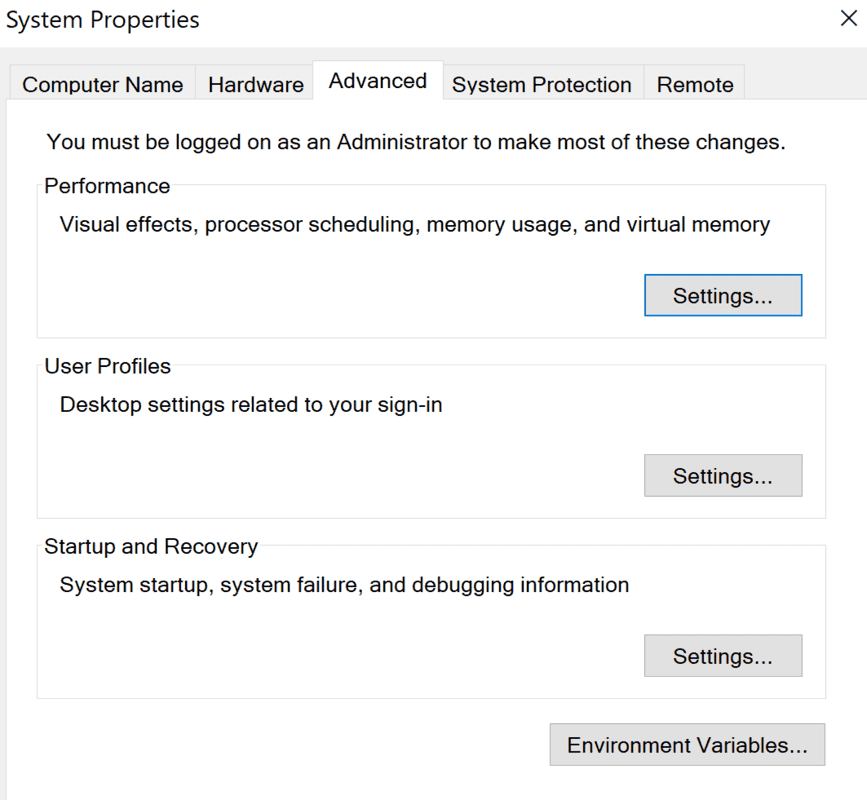
I am getting better at using the command line in Windows. I understand that the "set" command at the prompt shows all the various environment variables, PATH variable included, and I see many directories listed in the PATH. However, when I access the environment variables through the Windows GUI, through the Systems folder, I only see three directories in the PATH...Why so? The information should be exactly the same regardless of accessing through the command line or through the Systems folder...
1600478566961.png
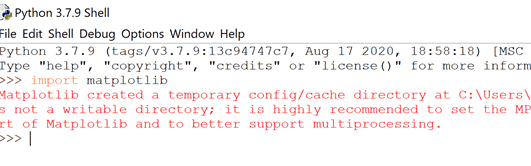
I am trying to figure out the PATH variable because after having downloaded the Python library matplotlib, I get the following error that I don't fully understand:

matplotlib created a temporary config/cache directory at C:\Users\FOG37\AppData\Local\Temp\matplotlib-qqx1v1f5 because the default path (H:\.matplotlib) is not a writable directory; it is highly recommended to set the MPLCONFIGDIR environment variable to a writable directory, in particular to speed up the import of Matplotlib and to better support multiprocessing.

Why was a temporary directory created?
1600478818571.png


Thanks!
 

Attachments

  • 1600478772022.png
    1600478772022.png
    12.7 KB · Views: 325
Technology news on Phys.org
Windows has two levels of environment vars. System level managed by the system admin used by all apps and user level editable by the user which is merged with system level vars and used by command shells.

The path you see in the command shell is the merged path if the %path is used in its definition. Your scripts and commands launched from the shell use it but gui apps launched by clicking on the icon do not unless of course they are launching a command shell script that launches the gui app.
 
Last edited:
  • Like
  • Informative
Likes   Reactions: Klystron and fog37
fog37 said:
Summary:: Understanding and correctly using the PATH variable

Why was a temporary directory created?
Because the program was told by the environment variable MPLCINFIGDIR to write to the H:/.matplotlib directory.
However H:/.matplotlib is Write Protected. Since it could not write the results there, it created a new directory to save the results.

Others here can better tell you the specifics of why this occurred and what the solution is.

Hope this helps!

Cheers,
Tom
 
  • Like
Likes   Reactions: fog37
Thank you!

First of all, when I check in Windows, My PC, I only see the C: drive. I don't see a H drive:

1600519291261.png

2) As far as the environment variable MPLCINFIGDIR, I don't see this variable listed when I type "set" at the CLI prompt. I assume the initial MPL part of the variable name means matplotlib...

On a different forum, I read that some Python code should be added to my Python programs when using the visualization library matplotlib. I am still trying to make sense out of it and why this code is needed.

Is a temporary directory being created to store the graphs? why? Is the temp directory deleted later unless I save the graphs?

See below:
1600518581898.png

or
1600518633766.png


Thanks!
 
Last edited:
If you want to know some background, the relevant part of the matplotlib documentation is here: https://matplotlib.org/faq/environment_variables_faq.html?highlight=tempdir

If you just want to get it to work, the code in the second image* will work better than the first (because it deletes the temporary directory on exit).

* Rather than post images of code, it is better to post code between [code=Python]...[/code] tags, or use the </> icon in the text editor.
 
  • Like
Likes   Reactions: fog37
Thanks for the link, pbuk.

At the link, I read that: MPLCONFIGDIR is the directory used to store user customizations to Matplotlib, as well as some caches to improve performance."
I guess the PATH variable MPLCONFIGDIR is not existing (yet) in my Windows. Also, when I type "where matplotlib" at the prompt, no result is shown...

"If MPLCONFIGDIR is not defined, HOME/.config/matplotlib and HOME/.cache/matplotlib are used on Linux, and HOME/.matplotlib on other platforms, if they are writable. Otherwise, the Python standard library's tempfile.gettempdir is used to find a base directory in which the matplotlib subdirectory is created."

My home directory is C:\Windows. This means that typing C:\Windows/.matplotlib at the prompt should do something but it does not... I found the root(home) directory typing "set systemroot.

thanks!
 
As an aside, please be aware that on Linux dot directories like .cache won’t appear when you do an ls -alh unless you do something like ls -alh .* to actually list them.
 
jedishrfu said:
on Linux dot directories like .cache won’t appear when you do an ls -alh

Yes, they will; the -a option means "include names that begin with a dot".
 
Quite true, I've been conditioned to always use those options though sometimes i skip them.
 
  • #10
fog37 said:
I guess the PATH variable MPLCONFIGDIR is not existing (yet) in my Windows. Also, when I type "where matplotlib" at the prompt, no result is shown...
I think you mean the ENV variable MPLCONFIGDIR. PATH is itself an ENV variable which in Windows is called Path.
fog37 said:
My home directory is C:\Windows ... I found the root(home) directory typing "set systemroot.
That is not your home directory which is likely to be something like C:\Users\fog37, but in any case Windows does not store this in HOME, it uses HOMEPATH. The directory C:\Windows (or the equivalent) is stored in windir.

Confused yet? You should be, because environment variables don't translate well from Linux to Windows environments.

As I said before the best way out of this mess is to use code like the second example you posted which will work on either Linux or Windows and avoid the warning message, although you could just ignore the warning and it will still work (but might be slower).
 
  • Like
Likes   Reactions: fog37

Similar threads

  • · Replies 1 ·
Replies
1
Views
2K
  • · Replies 12 ·
Replies
12
Views
4K
  • · Replies 3 ·
Replies
3
Views
2K
  • · Replies 13 ·
Replies
13
Views
4K