Align* environment. beautification.

  • Context: MHB 
  • Thread starter Thread starter caffeinemachine
  • Start date Start date
Click For Summary
SUMMARY

The discussion focuses on improving the visual presentation of mathematical equations using the align* and array environments in LaTeX. Users explore various formatting techniques to enhance readability, specifically addressing issues with Mathjax compatibility and spacing around equal signs. A solution is proposed for tagging equations within the array environment, allowing for proper numbering and alignment. The conversation highlights the importance of compiler compatibility and user preferences in formatting mathematical expressions.

PREREQUISITES
  • Understanding of LaTeX environments, specifically align* and array.
  • Familiarity with Mathjax for rendering mathematical expressions.
  • Knowledge of LaTeX commands for equation tagging and formatting.
  • Basic experience with LaTeX compilers like TeXShop and TeXworks.
NEXT STEPS
  • Research LaTeX array environment formatting options.
  • Learn about Mathjax limitations and workarounds for LaTeX commands.
  • Explore advanced LaTeX techniques for tagging and numbering equations.
  • Investigate compatibility issues between different LaTeX compilers and environments.
USEFUL FOR

Mathematicians, LaTeX users, educators, and anyone involved in typesetting complex mathematical documents who seeks to enhance the presentation of equations.

caffeinemachine
Gold Member
MHB
Messages
799
Reaction score
15
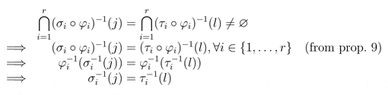
Using the align* environment I have the following output.
\begin{align*}
\bigcap_{i=1}^{r}(\sigma_i\circ\varphi_i)^{-1}(j)&=\bigcap_{i=1}^{r}(\tau_i\circ\varphi_i)^{-1}(l)\neq\emptyset\\
\Rightarrow(\sigma_i\circ\varphi_i)^{-1}(j)&=(\tau_i\circ\varphi_i)^{-1}(l),\forall i\in\{1,\ldots,r\}~~~(\text{from prop. 9})\\
\Rightarrow\varphi_i^{-1}(\sigma_i^{-1}(j))&=\varphi_i^{-1}(\tau_i^{-1}(l))\\
\Rightarrow\sigma_i^{-1}(j)&=\tau_i^{-1}(l)
\end{align*}

This looks ugly. How can I make it look better?
 
Physics news on Phys.org
caffeinemachine said:
Using the align* environment I have the following output.
\begin{align*}
\bigcap_{i=1}^{r}(\sigma_i\circ\varphi_i)^{-1}(j)&=\bigcap_{i=1}^{r}(\tau_i\circ\varphi_i)^{-1}(l)\neq\emptyset\\
\Rightarrow(\sigma_i\circ\varphi_i)^{-1}(j)&=(\tau_i\circ\varphi_i)^{-1}(l),\forall i\in\{1,\ldots,r\}~~~(\text{from prop. 9})\\
\Rightarrow\varphi_i^{-1}(\sigma_i^{-1}(j))&=\varphi_i^{-1}(\tau_i^{-1}(l))\\
\Rightarrow\sigma_i^{-1}(j)&=\tau_i^{-1}(l)
\end{align*}

This looks ugly. How can I make it look better?
Is this any better?

Code:
\begin{array}{rr@{\; = \;}l}
&\bigcap_{i=1}^{r}(\sigma_i\circ\varphi_i)^{-1}(j)&\bigcap_{i=1}^{r}(\tau_i\circ\varphi_i)^{-1}(l)\neq\emptyset\\
\Longrightarrow&(\sigma_i\circ\varphi_i)^{-1}(j)&(\tau_i\circ\varphi_i)^{-1}(l),\forall i\in\{1,\ldots,r\}~~~(\text{from prop. 9})\\
\Longrightarrow&\varphi_i^{-1}(\sigma_i^{-1}(j))&\varphi_i^{-1}(\tau_i^{-1}(l))\\
\Longrightarrow&\sigma_i^{-1}(j)&\tau_i^{-1}(l)
\end{array}

It does not compile properly here, because Mathjax does not understand the @{\; = \;} specifier in the array description, and so the = signs get left out altogether. But it looks good in TeXShop.

The best I can do using Mathjax is

Code:
\begin{array}{rrcl}
&\bigcap_{i=1}^{r}(\sigma_i\circ\varphi_i)^{-1}(j)&=&\bigcap_{i=1}^{r}(\tau_i\circ\varphi_i)^{-1}(l)\neq\emptyset\\
\Longrightarrow&(\sigma_i\circ\varphi_i)^{-1}(j)&=&(\tau_i\circ\varphi_i)^{-1}(l),\forall i\in\{1,\ldots,r\}~~~(\text{from prop. 9})\\
\Longrightarrow&\varphi_i^{-1}(\sigma_i^{-1}(j))&=&\varphi_i^{-1}(\tau_i^{-1}(l))\\
\Longrightarrow&\sigma_i^{-1}(j)&=&\tau_i^{-1}(l)
\end{array}

That compiles under Mathjax as $$\begin{array}{rrcl}
&\bigcap_{i=1}^{r}(\sigma_i\circ\varphi_i)^{-1}(j)&=&\bigcap_{i=1}^{r}(\tau_i\circ\varphi_i)^{-1}(l)\neq\emptyset\\
\Longrightarrow&(\sigma_i\circ\varphi_i)^{-1}(j)&=&(\tau_i\circ\varphi_i)^{-1}(l),\forall i\in\{1,\ldots,r\}~~~(\text{from prop. 9})\\
\Longrightarrow&\varphi_i^{-1}(\sigma_i^{-1}(j))&=&\varphi_i^{-1}(\tau_i^{-1}(l))\\
\Longrightarrow&\sigma_i^{-1}(j)&=&\tau_i^{-1}(l)
\end{array}$$

which does not look good to me because there is too much space on each side of the = signs.
 
Opalg said:
Is this any better?

Code:
\begin{array}{rr@{\; = \;}l}
&\bigcap_{i=1}^{r}(\sigma_i\circ\varphi_i)^{-1}(j)&\bigcap_{i=1}^{r}(\tau_i\circ\varphi_i)^{-1}(l)\neq\emptyset\\
\Longrightarrow&(\sigma_i\circ\varphi_i)^{-1}(j)&(\tau_i\circ\varphi_i)^{-1}(l),\forall i\in\{1,\ldots,r\}~~~(\text{from prop. 9})\\
\Longrightarrow&\varphi_i^{-1}(\sigma_i^{-1}(j))&\varphi_i^{-1}(\tau_i^{-1}(l))\\
\Longrightarrow&\sigma_i^{-1}(j)&\tau_i^{-1}(l)
\end{array}

It does not compile properly here, because Mathjax does not understand the @{\; = \;} specifier in the array description, and so the = signs get left out altogether. But it looks good in TeXShop.

The best I can do using Mathjax is

Code:
\begin{array}{rrcl}
&\bigcap_{i=1}^{r}(\sigma_i\circ\varphi_i)^{-1}(j)&=&\bigcap_{i=1}^{r}(\tau_i\circ\varphi_i)^{-1}(l)\neq\emptyset\\
\Longrightarrow&(\sigma_i\circ\varphi_i)^{-1}(j)&=&(\tau_i\circ\varphi_i)^{-1}(l),\forall i\in\{1,\ldots,r\}~~~(\text{from prop. 9})\\
\Longrightarrow&\varphi_i^{-1}(\sigma_i^{-1}(j))&=&\varphi_i^{-1}(\tau_i^{-1}(l))\\
\Longrightarrow&\sigma_i^{-1}(j)&=&\tau_i^{-1}(l)
\end{array}

That compiles under Mathjax as $$\begin{array}{rrcl}
&\bigcap_{i=1}^{r}(\sigma_i\circ\varphi_i)^{-1}(j)&=&\bigcap_{i=1}^{r}(\tau_i\circ\varphi_i)^{-1}(l)\neq\emptyset\\
\Longrightarrow&(\sigma_i\circ\varphi_i)^{-1}(j)&=&(\tau_i\circ\varphi_i)^{-1}(l),\forall i\in\{1,\ldots,r\}~~~(\text{from prop. 9})\\
\Longrightarrow&\varphi_i^{-1}(\sigma_i^{-1}(j))&=&\varphi_i^{-1}(\tau_i^{-1}(l))\\
\Longrightarrow&\sigma_i^{-1}(j)&=&\tau_i^{-1}(l)
\end{array}$$

which does not look good to me because there is too much space on each side of the = signs.

Thank you opalg. I want to use the first script since you say its better.. but my editor ain't able to compile it because of {rr@{\; = \;}l}. I am using TeXworks. Is there some package I need to download?
 
caffeinemachine said:
Thank you opalg. I want to use the first script since you say its better.. but my editor ain't able to compile it because of {rr@{\; = \;}l}. I am using TeXworks. Is there some package I need to download?
I don't know why some compilers fail to process the @-expression in an array environment. It is listed in the LaTeX User's Guide as a standard part of the system (see here, for example). On my Mac, the TeXShop compiler renders that code as
(Click on that thumbnail to see what it really looks like.)
 

Attachments

  • tex.gif
    tex.gif
    6.3 KB · Views: 119
Opalg said:
I don't know why some compilers fail to process the @-expression in an array environment. It is listed in the LaTeX User's Guide as a standard part of the system (see here, for example). On my Mac, the TeXShop compiler renders that code as
(Click on that thumbnail to see what it really looks like.)
Hmm.. It'd be great if we could "center" the LHS and RHS. This "inverted-triangular" shape it making it look bad. Any solution?
 
Opalg said:
I don't know why some compilers fail to process the @-expression in an array environment. It is listed in the LaTeX User's Guide as a standard part of the system (see here, for example). On my Mac, the TeXShop compiler renders that code as
(Click on that thumbnail to see what it really looks like.)
Now I understand how the array environment works. Centering makes it look worse. I'll go with the same as you have in the quoted text. Thanks.
 
Opalg said:
I don't know why some compilers fail to process the @-expression in an array environment. It is listed in the LaTeX User's Guide as a standard part of the system (see here, for example). On my Mac, the TeXShop compiler renders that code as
(Click on that thumbnail to see what it really looks like.)
I ran into another problem. The array environment works well when I want to manipulate my text.. but I am not able to tag my equations. \tag doesn't work. I also tried \hfill but that fails too. The only thing which seems to work is '~' but this is not practical. What can I do to label equations in the array environment?
 
caffeinemachine said:
I ran into another problem. The array environment works well when I want to manipulate my text.. but I am not able to tag my equations. \tag doesn't work. I also tried \hfill but that fails too. The only thing which seems to work is '~' but this is not practical. What can I do to label equations in the array environment?
You can pretty much tag anything if you add (below to your preamble):
Code:
\newcommand{\tagthisaux}{%                                                          
  \refstepcounter{equation}%                                                        
  (\theequation)%                                                                   
}
\newcommand{\tagthisline}{\`\tagthisaux}

Then at the end you would add:

Code:
\tagthisline

Example:
Code:
\begin{array}{ccc}
 & = & \tagthisline\\
 & = & 
\end{array}

The first line would be numbered and the second wouldn't. Additionally, the numbering convetion will follow in order to what you already have. That is, if you were on equation (1.2), that line would be (1.3).

I haven't looked at this post previously since it was marked solved. If it wasn't marked solved, I would have answered your last question sooner.
 
Last edited:
I usually prefer left aligned and to columnize everything:

\begin{array}{clclll}
&\bigcap_{i=1}^{r}(\sigma_i\circ\varphi_i)^{-1}(j)&=&\bigcap_{i=1}^{r}(\tau_i\circ\varphi_i)^{-1}(l)&\neq\emptyset\\
\Longrightarrow&(\sigma_i\circ\varphi_i)^{-1}(j)&=&(\tau_i\circ\varphi_i)^{-1}(l)&\forall i\in\{1,\ldots,r\}&~~~(\text{from prop. 9})\\
\Longrightarrow&\varphi_i^{-1}(\sigma_i^{-1}(j))&=&\varphi_i^{-1}(\tau_i^{-1}(l))\\
\Longrightarrow&\sigma_i^{-1}(j)&=&\tau_i^{-1}(l)
\end{array}
 

Similar threads

  • · Replies 2 ·
Replies
2
Views
6K
  • · Replies 2 ·
Replies
2
Views
3K
  • · Replies 7 ·
Replies
7
Views
1K
  • · Replies 13 ·
Replies
13
Views
4K
  • · Replies 18 ·
Replies
18
Views
2K
  • · Replies 1 ·
Replies
1
Views
2K
  • · Replies 20 ·
Replies
20
Views
1K
  • · Replies 7 ·
Replies
7
Views
2K
  • · Replies 8 ·
Replies
8
Views
2K
  • · Replies 4 ·
Replies
4
Views
4K