Dealing with Hard Drive Failure: Causes, Fixes, and Next Steps

Click For Summary

Discussion Overview

The discussion revolves around the issues related to hard drive failure, specifically addressing the implications of a bad S.M.A.R.T. status, potential fixes, and next steps for the user experiencing these problems. Participants explore software solutions, the importance of data backup, and considerations for replacing the hard drive.

Discussion Character

  • Debate/contested
  • Technical explanation
  • Exploratory

Main Points Raised

  • Some participants emphasize the need to trust diagnostic tools indicating the drive is bad, questioning the user's understanding of the situation.
  • Backup of important data is repeatedly stressed as a priority, with warnings about the escalation of drive failures.
  • Participants discuss the mechanical nature of hard drives and potential failure modes, including motor and actuator arm failures.
  • There are differing opinions on whether software can fix the drive, with some stating it is unlikely while others mention software that can relocate failing sectors.
  • Concerns are raised about the safety of data on an SD card connected to the same PC, with some suggesting it is unlikely to be affected.
  • Participants debate the effectiveness of formatting a failing drive, with some arguing it does not truly fix bad sectors while others mention low-level formatting as a potential option.
  • There is discussion about the feasibility of replacing the hard drive with an SSD and whether the laptop can accommodate such a change.

Areas of Agreement / Disagreement

Participants generally agree that the hard drive is failing and needs to be replaced, but there is no consensus on the effectiveness of software solutions or formatting as a remedy. Multiple competing views exist regarding the implications of continuing to use the failing drive.

Contextual Notes

Participants express uncertainty about the specifics of S.M.A.R.T. diagnostics and the implications of reallocated sectors, with some noting that different manufacturers may report values differently. The discussion also highlights the limitations of software solutions in addressing physical drive failures.

mech-eng
Messages
825
Reaction score
13
What is the situation for my hard drive now? Can I fix it with a software? Should I change it? The PC is working with no problem? What should I do now? Should I change the hard drive in the service? S.M.A.R.T status is bad. There was nothing a few days ago. I cannot understand how this has happened
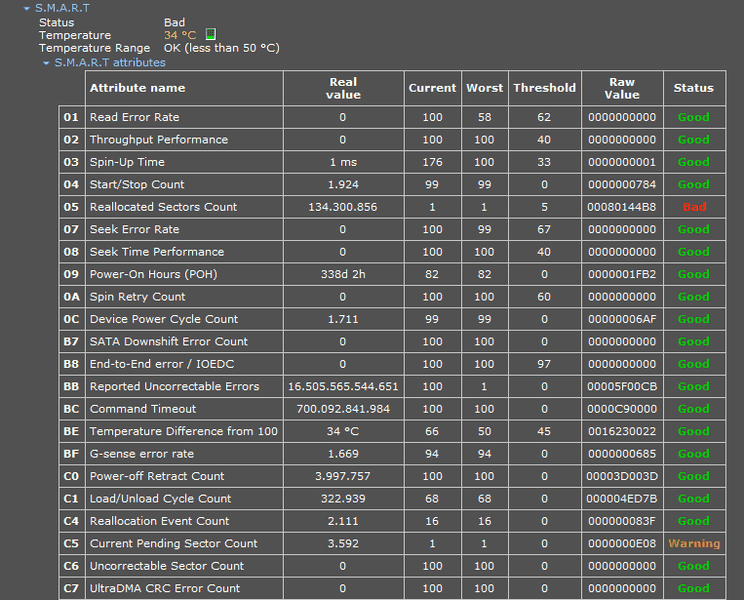
hard disk error.png


Thank you.
 
Computer science news on Phys.org
mech-eng said:
. There was nothing a few days ago.

By that logic nothing is ever broken.

Do you not believe the diagnostic when it says the drive is bad?
 
Make a backup if you can of whatever you can meaning backup your files first not the whole disk.

Drives are mechanical so there's room for motor failure, actuator arm failure, flying head failures which can scratch the disk, plate warpage from heat ...

http://www.adrc.com/hard_disk_failures.html
 
Vanadium 50 said:
By that logic nothing is ever broken.

Do you not believe the diagnostic when it says the drive is bad?

I still do not understand what is the problem. What is broken? Do you mean by diagnostic that program I have pasted here the pic of it? If so, yes I believe the program but I have checked the hard drive with that program a few days ago. There was nothing wrong. I mean this.

Thank you.
 
If you trust the program, and the program says the drive is bad, what is your question?
 
Have you made a backup yet?

Drive failures come as simple warnings and escalate exponentially from there until its just too late.
 
jedishrfu said:
Have you made a backup yet?

Drive failures come as simple warnings and escalate exponentially from there until its just too late.

No I haven't made a back up because there is no important information in that hard drive. But I pluged and SD card in that PC. There is important information in it are they in danger? Can this situation affect that SD card?

Thank you.
 
Vanadium 50 said:
If you trust the program, and the program says the drive is bad, what is your question?

I am not technically minded. I can see there is problem but I do not know what it is precisely. And as I referred to in #1 how can I fix it? Is there any software solution for this problem? Is that hard drive going to go into dustbin? What should I do at this stage? Its warranty is out of date now, can the service still plug a new hard drive? Instead of a hard drive, can I say them to plug a SSD? Are these possible? Can laptop accept this hardware change or it might give errors because of if new hardware do not fit with the laptop.

Thank you.
 
It says "Status Bad". That means the drive is bad and needs to be replaced.
 
  • Like
Likes   Reactions: stoomart and StevieTNZ
  • #10
mech-eng said:
No I haven't made a back up because there is no important information in that hard drive. But I pluged and SD card in that PC. There is important information in it are they in danger? Can this situation affect that SD card?

Thank you.
Unlikely to affect the SD card. But if it has important data on it, it should be backed up.
 
  • #11
mech-eng said:
What is the situation for my hard drive now? Can I fix it with a software? Should I change it? The PC is working with no problem? What should I do now? Should I change the hard drive in the service? S.M.A.R.T status is bad. There was nothing a few days ago. I cannot understand how this has happened

View attachment 209131

Thank you.
Reallocated Sectors Count indicates the count of reallocated sectors. When a drive finds a read/write/verification error it marks the sector as "reallocated" and transfers data to another part of the drive. This is why, on a modern hard disks, you will not see bad blocks while testing the surface - all bad blocks are hidden in reallocated sectors. The more sectors that are reallocated, the worse your drive gets, you'll see your drive working slower and slower.

The way you read smart tests is that your current values need to be above the threshold.
In this case, your current is 1 and your threshold is 5. Your drive is dying and could fail any moment. Different drive vendors report the numbers differently so the raw/real values can mean anything. If you want to know wha that the actual count of reallocation events is, then you'll need to find the documentation for your specific drive and learn what the raw/real mean.

This can happen due to age, normal wear&tear, bad luck, or you my gave unfortunately received a potato that looks like a HDD instead of an actual HDD (a bad hard drive).
 
  • Like
Likes   Reactions: mech-eng
  • #12
mech-eng said:
Can I fix it with a software?
That is extremely unlikely,
although there is software which attempts to figure out the status of physically failing sectors and relocate them.
What you really need to to do is backup anything important on that disk then replace the disk.
Before you then throw it in the trash though, you could do a full reformat on it.
If it's just a bad track or two, and not head failure, it may be good as a secondary storage for a year or two.
No, the problem cannot spread to other drives, it is a physical failure of some sort.
 
Last edited:
  • #13
rootone said:
That is extremely unlikely,
although there is software which attempts to figure out the status of physically failing sectors and relocate them.
What you really need to to do is backup anything important on that disk then replace the disk.
Before you then throw it in the trash though, you could do a full reformat on it.
If it's just a bad track or two, and not head failure, it may be good as a secondary storage for a year or two.
No, the problem cannot spread to other drives, it is a physical failure of some sort.

Sorry, but I cannot understand some parts of the above. What is relocation of failing sectors?
Can reformat such a disk hide for, correct bad sectors?

Thank you.
 
  • #14
You got the answer twice.

Vanadium 50 said:
That means the drive is bad and needs to be replaced.
rootone said:
What you really need to to do is backup anything important on that disk then replace the disk.

The rest of rootone's advice is bad, since a format does not actually test the drive's sectors. A formatted bad drive is just that, a formatted bad drive.
 
  • #15
That's true of regular formatting, but there is also low-level formatting which completely redefines the tracks and sectors and is the final part of the manufacturing of a disk.
There are several freeware products that can do this.
That won't however 'fix' areas of the disk that are physically damaged, it just marks them as unusable. so as far as the system is concerned those areas don't even exist.
It is fairly likely however that whatever caused the original failing could cause presently undamaged parts to go bad in future.
 
Last edited:
  • #16
Vanadium 50 said:
You got the answer twice.
I guess that can happen to anyone... twice in a while ?
 
Last edited:
  • #17
rootone said:
That is extremely unlikely,
although there is software which attempts to figure out the status of physically failing sectors and relocate them.
What you really need to to do is backup anything important on that disk then replace the disk.
Before you then throw it in the trash though, you could do a full reformat on it.
If it's just a bad track or two, and not head failure, it may be good as a secondary storage for a year or two.
No, the problem cannot spread to other drives, it is a physical failure of some sort.

I wouldn't recommend continuing to use this drive. The S.M.A.R.T. tests indicate that the drive is already passed the manufacturer's recommended threshold for reallocated sectors. Too much of the drive is already bad.

Low usage could very well see the drive last a while but assuming the test results are accurate, I don't believe it's worth the risk of putting the OP's data in danger. HDDs are pretty cheap now, IMO, this drive should be wiped & disposed.

That's true of regular formatting, but there is also low-level formatting which completely redefines the tracks and sectors and is the final part of the manufacturing of a disk.
There are several freeware products that can do this.
Off topic but, correct me if I'm wrong. I do not believe this is possible any more with modern hard drives. physical sector sizes are marked during the manufacturing process and cannot be changed.
https://en.wikipedia.org/wiki/Disk_formatting#Transition_away_from_LLF
https://en.wikipedia.org/wiki/Servowriter

Are you talking about logical sector size/cluster size?
If not, can you please point me to one of these programs? I'd be very curious to see what they do.
 
  • #18
rootone said:
That's true of regular formatting, but there is also low-level formatting which completely redefines the tracks and sectors and is the final part of the manufacturing of a disk.

Which would be helpful if the OP lived in or next to a disk factory.

Given that the OP is struggling with a SMART report, it doesn't make sense to point him at expert tools, especially since you need a chain of tools running in the right order (surface scan, then format), with no guarantee of success and indeed, a high probability of failure. At best he will have a lower capacity drive that is likely to fail hard at any moment. The drive is bad and should be replaced.
 
  • #19
I can't help but think about a conversation I've had a few times with a few people -

Me: "Do you have a backup?"
Them: "Yes. It is run every night."

Me: "Have you ever tried to recover anything from your backup?"
Them: "No. I've never had to."

Me: "You do not have a backup"
Them: "?"​

I would occasionally test any new IT guy at MegaCorp (after copying the file to a flash drive) - "Hey IT guy, I just accidentally deleted a file I need for a presentation to our VP later today, can you recover it?" Sometimes I would have it in 15 minutes, and they would get a lot of praise from me and I would let their boss know what a great job they were doing. Other times, I would get this line about how they need to run the recovery program, but first, they need to update the recovery program to the latest version, but wait, that's not compatible with the old version, and on and on. "But we have you backed up."

Me: "You do not have a backup"
 

Similar threads

  • · Replies 30 ·
2
Replies
30
Views
6K
  • · Replies 6 ·
Replies
6
Views
10K
Replies
2
Views
1K
Replies
4
Views
3K
  • · Replies 8 ·
Replies
8
Views
3K
  • · Replies 30 ·
2
Replies
30
Views
3K
  • · Replies 4 ·
Replies
4
Views
5K
  • · Replies 2 ·
Replies
2
Views
11K
  • · Replies 27 ·
Replies
27
Views
5K
  • · Replies 22 ·
Replies
22
Views
3K