Different format of .dat files in different software

Click For Summary
SUMMARY

The discussion centers on the formatting issues of .dat files generated by Fortran on a Linux cluster and accessed via WinSCP. Users noted that the files appear correctly when opened in WinSCP but are misformatted when downloaded and opened in Notepad on Windows 8. The problem arises from differences in line-ending conventions between UNIX and DOS systems. Solutions include using Notepad++, Wordpad, or UNIX commands like dos2unix to convert the file formats for better readability.

PREREQUISITES
  • Understanding of Fortran file handling, specifically the "open" function.
  • Familiarity with line-ending conventions in UNIX and DOS systems.
  • Basic knowledge of using WinSCP for file transfers.
  • Experience with text editors like Notepad++ and Wordpad.
NEXT STEPS
  • Learn how to use the dos2unix and unix2dos commands for file format conversion.
  • Explore advanced features of Notepad++ for handling large data files.
  • Investigate Fortran's carriage control characters and their impact on file formatting.
  • Research best practices for file transfer between UNIX and Windows systems.
USEFUL FOR

This discussion is beneficial for Fortran developers, data analysts, and anyone involved in cross-platform file handling and formatting issues, particularly those working with .dat files on Linux clusters and Windows systems.

kelvin490
Gold Member
Messages
227
Reaction score
3
I have generated some .dat files using Fortran on a cluster. I need to use WinSCP(https://winscp.net/eng/download.php) to access files in the cluster so sometimes I just use the WinSCP to open the .dat files generated. The data can be shown regularly like this one: https://www.dropbox.com/home/Pictures?preview=notepad2.jpg
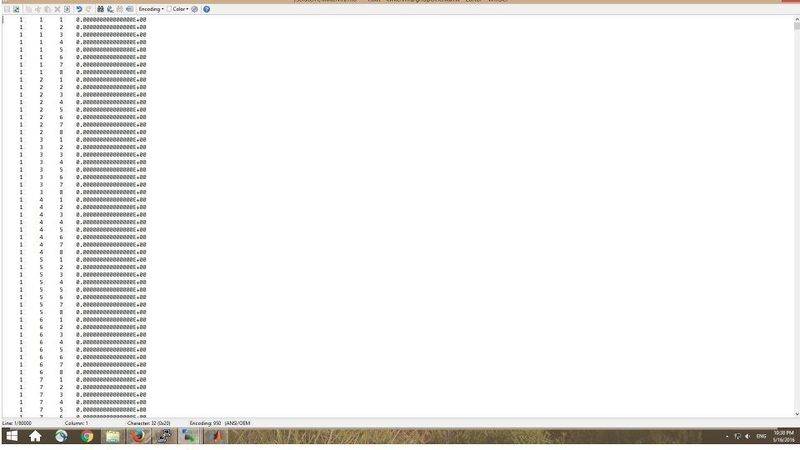
notepad2.jpg


However, if I download it to my desktop and open it with notepad it becomes like this: https://www.dropbox.com/home/Pictures?preview=notepad1.jpg
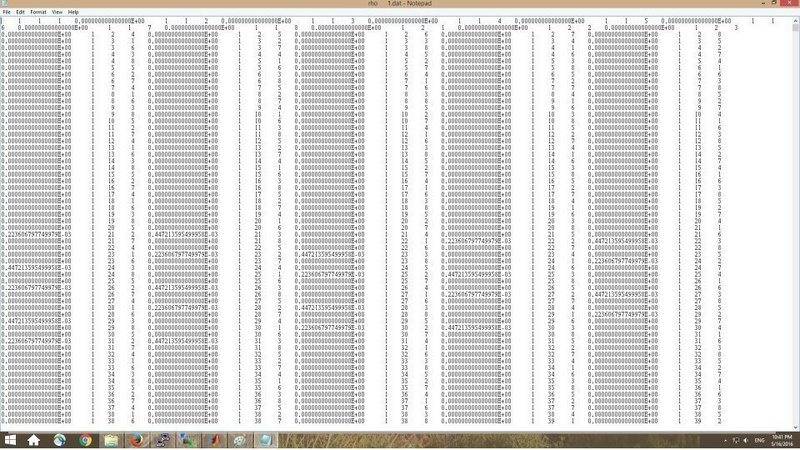
notepad1.jpg

It bothers me because usually I read the file in PC and I need to share it to some other people and I don't expect they open it in WinSCP. How can I change the format so it looks better? Thank you.
 
Last edited:
Technology news on Phys.org
Dropbox requires a sign-in for your links. You should use some other method.
 
phinds said:
Dropbox requires a sign-in for your links. You should use some other method.
I agree completely. Can't you just attach the files, instead of posting images of them?

BTW, are the .dat files you (OP) create text files or are they binary files?
 
Mark44 said:
I agree completely. Can't you just attach the files, instead of posting images of them?

BTW, are the .dat files you (OP) create text files or are they binary files?

Sorry for the trouble. Actually I tried to attach pictures directly but it still ask me to put the picture's URL. I copied the link to it but it seems doesn't work.
For the .dat file, I only know it's .DAT type by checking the properties of the file. In Fortran I just use the "open" function, for example: open(10, file = 'Overall.dat', form = 'formatted',status = 'unknown',position="append") to create and then write the file. Curiously, if I run the program in my PC, the file generated is good and just looks like the first picture above. The problem just occurs when I run it in the cluster to creates the .dat file then download it to my PC.
 
kelvin490 said:
Sorry for the trouble. Actually I tried to attach pictures directly but it still ask me to put the picture's URL. I copied the link to it but it seems doesn't work.
Well, don't fool around with links (URLs), just post the images here directly.
 
  • Like
Likes   Reactions: kelvin490
kelvin490 said:
Sorry for the trouble. Actually I tried to attach pictures directly but it still ask me to put the picture's URL. I copied the link to it but it seems doesn't work.
Use the upload button on the bottom right to post pics from your computer.
 
  • Like
Likes   Reactions: kelvin490
phinds said:
Well, don't fool around with links (URLs), just post the images here directly.

I can attach it now. Thanks a lot.
 
I think you are running afoul of the carriage control (how the computer says "give me the next line").
Fortran uses a channel control character like a '0' as the very first character of a "line". gfortran still implements this.

DOS uses (hence notepad) \r and \n at the end of a line (ASCII 10 and ASCII 13)
UNIX uses \n.

Since we cannot see what is going on - all of the above is simply a guess.
Please tell what platforms (and OS) are involved: like "the cluster" Is it a Linux cluster?
 
  • Like
Likes   Reactions: kelvin490
jim mcnamara said:
I think you are running afoul of the carriage control (how the computer says "give me the next line").
Fortran uses a channel control character like a '0' as the very first character of a "line". gfortran still implements this.

DOS uses (hence notepad) \r and \n at the end of a line (ASCII 10 and ASCII 13)
UNIX uses \n.

Since we cannot see what is going on - all of the above is simply a guess.
Please tell what platforms (and OS) are involved: like "the cluster" Is it a Linux cluster?

Yes, it's a Linux cluster and my OS is Win 8. In the cluster I use commands like pgf90 to compile the program and in my PC I use GNU or PGI Fortran. Are there any means to convert the files back to desirable format?
 
  • #10
Try opening it in Wordpad or https://notepad-plus-plus.org/download/v6.9.1.html. Plain old notepad is pretty bad with carriage returns from different OS's. Notepad++ is also really good with large data files. I'm currently working with a 200 Meg file using it and the file opens quickly.
 
  • Like
Likes   Reactions: kelvin490 and jim mcnamara
  • #11
unix has the dos2unix and unix2dos command to reformat files. Most decent editors can do this too. Use the unix commands on the linux boxes.
 
  • #12
Borg said:
Try opening it in Wordpad or https://notepad-plus-plus.org/download/v6.9.1.html. Plain old notepad is pretty bad with carriage returns from different OS's. Notepad++ is also really good with large data files. I'm currently working with a 200 Meg file using it and the file opens quickly.
I agree completely about Notepad++ ... SO much better than notepad in a huge number of ways, given all the features it has
 
  • Like
Likes   Reactions: kelvin490

Similar threads

  • · Replies 7 ·
Replies
7
Views
2K
  • · Replies 3 ·
Replies
3
Views
3K
  • · Replies 29 ·
Replies
29
Views
3K
  • · Replies 14 ·
Replies
14
Views
2K
  • · Replies 11 ·
Replies
11
Views
3K
  • · Replies 4 ·
Replies
4
Views
7K
  • · Replies 6 ·
Replies
6
Views
3K
  • · Replies 5 ·
Replies
5
Views
3K
  • · Replies 1 ·
Replies
1
Views
2K
  • · Replies 11 ·
Replies
11
Views
8K