ExcelGetting a Better Curve fit?

  • Thread starter Thread starter Saladsamurai
  • Start date Start date
  • Tags Tags
    Curve Fit
Click For Summary

Discussion Overview

The discussion revolves around improving curve fitting techniques for data related to the H2-->2H reaction, with participants sharing their experiences, methods, and tools used for curve fitting in Excel and other software. The conversation includes both theoretical considerations and practical applications.

Discussion Character

  • Exploratory
  • Technical explanation
  • Debate/contested
  • Mathematical reasoning
  • Experimental/applied

Main Points Raised

  • One participant questions the logarithmic dependency in the data set, suggesting that a log scale should yield a straight-line plot if true.
  • Another participant shares their successful use of a specific curve-fitting software, noting the parameters obtained and expressing surprise at the quality of the fit.
  • A different approach is proposed involving a specific mathematical function with parameters that reportedly yield a very low RMSE and high R-squared value.
  • Participants discuss the potential of simpler functions with fewer coefficients for better fitting results.
  • One participant describes a similar problem involving ellipsometry data and seeks advice on optimizing parameters for better curve fitting, while noting confidentiality constraints on sharing data.
  • Suggestions for software tools, such as PeakFit and a specific Excel add-in, are provided to assist with curve fitting.
  • There is a discussion about the feasibility of using Excel for curve fitting, with some participants expressing skepticism about its capabilities without a clear functional form.
  • One participant outlines a method using Excel's Solver function to minimize error between original and fitted data, emphasizing the need for an initial guess of the function form.

Areas of Agreement / Disagreement

Participants express varying opinions on the best methods and tools for curve fitting, with no consensus on a single approach. Some participants agree on the usefulness of specific software, while others debate the effectiveness of Excel for this purpose.

Contextual Notes

Limitations include the need for initial guesses of function forms for fitting in Excel, and the potential for different interpretations of data dependencies. Some methods discussed rely on specific software capabilities that may not be universally accessible.

Who May Find This Useful

Researchers and practitioners in fields involving data analysis, particularly in chemistry and physics, who are looking for effective curve fitting techniques and software recommendations.

Saladsamurai
Messages
3,009
Reaction score
7
Hey folks,

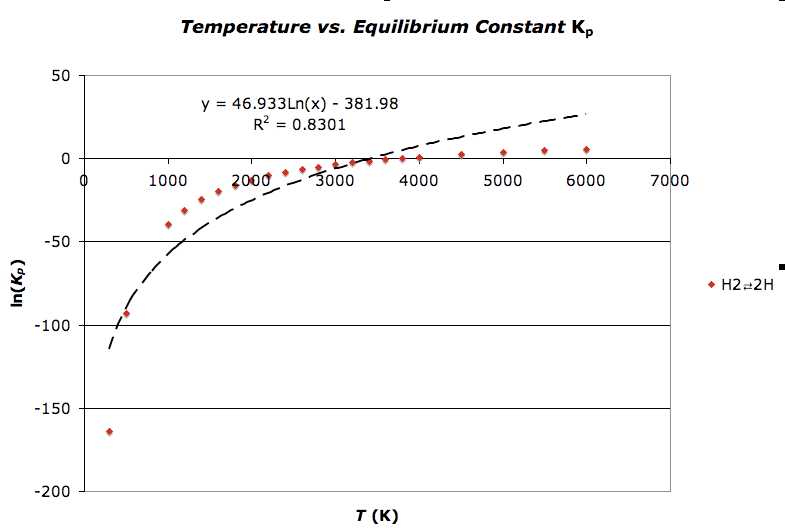
Am I doing something wrong here? It just seems like I should be able to get a better fit. The data is plotted for the H2-->2H reaction data. I have attached the .xls file. Don't worry, no macros :wink: I created it on a Mac, but hopefully everything converts correctly.

Here's a snapshot:
Picture2-25.png
 

Attachments

Physics news on Phys.org
Am I missing something very simple here? The title on your graph says "Temp versus K" but your axes are actually log(K) versus T.
 
shoehorn said:
Am I missing something very simple here? The title on your graph says "Temp versus K" but your axes are actually log(K) versus T.

No, you are not missing anything :smile: It is indeed log(K) and T. I have been messing around with the data, but forgot to change the title.

Good catch!
 
Are you sure there's a logarithmic dependency in your data set? If there was, then rescaling the x-axis to a log scale should give you a straight-line plot.
 
Hi,

I used my company's http://www.miraibio.com/masterplex-readerfit/curve-fitting-for-plate-readers.html" and used the Best Fit feature (and optimized for root mean square error) to find the best model equation and it appears to fit the 4 Parameter Logistic or 4PL surprisingly well:

http://www.miraibio.com/images/curve-saladsamurai.gif


I just realized that your x-axis was not in log scale. Here is the same curve fit with the x-axis on a linear scale.

http://www.miraibio.com/images/curve-saladsamuraiv2.gif

Here are the parameters that were calculated:

A = -1862.64705 (lower asymptote)
B = 1.04715 (Hill slope)
C = 34.42647 (inflection point)
D = 13.67627 (upper asymptote)

R-square = 0.9999544 (although R-square is not really a really good indicator of nonlinear curves I thought I would post it anyway since you have it in your post)
RMSE = 0.28340 (root mean square error is more reliable and it is really good in your case)

Although MasterPlex ReaderFit is intended for ELISA analysis, it's application is flexible which is why I gave it a shot in your case. In all honesty, I was surprised at how nicely the curve fit came out to be (and I am assisting customers all day with curve fitting)!

Anyway, I hope this information helps :smile:
 
Last edited by a moderator:
You might consider:

Ln(Kp) = a / (c * Temp + d)^b + Offset

a = -1.4895890519700544E+04
b = 9.6571085998524553E-01
c = 3.3096509207808700E-01
d = -1.4626098473438096E+00
Offset = 1.5342375844418289E+01

as it fits with RMSE of 0.0061 and r-squared of 0.99999997, the fitting page is at:

http://zunzun.com/Equation/2/Miscellaneous/Polytrope%20Transform%20With%20Offset/

It appears to interpolate and extrapolate smoothly and reasonably:

[PLAIN]http://zunzun.com/images/temp1.png

I found this using the http://zunzun.com "Function Finder" at:

http://zunzun.com/FunctionFinder/2/

and turning off the Polyfunctionals as I wanted named equations only.

James Phillips
http://zunzun.com
zunzun@zunzun.com
 
Last edited by a moderator:
This function might be better since it has only three coefficients, and the terms are simple functions.
RMSE = 0.0083, R-squared: 0.99999995,

y = a( Temp(K) ) + b( 1/Temp(K) ) + c( ln(Temp(K)) )

a = -2.0624423802678490E-04
b = -5.1874919532864478E+04
c = 1.7768380294902535E+00

James Phillips
http://zunzun.com
zunzun@zunzun.com

[PLAIN]http://zunzun.com/images/temp1.png
 
Last edited by a moderator:
Hello everyone, I am facing a similar problem,

I have two curves, (assume data and model)

data is derived from measurements taken by an Ellipsometry instrument,curve.

model is derived from many many complex number calculations in excel,

as you can see in the picture attached, they fit, but not that well,
I have about 6 parameters that I can vary, all withing their certain limits.

How do I implement this so as to get the set of values to get the best fit possible ?

Any help would be greatly appreciated.

I cannot share with you the xls file due to the confidential nature of the data.
Let me know if you can help with the information I have already provided.

Thanks.
 

Attachments

  • curves.JPG
    curves.JPG
    33 KB · Views: 562
The program peakfit might help: http://www.sigmaplot.com/products/peakfit/peakfit.php

James
 
Last edited by a moderator:
  • #10
Thank you for your quick response.

Is it possible to do so in excel ?
 
  • #11
ripper_pc said:
Is it possible to do so in excel ?

Not that I know of.

James
 
  • #12
ripper_pc said:
Thank you for your quick response.

Is it possible to do so in excel ?

I think that the only way to something like this in excel is if you can guess the form that the function takes (which can be quite difficult). For example, you could guess that your funtion takes the form y = A*x^2 + B*x + C (which, of course, it does not) and then use your x values, along with some assumed values of A,B,C, to generate a set of corresponding y values.

Now you can have A,B, and C located in some cells, say A1,A2,A3. And you would also have your original y data in a column and your new guessed function's y data in another. You can quantify the overall error between the original and new using the RSME function. Place that in a cell some where, say B1.

Now use the Excel solver function. This allows you to minimize a value in one cell by adjusting values in other cells. You would use this to minimize the RMSE in cell B1 by adjusting the values of the constants in A1,A2 and A3.

Again, this all hinges on you being able to guess an appropriate form of the function that fits your data, which I do not think I can help you with.
 
  • #13
You certainly know the "Solver" in the "Extras" Menu?
 
  • #14
Hi, I have recently downloaded a software program that can perform the fit you want in excel. It can be downloaded at www.ivdtools.com
 

Similar threads

  • · Replies 9 ·
Replies
9
Views
4K
  • · Replies 6 ·
Replies
6
Views
6K
  • · Replies 8 ·
Replies
8
Views
3K
  • · Replies 4 ·
Replies
4
Views
2K
  • · Replies 14 ·
Replies
14
Views
4K
  • · Replies 4 ·
Replies
4
Views
2K
  • · Replies 9 ·
Replies
9
Views
5K
  • · Replies 3 ·
Replies
3
Views
2K
  • · Replies 1 ·
Replies
1
Views
5K
  • · Replies 16 ·
Replies
16
Views
3K