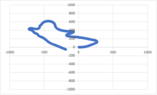
Generate a trackmap with speed and g forces

  • Context: Undergrad 
  • Thread starter Thread starter Gwen49
  • Start date Start date
  • Tags Tags
    G-forces Speed
Click For Summary
SUMMARY

This discussion focuses on generating a track map using speed (m/s) and G-forces data in Excel. Users identified critical issues in the provided Excel file, including missing time intervals, incorrect angles for velocity components, and the need for proper calculations to derive track coordinates. The conversation highlights the importance of accurately interpreting G-forces and speed data to create a functional track map, with references to previous discussions and tools like PI datalogging software for data correction.

PREREQUISITES
  • Understanding of Excel functions and data manipulation
  • Knowledge of G-forces and their representation in physics
  • Familiarity with coordinate systems and angle calculations
  • Basic principles of data logging and analysis in motorsports
NEXT STEPS
  • Learn how to calculate time intervals between measurements in Excel
  • Research methods for correcting angle discrepancies in velocity calculations
  • Explore techniques for visualizing G-forces and speed data in Excel
  • Investigate the use of PI datalogging software for track mapping
USEFUL FOR

This discussion is beneficial for motorsport engineers, data analysts, and hobbyists interested in creating track maps from vehicle telemetry data, particularly those utilizing Excel for data analysis and visualization.

Gwen49
Messages
5
Reaction score
5
Hello everyone,

I hope you are all great. I am writing down to all of you concerning a problem of mine. I am struggling to generate a trackmap based on Speed (m/s) and G-Forces on excel.
I followed a topic created 12 years ago but unfortunately it is closed :
https://www.physicsforums.com/threads/draw-map-based-on-speed-and-g-forces.518628/

Attached you will find my row data, there is just the beginning of the lap to minimize the file's size, I would be so happy to get some explanations, we never learn enough :-)

Thank you very much!
 

Attachments

Physics news on Phys.org
Welcome to PF.

It's best not to attach files that can contain macros, since those can pose security issues. It's better to post a PDF screenshot of your file, to give others an idea of what you are doing.

Is this for schoolwork, BTW? Or is it for your own personal racing and tuning?
 
Thank you very much!

The file doesn’t contain macro, it’s a xlsx file.
In fact it’s just a file full a data no more, with car speed and g-lat forces.

From that, I would like to draw a track map.

This is for both! Thanks
 
Gwen49 said:
The file doesn’t contain macro, it’s a xlsx file.
Excel files routinely contain macros; I've used them myself to automate various tasks in spreadsheets. There is no way to know if there are macros (good or bad) in an Excel file prior to opening it, AFAIK.

Gwen49 said:
This is for both!
Which both?
 
In your Excel spreadsheet:
  • You are missing the time interval between each measurement;
  • Are you sure the lateral acceleration is in m/s²?
  • dA doesn't include the multiplication with the time interval;
  • Vx & Vy have the wrong angle (they all have 1 rad or 89 rad);
  • X & Y do not include the multiplication with the time interval either;
  • X & Y have the velocity Vx & Vy multiplied by sine and cosine and they shouldn't;
  • Might be better if X0 & Y0 both equal zero;
  • Your graphs are linked to external data.
Because of the large values for R, this looks like a vehicle going in a straight line.
 
jack action said:
In your Excel spreadsheet:
  • You are missing the time interval between each measurement;
  • Are you sure the lateral acceleration is in m/s²?
  • dA doesn't include the multiplication with the time interval;
  • Vx & Vy have the wrong angle (they all have 1 rad or 89 rad);
  • X & Y do not include the multiplication with the time interval either;
  • X & Y have the velocity Vx & Vy multiplied by sine and cosine and they shouldn't;
  • Might be better if X0 & Y0 both equal zero;
  • Your graphs are linked to external data.
Because of the large values for R, this looks like a vehicle going in a straight line.
Jack, massive thanks for this deep analysis, I go back to work!
 
  • Like
Likes   Reactions: palagi
After working today on it, I feel I am not too far away from the right result.
The thing is, I don't know how to figure Ao out. As I don't know Ao and A, I can't solve the equation. I feel like I am stuck.
Is there another way round to know my Ao ? As normally i should be able to draw a trackmap from G forces and Speed I guess there is something I don't get here
Thanks!
 

Attachments

  • Like
Likes   Reactions: palagi
A is the angle of the car with respect to your X-Y plot. It is not the steering angle.
A0 is the initial value.

A1 = A0 + dA0
A2 = A1 + dA1
A3 = A2 + dA2
...

The same concept goes for X and Y.
 
  • Like
Likes   Reactions: palagi
  • #10
Jack,

Big big thanks for your crucial help. I manage to finish the tool I wanted to do.
You are a genius!

See you soon!
 

Attachments

  • pau excel.png
    pau excel.png
    7.1 KB · Views: 133
  • Like
Likes   Reactions: palagi, Juanda and jack action
  • #11
Can you post the final version of your spreadsheet? Also, can there be a correction factor applied to lateral G to join the ends of the plot? I assume these are the same position on the track (start/finish)... I recall about 25 years ago, PI datalogging software would automatically do this to represent a track map.

I also notice that your plot is a mirror image of the actual Pau track. Again can this simply be corrected by multiplying Lateral G by -1?
 
  • #12
Welcome to PF. :smile:

palagi said:
Can you post the final version of your spreadsheet?

@Gwen49 has not been back since June of 2023, so about a year. Hopefully he gets an e-mail notification about your post (or my tagging him) and comes back to respond.
 
  • Like
Likes   Reactions: palagi
  • #13
Thanks, I'm no maths genius,, just a hack programmer that tries to solve such challenges by adapting other smarter peoples stuff. I am building a dash logger with my son for his track bike and would love to be able to plot track maps. GPS data is not fine enough and this method being tied to distance enables overlay comparisons of data from one lap with another with an indicator on a map for reference.
 
  • #14
palagi said:
Thanks, I'm no maths genius,, just a hack programmer that tries to solve such challenges by adapting other smarter peoples stuff. I am building a dash logger with my son for his track bike and would love to be able to plot track maps. GPS data is not fine enough and this method being tied to distance enables overlay comparisons of data from one lap with another with an indicator on a map for reference.
What is your data acq suite on that track bike? I'm sure you have speed, but how do you handle the combined g-forces and bike lean angle?
 

Similar threads

  • · Replies 6 ·
Replies
6
Views
1K
  • · Replies 9 ·
Replies
9
Views
2K
  • · Replies 11 ·
Replies
11
Views
3K
  • · Replies 13 ·
Replies
13
Views
17K
  • · Replies 6 ·
Replies
6
Views
3K
  • · Replies 24 ·
Replies
24
Views
4K
  • · Replies 2 ·
Replies
2
Views
2K
  • · Replies 16 ·
Replies
16
Views
8K
  • · Replies 9 ·
Replies
9
Views
3K
  • · Replies 19 ·
Replies
19
Views
2K