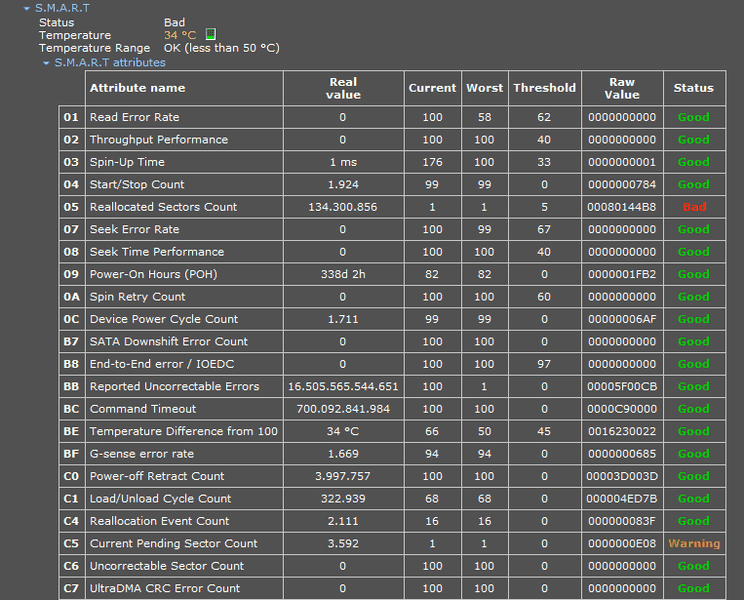
SUMMARY
The discussion centers on diagnosing and addressing hard drive failures, particularly when S.M.A.R.T. status indicates a "bad" condition. Users emphasize the importance of backing up data immediately and replacing the failing hard drive, as software solutions are unlikely to resolve physical issues. Key points include understanding reallocated sectors and the limitations of formatting in addressing bad sectors. The consensus is clear: if a hard drive shows bad S.M.A.R.T. status, it should be replaced to avoid data loss.
PREREQUISITES
- Understanding of S.M.A.R.T. diagnostics and their implications
- Knowledge of hard drive mechanics and common failure modes
- Familiarity with data backup strategies and tools
- Basic understanding of hard drive replacement procedures
NEXT STEPS
- Research S.M.A.R.T. attributes and how to interpret them for various hard drive brands
- Learn about effective data backup solutions and best practices
- Explore the differences between HDDs and SSDs, including installation considerations
- Investigate software tools for diagnosing hard drive health and recovery options
USEFUL FOR
This discussion is beneficial for IT professionals, computer technicians, and anyone experiencing hard drive issues, particularly those looking to understand failure diagnostics and data protection strategies.