How to make an animation in SymPy using Python

  • Context: Python 
  • Thread starter Thread starter JD_PM
  • Start date Start date
  • Tags Tags
    Animation Python
Click For Summary

Discussion Overview

The discussion revolves around creating an animation of the function ##f(x) = \sin x## using Python, specifically focusing on the use of SymPy and matplotlib. Participants explore how to animate a red ball that traces the sine curve, addressing both the plotting of the function and the animation mechanics.

Discussion Character

  • Exploratory
  • Technical explanation
  • Homework-related

Main Points Raised

  • One participant expresses a desire to animate a red ball that traces the sine function, mentioning their current understanding of plotting the function.
  • Another participant suggests a tutorial link that may assist with creating animations in matplotlib.
  • Some participants argue that SymPy is not directly related to animations, emphasizing that the animation functionality is primarily a feature of matplotlib.
  • A participant provides a link to examples of matplotlib animations, suggesting that the original poster could adapt existing code for their needs.
  • One participant advises on the necessity of creating a second line element for the red dot in the animation update function, indicating that the current code only updates the blue line.

Areas of Agreement / Disagreement

Participants generally agree that matplotlib is the primary tool for creating animations, while there is some uncertainty about the role of SymPy in this context. Multiple views on how to implement the animation and the specifics of the code remain present.

Contextual Notes

Some limitations in the discussion include the lack of detailed code examples for the animation and the need for clarification on how to properly implement the update function for the red dot.

JD_PM
Messages
1,125
Reaction score
156
I want to make an animation where a (red) ball departs from (0,0) and draws the function ##f(x) = sin x##

This is what I know:

How to plot ##f(x) = sin x##

Captura de pantalla (573).png


To do so I followed instructions from the worksheet. Actually I'd have done:
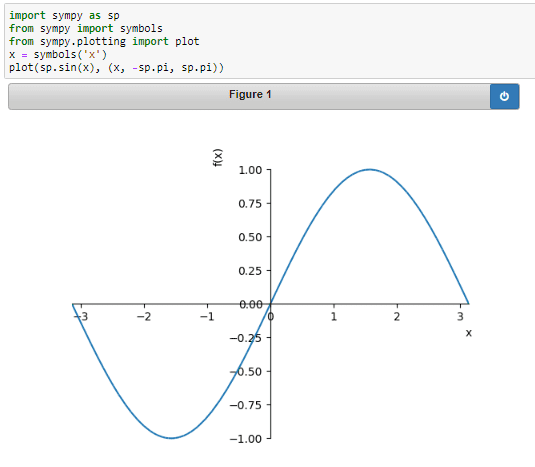
Captura de pantalla (575).png


But I guess they want to me to it in that way because I have to do less work while coding for the red dot to draw the entire sine curve.

Now to plot just a piece of the function:
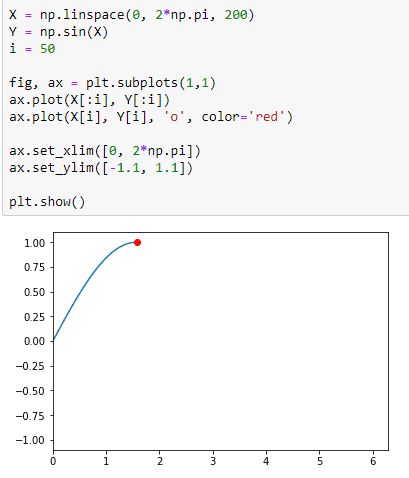
Captura de pantalla (574).png

If we set i=50 and x runs from 0 to 200, we are aiming at plotting just 1/4 of ##f(x) = sin x## .

The line ax.plot(X, Y, 'o', color='red') locates the point at i=50 (I guess 'o' is just the command for the point).

But now, how can I code such an animation of ##f(x) = sin x## from (0,0)? I have read I should import:

import matplotlib.animation as animation

I've been looking for exercises on animations in SymPy in Python but found nothing.

Any help is appreciated.
 
Technology news on Phys.org
I think that SymPy has nothing to do with animations. It is a functionality of matplotlib. You may want to check this link describing it. You can find there several examples, providing full code. It should be easy to pick one and rewrite it for your needs.
 
  • Informative
Likes   Reactions: JD_PM
lomidrevo said:
I think that SymPy has nothing to do with animations. It is a functionality of matplotlib. You may want to check this link describing it. You can find there several examples, providing full code. It should be easy to pick one and rewrite it for your needs.

Thanks, in that link I found what I was looking for. There's a final issue now.

Screenshot (333).png


How can I make the leading point red?
 
You should have second line element (matplotlib.lines.Line2D) for the red dot to be updated in your "update" function. In the third line of the code from your screenshot, you get only one line element, that is your blue line. So you should create an empty list of the line elements and using the "append()" method to add new line elements as many as you may need them to update.

Here is an example (including also a text field updated in the graph):
https://stackoverflow.com/questions/20624408/matplotlib-animating-multiple-lines-and-text?rq=1
 
  • Like
Likes   Reactions: JD_PM

Similar threads

Replies
1
Views
6K
  • · Replies 1 ·
Replies
1
Views
2K
  • · Replies 1 ·
Replies
1
Views
2K
Replies
3
Views
2K
  • · Replies 3 ·
Replies
3
Views
2K
Replies
1
Views
2K
  • · Replies 9 ·
Replies
9
Views
10K
  • · Replies 10 ·
Replies
10
Views
4K
  • · Replies 5 ·
Replies
5
Views
3K
  • · Replies 15 ·
Replies
15
Views
2K