How to Operate a CIMARK Digital Microscope with a 26pin Jack?

Click For Summary

Discussion Overview

The discussion revolves around operating a CIMARK digital microscope, which some participants suggest may actually be a digital camera with a telephoto lens. Participants are exploring how to connect the device to a PC or TV, identifying components, and understanding the necessary interfaces and protocols.

Discussion Character

  • Exploratory
  • Technical explanation
  • Debate/contested

Main Points Raised

  • One participant expresses confusion about how to operate the CIMARK device and seeks assistance in identifying the necessary connections and components.
  • Another participant suggests that the device may not be a microscope but rather a digital camera with a telephoto lens, prompting further investigation into its components.
  • A participant identifies an IC related to a high-speed digital interface and notes that it likely connects to a receiver and display, indicating a complex setup.
  • There is a suggestion that the device may be part of a machine vision system, and the need for model numbers or additional information is emphasized for further progress.
  • One participant expresses a desire to use the device simply as a CCTV without recording capabilities.
  • Discussion includes references to Camera Link and Channel Link interfaces, with some participants questioning the compatibility of the device with these standards.
  • Concerns are raised about the cable connections and color coding not matching standard datasheets, complicating the setup process.

Areas of Agreement / Disagreement

Participants do not reach a consensus on the nature of the device, with some arguing it is a digital camera while others maintain it is a microscope. The discussion remains unresolved regarding the specific connections and operational methods needed to use the device.

Contextual Notes

Participants note the lack of clear model numbers and the complexity of the device's interface, which may not conform to standard protocols. There are also unresolved questions about power connections and cable configurations.
nzhuhu
Messages
8
Reaction score
0
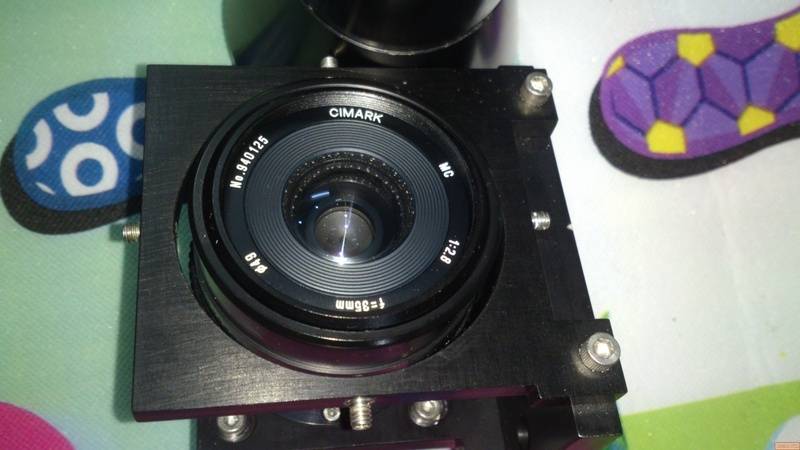
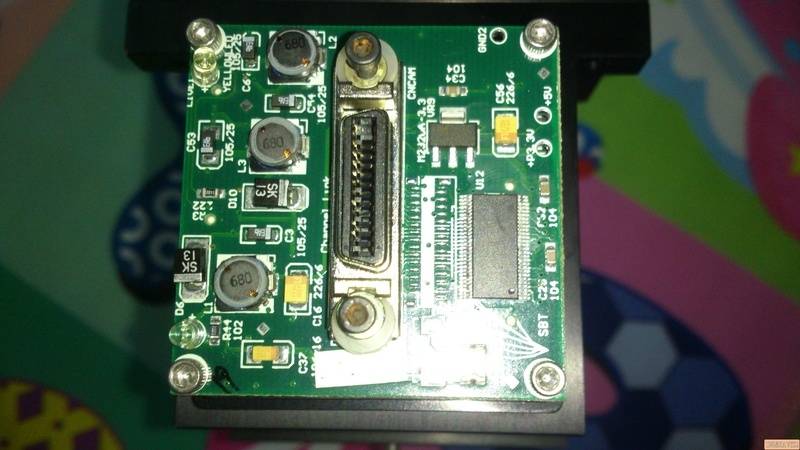
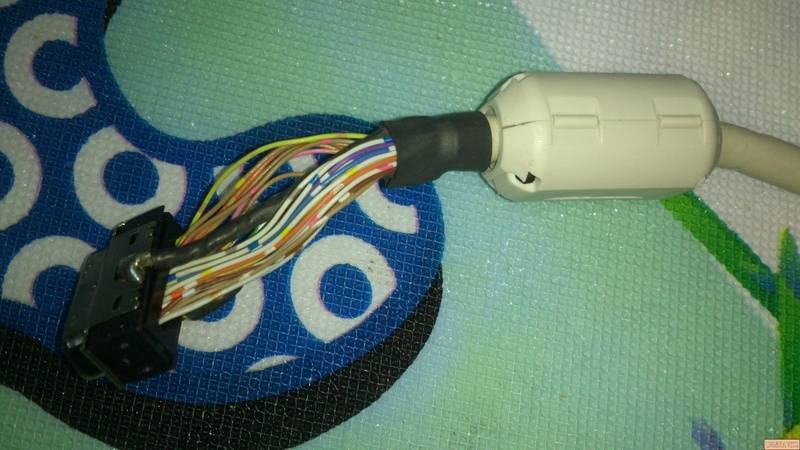
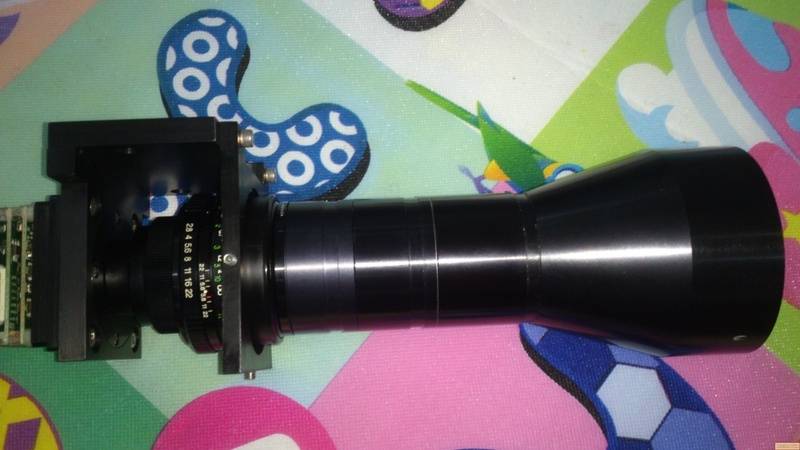
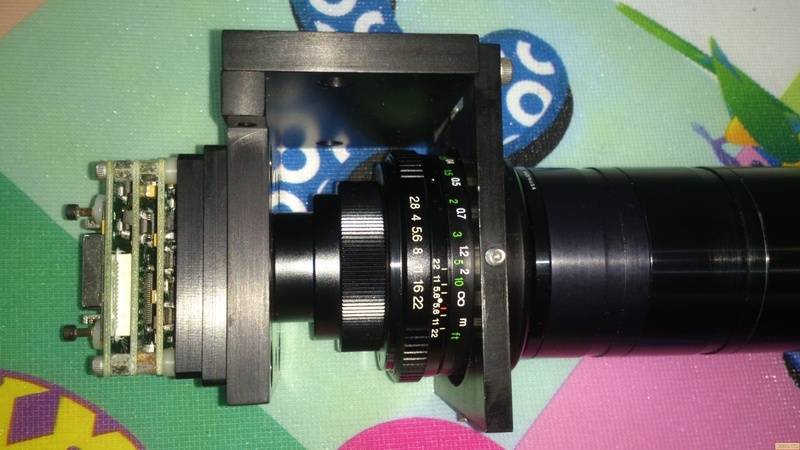
Hello everyone, I would like to ask if anyone has ever know about this one. I have no idea how to make it run. The jack on top of it is 26pin inside but the cable is 26pin plus 2 more very black wire welding on each side of the Jack. I remove the Lense i see the small camera with name is CIMARK. Please help me because i would like to make it run, so do please tell me what things i need to run via PC or TV. I tried to figure out which cable is out put but no luck with Google.
lT622nW.jpg

QFmfJaA.jpg

kFd1rDm.jpg

20cAPDq.jpg

m8cwPKA.jpg
 
Computer science news on Phys.org
It is not a digital microscope. I think it is a digital camera with a telephoto lens. 35mm f2.8

http://camera-wiki.org/wiki/Cimark made the lens

There should be more information on the PCB assembly or mounting assembly somewhere.

It looks like part of a machine vision system. The back assembly is a camera, possibly including a frame grabber.
It's hard to tell without more info, numbers. Perhaps you can take a picture of the large IC that will show the part numbers. (may or may not help)
 
Last edited:
  • Like
Likes   Reactions: davenn
Thank you so much for your reply meBigGuy. I have a photo of IC now. After google that IC number i found something like this " +3.3V Programmable LVDS Transmitter 24Bit Flat Panel Display (FPD) Link-65 MHz/ +3.3V LVDS Receiver 24-Bit Flat Panel Display (FPD) Link-65 MHz " and to be honest with you, i have no idea what that is.
9ACABiR.jpg
 
That IC provides a high speed digital interface to a companion IC that drives a digital video device. It is probably a "custom" interface, that is, not an industry standard of any kind. If you look at the picture in the data sheet, what you have is represented by the Host Graphics Controller and Transmitter. Your cable will connect to a receiver and display (or frame grabber, or who knows what?).

You will need some sort of model number or such information to proceed. Unless you are set up to do some sophisticated experimentation to reverse engineer what you have (that's not likely to yield anything useful --- depends on your level of determination.). I wouldn't even hazard a guess about how to power it up.
 
Thanh you MeBigGuy, i just want to make it run simple as CCTV without recording.
 
The 24 bit driver IC is not designed for that interface, but it is something close/related to that. Check out http://www.ti.com.cn/cn/lit/ds/snls124a/snls124a.pdf

He needs to find the model numbers somewhere on the PCB or metal assembly.

There will be a control interface and control protocol also. It is not a "simple" camera. He will need to find a manual, and build an interface designed to receive that LVDS data stream and turn it into something compatible with some kind of display.

I expect there is a CCD/imaging chip with companion controller, and an fpga, implementing a video stream and a control channel, all interfaced through the LVDS chip and other driver/receiver chips we don't see.
 
  • #10
Thank you guys, As on https://en.wikipedia.org/wiki/Camera_Link showing Pin Connection in and out of all range of Data Bit. There are only 10 pin out and in so i wonder 16 pin left stand for power and I do not know. Another thing so hard for me is Cable colour is not marching with any MDR26 Ribbon datasheet.
 
  • #11
rbelli1 said:
Says so right on the board.
I sure missed that one
 

Similar threads

Replies
2
Views
1K
Replies
7
Views
2K
  • · Replies 8 ·
Replies
8
Views
3K
Replies
20
Views
3K
Replies
3
Views
8K
  • · Replies 1 ·
Replies
1
Views
3K
Replies
4
Views
2K
  • · Replies 1 ·
Replies
1
Views
3K
Replies
22
Views
5K
Replies
4
Views
20K