Interpretation of Isometric Drawing

Join the discussion
Ask a follow-up here, or get your own question answered by working scientists, mathematicians and engineers — people, not an autocomplete.
Real named experts · corrections over time · the nuance an AI answer skips
3 replies · 10K views
Sirsh
Messages
262
Reaction score
10
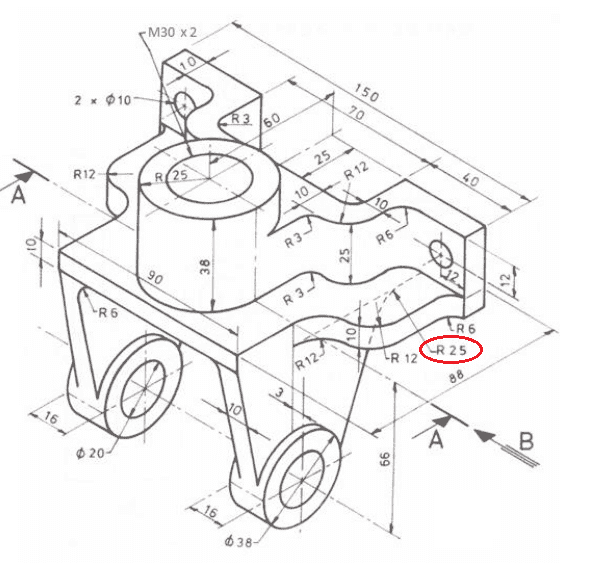
I am trying to create a third angle projection of this isometric drawing and for the most part it is very straight forward. However, I cannot figure out where to position a 'circle' of radius 25 to give me the correct curvature that is required for this drawing.

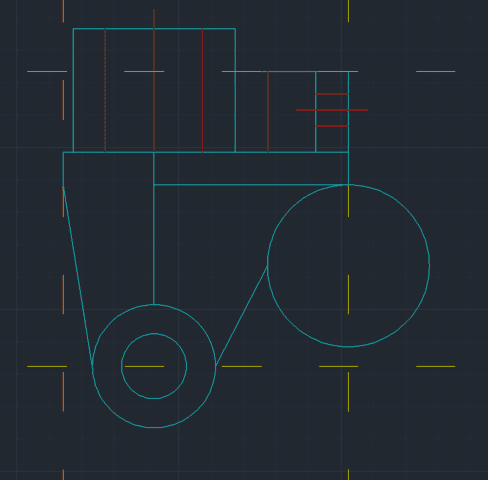
Whenever I locate a circle and then try to connect a straight line to it, I get some awkward connection as seen below where it seems like there is a 'jump'.

Here is the isometric drawing that I have (red is the dimension I'm having issues with):
4vfn2b.png


Attempt 1:
Screen_Shot_2016_03_29_at_12_30_07_pm.png


Attempt 2:
Screen_Shot_2016_03_29_at_12_30_31_pm.png


Any help is much appreciated!
 
Physics news on Phys.org
Sirsh said:
I am trying to create a third angle projection of this isometric drawing and for the most part it is very straight forward. However, I cannot figure out where to position a 'circle' of radius 25 to give me the correct curvature that is required for this drawing.

Whenever I locate a circle and then try to connect a straight line to it, I get some awkward connection as seen below where it seems like there is a 'jump'.

Here is the isometric drawing that I have (red is the dimension I'm having issues with):
4vfn2b.png


Attempt 1:
Screen_Shot_2016_03_29_at_12_30_07_pm.png


Attempt 2:
Screen_Shot_2016_03_29_at_12_30_31_pm.png


Any help is much appreciated!
I think your Attempt #2 is the closest to what the iso shows.

In drawing the line between the two circles, you want each end of the line to be tangent to its respective circle. Most CAD programs allow you to specify lines in this manner.

You can't do much else with the side view because the R25 location is so poorly specified on the iso.
 
SteamKing said:
I think your Attempt #2 is the closest to what the iso shows.

In drawing the line between the two circles, you want each end of the line to be tangent to its respective circle. Most CAD programs allow you to specify lines in this manner.

You can't do much else with the side view because the R25 location is so poorly specified on the iso.

As always, thank you for your help. I went with drawing #2 as there isn't anyway the other is the correct interpretation of the drawing, in my opinion.
 
The old fashioned way using paper an pencil would be to draw two construction lines parallel to and 25mm away from the lines you are blending together. Where they cross is the centre of the rad.

PS I believe the web should be symmetrical about the 38mm diameter hole as per your second attempt?