Making "tabs" in LaTeX for problem sets

  • Context: LaTeX 
  • Thread starter Thread starter opus
  • Start date Start date
  • Tags Tags
    Latex Sets
Click For Summary

Discussion Overview

The discussion revolves around formatting techniques in LaTeX, specifically focusing on creating aligned sections labeled "Factor" and "Solution" in a problem set, as well as addressing issues related to matrices and the use of symbols like tilde.

Discussion Character

  • Technical explanation

Main Points Raised

  • One participant seeks advice on aligning "Factor" and "Solution" in LaTeX after a specific enumerated item.
  • Another participant explains that the alignment can be achieved by using an enumerated list with the \item command, noting that a blank line after an item allows for new paragraphs to align correctly.
  • A third participant confirms that the suggested method worked for them, successfully implementing the enumerate and \item commands.
  • One participant raises a question about issues with using tilde symbols in matrices, reporting problems with alignment and visibility of the matrix.
  • The same participant later resolves their issue by realizing that math mode is necessary for proper formatting.

Areas of Agreement / Disagreement

Participants generally agree on the methods for aligning text in LaTeX, but there are unresolved issues regarding the use of tilde symbols in matrices, which one participant initially struggled with before finding a solution.

Contextual Notes

Limitations include potential misunderstandings of LaTeX commands and the specific formatting requirements for math mode, which were not fully explored in the discussion.

opus
Gold Member
Messages
717
Reaction score
131
TL;DR
Trying to replicate a document in LaTeX. Not sure how they got the tab or alignment format.
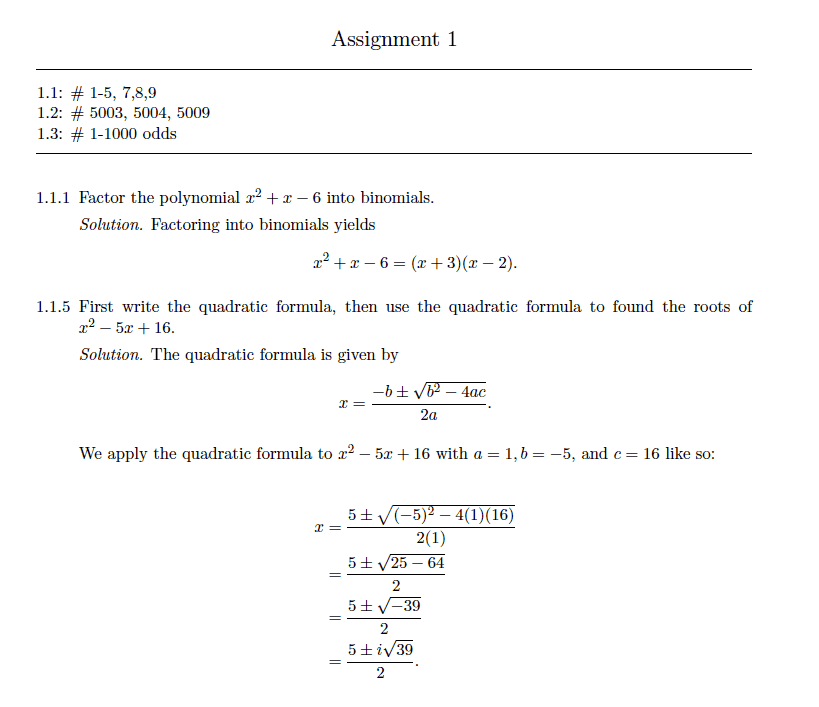
I'm trying to recreate this document in LaTeX, but I'm not sure how they aligned "Factor" and "Solution" after 1.1.1.
Any ideas?
Screen Shot 2020-01-15 at 6.58.48 PM.png
 
Physics news on Phys.org
It looks like the paras with numbers like 1.1.1 are part of an enumerated list, between \begin{enumerate} and \end{enumerate}.

In such a list, numbered items must be preceded by the code \item. The default is to number them as 1, 2, 3 but settings can be changed to show legal style numbering such as is shown above.

If you put a blank line after a numbered item and then start a new para, without starting it with \item, latex will align the left side of the new para with the left side of text of the numbered item above, as you see in the OP.

I think that's what they've done.

Note that a blank line in latex code signifies a new para. It doesn't put a blank line in the output text.
 
  • Like
Likes   Reactions: opus
Excellent thank you andrew! That was it exactly. I just did the enumerate and \item[1.1.1]
 
Ok one more question if it's not too much trouble. This is with the matrices on the bottom. I've tried \~ as well as \sim to go where to the tilde is and neither works.
The former jumbles everything up and even makes a matrix disappear.
The latter looks good but it gets ride of the centering. Any ideas?
\
Screen Shot 2020-01-15 at 9.34.23 PM.png
Screen Shot 2020-01-15 at 9.35.09 PM.png
 
Actually just got it. Had to use math mode for some reason.
 

Similar threads

  • · Replies 9 ·
Replies
9
Views
2K
  • · Replies 2 ·
Replies
2
Views
2K
  • · Replies 12 ·
Replies
12
Views
3K
  • · Replies 3 ·
Replies
3
Views
4K
  • · Replies 1 ·
Replies
1
Views
2K
  • · Replies 11 ·
Replies
11
Views
9K
  • · Replies 9 ·
Replies
9
Views
6K
  • · Replies 12 ·
Replies
12
Views
2K
  • · Replies 3 ·
Replies
3
Views
7K
  • · Replies 7 ·
Replies
7
Views
3K