Mirrored pattern in antenna dB vs frequency, explanation?

Click For Summary
The discussion revolves around a high school astronomy class experiencing a mirrored pattern in their dB vs frequency plots while detecting VLF radio signals for solar flare detection. The issue is attributed to aliasing, likely caused by incorrect sampling rates from their sound card, which may be set at 48kHz instead of the required 96kHz. Participants emphasize the importance of adhering to the Nyquist criterion to avoid distortion in the data, particularly since the signals of interest are around 24kHz. Suggestions include checking the sound card settings and using a signal generator to calibrate the system. The conversation highlights the need for proper sampling techniques and understanding of sound card limitations to ensure accurate data collection.
mishima
Messages
576
Reaction score
43
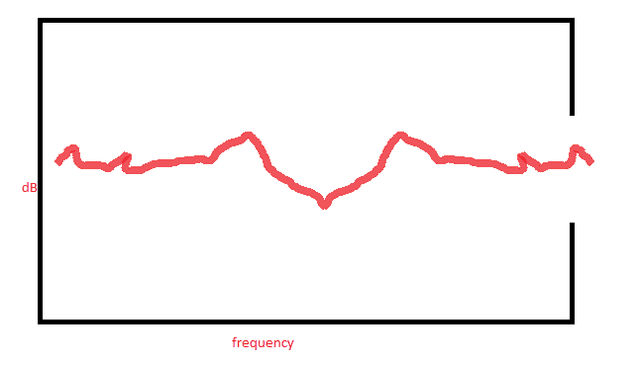
Hi, my high school astronomy class designs/builds antennas to detect VLF radio for solar flare detection. Recently, and regardless of their design, we get a strange "mirrored" shape to the dB vs frequency plot. The shape of the graph before roughly mid-band is exactly mirrored about the center.

The antennas are all small loop designs. We use an amplifier circuit provided from Stanford, and feed the signal into a soundcard (96kHz sampling rate). The computer is running linux and Stanford software (a python based program that does db vs frequency, and db vs time for selected frequency) and is usually rock solid. I don't remember changing anything about our monitoring station before this started happening.

Hoping some antenna gurus can provide some insight. Here is a rough sketch of what's happening...luckily this does not seem to be affecting the db vs time plot which is used to interpret flare occurrence. Something that also adds to the curiosity is that the frequency we are monitoring occurs on the axis of reflection.
mirrorgraph.png
 
Engineering news on Phys.org
WHat is the center frequency on the graph. If it is 48Khz then you are seeing aliasing. That's exactly what it would look like. You just expanded the X axis too much in your viewing program.

Do you need explanation of aliasing, and shannon's limit, etc?
 
  • Like
Likes sophiecentaur
Max on frequency is ~48kHz, the center is ~24kHz. Those are new terms to me, I can look it up though unless you have a moment.
 
Its true, I hadn't checked that before. The computer seems to be sampling at 192kHz, even though the project is designed for 96kHz. Should just be a matter of changing some linux settings I hope.
 
Are you using an appropriate analogue input filter to eliminate any harmonics?
 
Not sure, I don't really know enough about their circuit to say what has been accounted for. I have never really had to troubleshoot it in the 3 years we've been doing this. The antenna is 50 ft of 22 gauge looped into a circle roughly 1m diameter. That goes through coax of about 20 ft to this circuit:
sspa_v2b_image.png

with a normal looking wall wart power supply. Signal from this circuit it then carried through a 2 ft length of normal 3 pole audio cable into the line in of
Creative Labs SB0570 PCI Sound Blaster Audigy SE Sound Card on a circa 1999 computer (pentium 3) running linux.
 
Has anyone messed with the computer end of things recently?

If you were really sampling at 192KHz, it would mirror around 96KHz

I think that if you apply a 10KHz tone to the sound card input you will see it reflected about the center of the output graph.

If you don't have a signal generator, the easiest way to get a test tone is with some free generator application on an iOS or Android device.

That will also serve to test and calibrate your display.
 
This afternoon I tried sending some signals to the sound card. You were right, they are getting reflected about the center. A 10kHz spike also shows at 38kHz, a 20kHz spike also shows at 28kHz, a 5kHz spike also shows at 43kHz, etc. These mirrored patterns are called aliases of my generated tone.

Let me try to get through some theory there on the wiki...please correct me if I am out of touch anywhere. The program requires a HD sound card capable of 96kHz. This is because VLF radio signals are from 3kHz to 30kHz. In Europe and Asia, VLF broadcasting stations are 22kHz or less. In US however, there are significant stations (namely the one in Cutler, Maine) which are higher than 24 kHz. Thus I need a device that can sense frequencies of at least 30kHz. (from past experience, at my location I get the strongest signal from the 2 megawatt NAA in Cutler, Maine at a frequency of 24kHz.)

In an ideal situation, this implies that my bandlimit B is 30kHz (or maybe a few kHz higher to account for real world variances?). That being the case, my sample rate should be 60kHz (this is my Nyquist rate). There is no cheap, commonly available device with a 60kHz sample rate. However, HD soundcards are capable of 96kHz, which can fit any frequency between 3 and 30kHz. Luckily, the Nyquist criterion is an inequality that says my sample doesn't have to be exactly equal to my bandlimit*2, only that my sample rate can be greater than or equal to bandlimit*2. So in theory, I could use any device that is capable of sampling equal to or greater than 60kHz.

Thats why I was incorrect when I thought I was sampling at a higher frequency of 192kHz. Such a frequency is a sufficient solution to the Nyquist criterion for my bandlimit. A sample rate of 48kHz however is not...it doesn't satisfy the Nyquist criterion for bandlimits extending above 24kHz.

Therefore 48kHz must be my actual sample rate (that I need to change in software). What I am seeing as aliasing is the distortion of all signals above 24kHz...again predicted by the referenced theory.

The fact that the NAA signal of interest is 24kHz and that my data plot is reflected about 24kHz is just coincidence.
 
  • #10
I think you stated it well. There is one other possible limitation that you will have to test.

What is the frequency response of the soundcard when it is sampling at 96KHz or 192Khz. Just use your signal generator to calibrate the setup.

The soundcard will have internal limitations and filters. Some may be accessible and programmable. You need to look at the soundcard register definitions or API.
 

Similar threads

  • · Replies 14 ·
Replies
14
Views
2K
Replies
17
Views
5K
  • · Replies 12 ·
Replies
12
Views
11K
  • · Replies 8 ·
Replies
8
Views
721
  • · Replies 66 ·
3
Replies
66
Views
6K
  • · Replies 52 ·
2
Replies
52
Views
7K
Replies
16
Views
9K
  • · Replies 6 ·
Replies
6
Views
6K
  • · Replies 1 ·
Replies
1
Views
2K
  • · Replies 184 ·
7
Replies
184
Views
23K