Problem with Cruzer micro 8.0 gb.

  • Thread starter Thread starter gawa_201050
  • Start date Start date
  • Tags Tags
    Micro
Click For Summary
SUMMARY

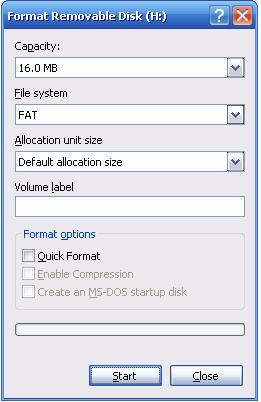
The discussion centers on issues with a Cruzer Micro 8.0 GB flash drive, specifically the drive displaying a capacity of only 16 MB and prompting a format error. The user reports that attempts to format the drive fail, indicating potential hardware failure. Recommendations include returning the drive to the retailer for a replacement and contacting SanDisk for warranty support. The drive in question is identified as model bl0807kveb, manufactured in China.

PREREQUISITES
  • Understanding of USB flash drive functionality
  • Familiarity with file system formats, particularly FAT
  • Knowledge of basic troubleshooting steps for external storage devices
  • Awareness of warranty and return policies for electronic products
NEXT STEPS
  • Research troubleshooting methods for USB flash drives
  • Learn about the warranty process for SanDisk products
  • Investigate common issues with USB flash drive formatting
  • Explore data recovery options for malfunctioning flash drives
USEFUL FOR

This discussion is beneficial for end-users experiencing issues with USB flash drives, IT support professionals diagnosing storage device failures, and anyone interested in understanding warranty processes for electronic devices.

gawa_201050
Messages
1
Reaction score
0
Problem with Cruzer micro 8.0 gb.please help
249766147.jpg
I have a Cruzer micro 8.0 gb and when I attach it to the computer I clicked to open it a message appeared and says `the disk is not formatted do you want to format it` but it appears to be 16 mb .my flash memory wrote in it bl0807kveb made in china sdcz4-8192.and when i press format a message appears and says `the disk cannot be formatted.
 
Computer science news on Phys.org


Does clicking on the drop-down box (the box with the down arrow beside it) give you anything aside from 16 MB for the capacity, and FAT for the file system?

If not, you may have gotten a dud drive. If you bought it quite recently, I'd take it back to the store and ask for some help (assuming this is a computer place and not, say, the supermarket) and if nobody can figure it out, return it as defective and get a new one. You can also get in touch directly with Sandisk to see if they may have a solution, or can ship you a warranty replacement:
http://kb.sandisk.com/
 

Similar threads

Replies
2
Views
3K
  • · Replies 5 ·
Replies
5
Views
8K
  • · Replies 5 ·
Replies
5
Views
2K
  • · Replies 8 ·
Replies
8
Views
3K
  • · Replies 4 ·
Replies
4
Views
2K
  • · Replies 2 ·
Replies
2
Views
3K
  • · Replies 4 ·
Replies
4
Views
7K
  • · Replies 2 ·
Replies
2
Views
4K
  • · Replies 17 ·
Replies
17
Views
8K
  • · Replies 2 ·
Replies
2
Views
2K