Simulating Bonded Contact from ANSYS Mechanical in ANSYS APDL

Click For Summary
SUMMARY

This discussion focuses on simulating "Bonded Contact" in ANSYS APDL, specifically transitioning from ANSYS Mechanical. The user initially modeled a beam structure using Solid Brick Elements in ANSYS Mechanical and is now attempting to replicate this in ANSYS Classic with Solid-Shell and 8-node brick elements. Key issues include setting the correct contact parameters, particularly changing from "Standard" to "Bonded (always)" in the contact wizard, and ensuring the contact algorithm is set to "MPC" for better convergence. Despite these adjustments, discrepancies in equivalent stress results remain, indicating potential issues with contact settings or modeling approach.

PREREQUISITES
  • Understanding of ANSYS Mechanical and ANSYS APDL
  • Familiarity with Solid Brick and Solid-Shell element types
  • Knowledge of contact settings and algorithms in finite element analysis
  • Experience with IGES file formats and importing models into ANSYS
NEXT STEPS
  • Research "ANSYS APDL contact settings and algorithms"
  • Learn about "MPC contact algorithm" and its applications in ANSYS
  • Explore tutorials on "modeling bonded contact in ANSYS Workbench"
  • Investigate "deformation and stress analysis in ANSYS APDL"
USEFUL FOR

Engineers and analysts working with ANSYS software, particularly those involved in finite element modeling and simulation of bonded contacts in structural analysis.

50Cent
Messages
33
Reaction score
0
Simulating "Bonded Contact" from ANSYS Mechanical in ANSYS APDL

Hi,

Im looking into the accuracy of using different element types to model a particular structure. As a simple approximation think of it as a beam split into 3 horizontal sections. Shown in the diagram as top, middle & bottom layer. (The middle layer is very thin!)

I have modeled the structure in ANSYS Mechanical and obtained the results using Solid Brick Elements. Now I am trying to create the same model in ANSYS Classic using a combination of Solid-Shell and 8-node brick elements.

I have all the loading conditions set up, but I'm having a problem with contact settings. In ANSYS Mechanical i used "bonded" symmetric contact on the areas in contact.

In APDL I am trying to use the contact wizard to do the same, but don't know the friction coefficeints that would be comparable to that of the "bonded" contact in mechanical. The model is not deforming how i would expect, if all the layers are bonded the structure should experience bending stresses and displacement on the LHS rather than the RHS.
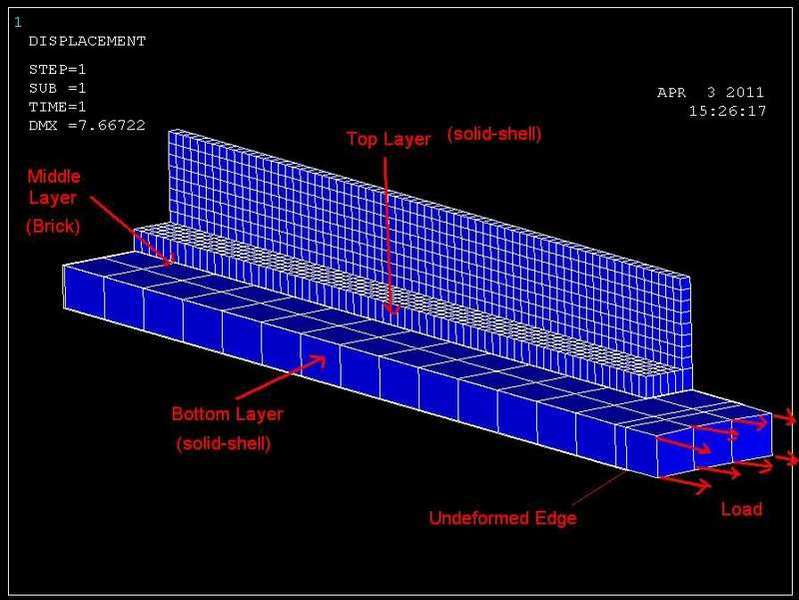
10mpsvp.jpg


I have a feeling my contact is not set up correctly. Any tips? ideas?
Many thanks
 
Engineering news on Phys.org


Hi, I am new with Ansys. Can I know how you model this model? Are you using Ansys Mechanical APDL to model it or are you importing as iges file from Solidworks or any other modelling sotfware? This is because there is error when importing from into Ansys as the error stated that "Line 12 is used 3 times for this list of areas. The list of areas may consist of multiple volumes. Please reselect the areas to form a single volume."


PHILIPCHANCK said:
Hi, I am new with Ansys. Can I know how you model this model? Are you using Ansys Mechanical APDL to model it or are you importing as iges file from Solidworks or any other modelling sotfware? This is because there is error when importing from into Ansys as the error stated that "Line 12 is used 3 times for this list of areas. The list of areas may consist of multiple volumes. Please reselect the areas to form a single volume."

Hi,

I created the model in SolidEdge and saved it as an iges file. Then using Workbench, i set up a Mechanical APDL module and assigned the iges model to it. Then i can right click and say "edit in Mechanical APDL" and it will start up ANSYS classic for me to do my meshing, add loads etc

Hope that helps!


Any suggestions? Been looking for some good contact tutorials... but couldn't find any :/ anyone got a link for one?


Hi,

So i solved the above problem. I had forgotten to change the contact settings from "Standard" to "Bonded (always)" in the contact wizard.

However, that didnt solve my problem as i was still getting large errors. So i thought i would do a test to see if it was my contact settings. I had created an all solid model in ANSYS Mechanical, so i thought i'd recreate this in APDL to see if i could get matching answers. After many trials, i still can't get it correct =( The deformation is spot on, but when looking at Equivalent Stress.. i get errors of upto 15%!

I am using currently using Nodal components (surface-Surface) and the contact wizard to create the contact. Is there another way i can try doing this?

Any help is much appreciated,
Thanks
50
 
well I am currently trying to solve a wood-dowel project using contact element. The problem for the error maybe due to the parameters and equation that you select. make sure that if you use bonded contact the contact algorithm is" MPC" because MPC has a good convergence behavior (with few equilibrium iterations) if you change the standard to bonded (always) also check to change the contact algorithm to MPC, that fits better. and change your normal stiffness to 1 and see if it helps.
 
Try using ANSYS Workbench instead

APDL is for people who are experts in APDL
 

Similar threads

  • · Replies 1 ·
Replies
1
Views
3K
Replies
7
Views
4K
  • · Replies 5 ·
Replies
5
Views
16K
  • · Replies 1 ·
Replies
1
Views
7K
  • · Replies 2 ·
Replies
2
Views
3K
Replies
1
Views
6K
  • · Replies 1 ·
Replies
1
Views
3K
Replies
2
Views
7K
Replies
3
Views
2K
  • · Replies 4 ·
Replies
4
Views
3K