Simulating op-amp circuits using Multisim/Matlab

  • Thread starter Thread starter Fatima Hasan
  • Start date Start date
  • Tags Tags
    Circuits Op-amp
Click For Summary

Discussion Overview

The discussion revolves around simulating operational amplifier (op-amp) circuits using Multisim and Matlab. Participants share their simulation results, seek assistance with issues encountered, and discuss the configuration of input sources and expected waveforms. The conversation includes technical details related to circuit behavior and oscilloscope outputs.

Discussion Character

  • Technical explanation
  • Debate/contested
  • Mathematical reasoning
  • Experimental/applied

Main Points Raised

  • One participant expresses uncertainty about their simulation results and requests help identifying mistakes.
  • Another participant notes that input sources in SPICE simulators require explicit ground connections to avoid floating inputs.
  • Concerns are raised about potential shorting of the op-amp's -VEE supply to its output, suggesting a need for clearer connections in the circuit diagram.
  • Participants discuss the visibility of oscilloscope outputs and suggest adjustments to timebase and color settings for better readability.
  • There is a suggestion to adjust the frequency and amplitude of the signal generators to achieve desired waveforms.
  • One participant questions whether the frequencies and amplitudes of the sine and square waves are set correctly, indicating a possible mix-up.
  • Another participant suggests adjusting the phase of the sine wave to better match the oscilloscope output, highlighting the importance of relative phase in waveform behavior.
  • Clarifications are made regarding the expected outputs of different stages in the circuit, including a comparator and differentiator, with participants sharing their interpretations of the results.

Areas of Agreement / Disagreement

Participants generally agree on the need for proper configuration of input sources and the importance of phase adjustments. However, there are competing views regarding the correct settings for frequencies and amplitudes, as well as interpretations of the resulting waveforms, indicating that the discussion remains unresolved.

Contextual Notes

Some participants mention limitations in their understanding of the circuit's behavior, particularly regarding the final waveforms and the unspecified value of a resistor in one of the figures. There are also references to assumptions about the circuit configuration that may affect the simulation results.
Fatima Hasan
Messages
315
Reaction score
14
Homework Statement
Find Vo for figure 1 & figure 2.
Find Vo, Vo1,Vo2 for figure 3
Figures are attached below.
Simulate using Multisim, MATLAB, or any Electrical software.
Relevant Equations
-
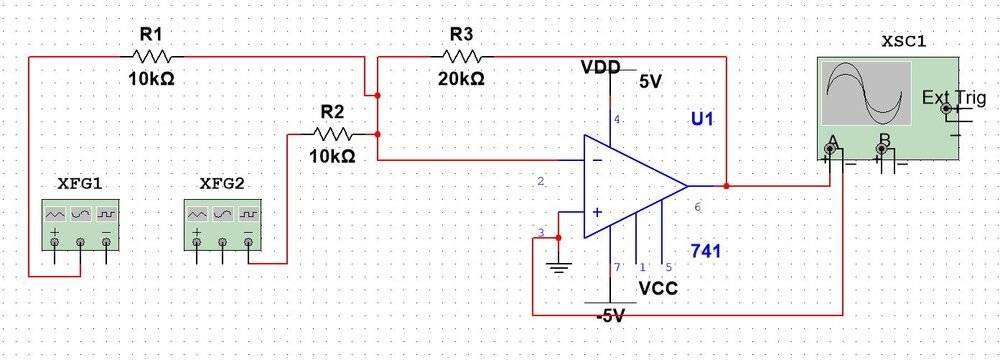
I tried to simulate the circuit shown in fig 1 using Multisim and here's my work:
circuit.JPG

sine wave.JPG
The result:
square wave.JPG
result.JPG


I do not know where is my mistake, could someone help me figuring out the problem?
Any help would be greatly appreciated!
 

Attachments

  • prob1.JPG
    prob1.JPG
    47.1 KB · Views: 228
  • prob2.JPG
    prob2.JPG
    25.1 KB · Views: 215
Last edited:
Physics news on Phys.org
In the SPICE simulators that I use, those input sources would need explicit ground connections. Otherwise they would just be floating...
 
berkeman said:
In the SPICE simulators that I use, those input sources would need explicit ground connections. Otherwise they would just be floating...
Here's my second attempt:
circuit2.JPG

result2.JPG


However, the result is not as expected to be.
 
It looks like in this version you shorted the opamp -VEE supply input to its output? I guess there is no connection dot at the intersection, so maybe they are not shorted. You should still move the -VEE power symbol off of the feedback wire, though.

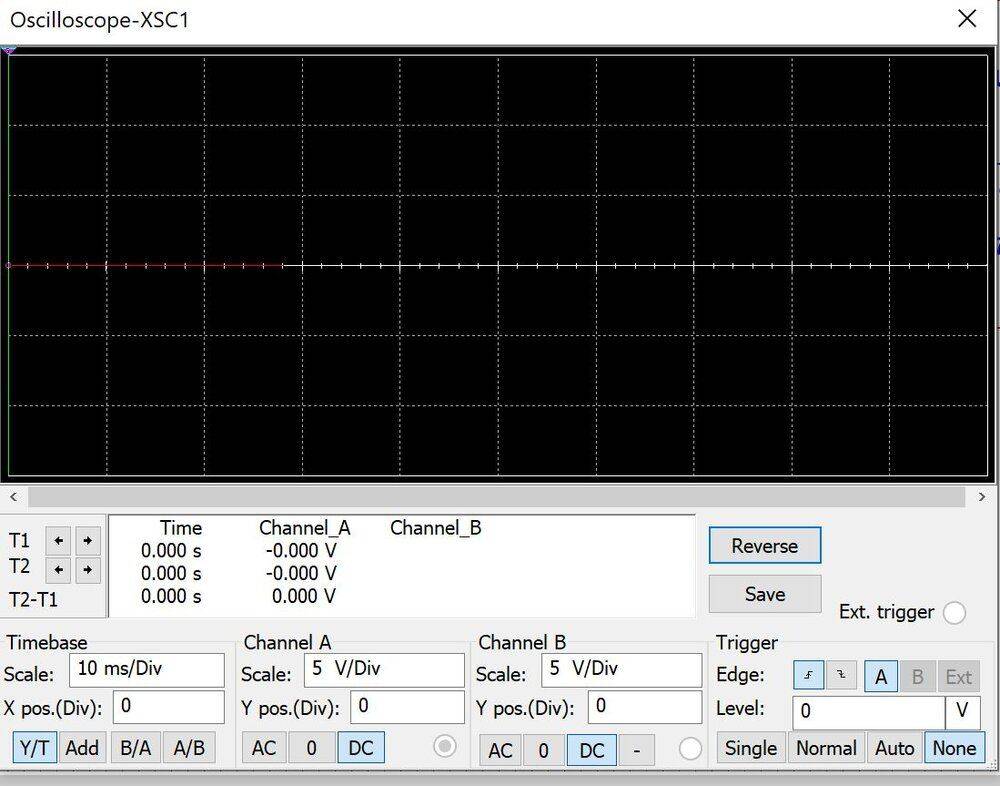
Can you expand the oscilloscope trace out more so that the overall character of the startup transient can be seen? Maybe go out about 10x in timebase. Also, can you invert the colors of the oscilloscope display? It's hard to read the red trace on the black background. Thanks.
 
berkeman said:
It looks like in this version you shorted the opamp -VEE supply input to its output? I guess there is no connection dot at the intersection, so maybe they are not shorted. You should still move the -VEE power symbol off of the feedback wire, though.

Can you expand the oscilloscope trace out more so that the overall character of the startup transient can be seen? Maybe go out about 10x in timebase. Also, can you invert the colors of the oscilloscope display? It's hard to read the red trace on the black background. Thanks.
circuit3.JPG


Here's what I got:
result3.JPG
 
Thank you, much easier to see the 'scope output! That looks pretty reasonable if the two sources are configured as sin and square wave sources, which was your original problem statement, right? What are your settings for XFG1 and XFG2?
 
berkeman said:
Thank you, much easier to see the 'scope output! That looks pretty reasonable if the two sources are configured as sin and square wave sources, which was your original problem statement, right? What are your settings for XFG1 and XFG2?
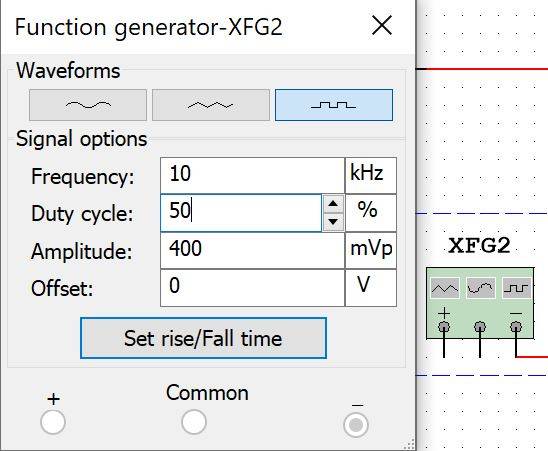
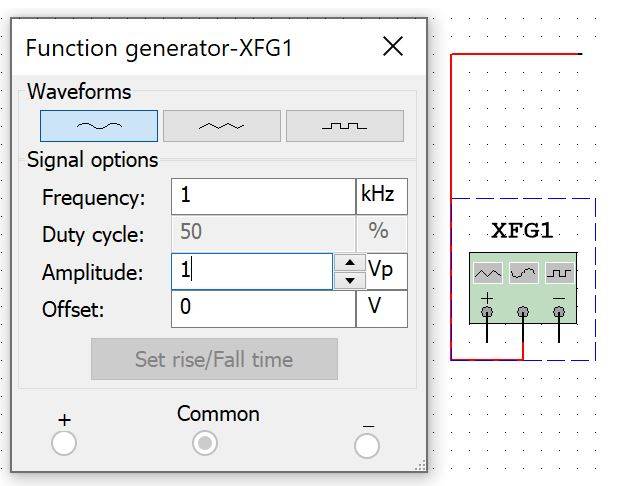
Yes, XFG1: sine wave
sine wave.JPG


XFG2: square wave
square wave.JPG


I am trying to get a result similar to this:
ans1.JPG
 
Looks like you are close. Just adjust the frequency and amplitude of the two generators to get you that desired waveform...
 
berkeman said:
Looks like you are close. Just adjust the frequency and amplitude of the two generators to get you that desired waveform...
The amplitude and frequency are mentioned in the question.
Is this result acceptable or I have to adjust the scales?
result4.JPG
 
Last edited:
  • #10
From the picture in your Post #7 it looks like you have the frequencies and amplitudes of the square and sine backwards? Double-check the original problem statement and match those settings...
 
  • Like
Likes   Reactions: Fatima Hasan
  • #11
berkeman said:
From the picture in your Post #7 it looks like you have the frequencies and amplitudes of the square and sine backwards? Double-check the original problem statement and match those settings...
I solved all the parts, can you please check my results?
figure 1:
1.JPG

Figure 2 & Figure 3:
fig2&3.JPG


Result of fig2 :
2.JPG

Results of Figure 3 (Vo1,Vo2, & Vo, respectively):
3_vo1.JPG

3_vo2.JPG

3_vo.JPG


I am not sure about Vo in figure 3, because the value of the rightmost resistor in figure 3 is not written. I assume it's 1k,. This is the color code of it, I did a search but did not get the right value:
resistor.JPG


Thanks,
 

Attachments

  • 3_vo2.JPG
    3_vo2.JPG
    64.2 KB · Views: 200
  • #12
For Figure 1 -- does your simulator let you adjust the phase of your sources? If so, I'd play with the phase (or delay) of the sine wave to get your simulation to better match the 'scope picture. You can see how the relative phase of the sine and square waves is causing an initial offset of the sine that appears to droop across the plateaus of the square wave. Adjusting the phase of the sine so that it is mid-waveform at the square wave transitions should get rid of that.

Figure 2 is an integrator, so getting a tri wave out for the square wave input seems right.

Figure 3 has a differentiator as the 2nd stage, so the tri wave input giving a square wave output looks right. I'm not understanding the final waveforms yet, though...
 
  • #13
berkeman said:
For Figure 1 -- does your simulator let you adjust the phase of your sources? If so, I'd play with the phase (or delay) of the sine wave to get your simulation to better match the 'scope picture.
In the function generator, I can change the amplitude, frequency, and the offset, if I use it as sine wave. If I use it as square wave, I can change the duty cycle too.
berkeman said:
Figure 3 has a differentiator as the 2nd stage, so the tri wave input giving a square wave output looks right. I'm not understanding the final waveforms yet, though...
As our instructor said, the 1st stage is comparator, so the result would be a square wave ( Vo1). The 2nd stage is a differentiator, so the result would be as follows:
Vo2.JPG

The 3rd stage is a rectification and the result should be as follows:
Vo.JPG

(No negative pulses)
which is the output of the time-maker.
 

Similar threads

Replies
15
Views
2K
  • · Replies 8 ·
Replies
8
Views
2K
Replies
21
Views
3K
Replies
15
Views
3K
Replies
34
Views
4K
  • · Replies 8 ·
Replies
8
Views
2K
  • · Replies 44 ·
2
Replies
44
Views
5K
Replies
1
Views
2K
  • · Replies 16 ·
Replies
16
Views
4K
  • · Replies 16 ·
Replies
16
Views
3K