Simulate a circuit diagram of a step-down chopper using Multisim/MATLAB

  • Thread starter Thread starter Fatima Hasan
  • Start date Start date
  • Tags Tags
    Circuit Diagram
Click For Summary

Discussion Overview

The discussion revolves around simulating a step-down chopper circuit using Multisim or similar electrical engineering software. Participants are exploring the relationships between circuit diagrams, specifically Figures 2 and 3, and are seeking assistance with waveform outputs, circuit functionality, and troubleshooting simulation results.

Discussion Character

  • Exploratory
  • Technical explanation
  • Debate/contested
  • Mathematical reasoning
  • Homework-related

Main Points Raised

  • One participant reports successfully obtaining an output voltage but seeks guidance on finding the current waveform.
  • Multiple participants question the validity of the circuit diagram in Figure 3 as a representation of a step-down chopper and its relationship to Figure 2.
  • There is a request for clarification on how the components in Figure 3 correspond to the blocks in Figure 2.
  • Some participants express uncertainty about the functionality of the LM741 op-amp in the circuit, suggesting it is not being used as a typical amplifier.
  • Concerns are raised about the placement of oscilloscope probes and the interpretation of output signals from the circuit.
  • A participant emphasizes the importance of verifying circuit connections and the potential for errors in simulation setups.
  • One participant shares modified circuit results but receives feedback that the output information is insufficient for confirmation.
  • Another participant expresses confusion over the values of load current and voltage, asking for help in identifying mistakes in their simulation.

Areas of Agreement / Disagreement

Participants do not reach a consensus on the relationship between Figures 2 and 3, and there are multiple competing views regarding the functionality of the LM741 op-amp and the interpretation of simulation results. The discussion remains unresolved with ongoing questions and requests for clarification.

Contextual Notes

Participants highlight limitations in their understanding of circuit relationships and the accuracy of simulation outputs. There are unresolved questions regarding the expected behavior of the circuit components and the interpretation of waveform data.

Who May Find This Useful

Individuals interested in circuit simulation, particularly those working with step-down chopper circuits, as well as students seeking to understand the intricacies of circuit design and simulation troubleshooting.

Fatima Hasan
Messages
315
Reaction score
14
Homework Statement
Attached below.
Relevant Equations
-
Using Multisim or any Electrical Engineering software:
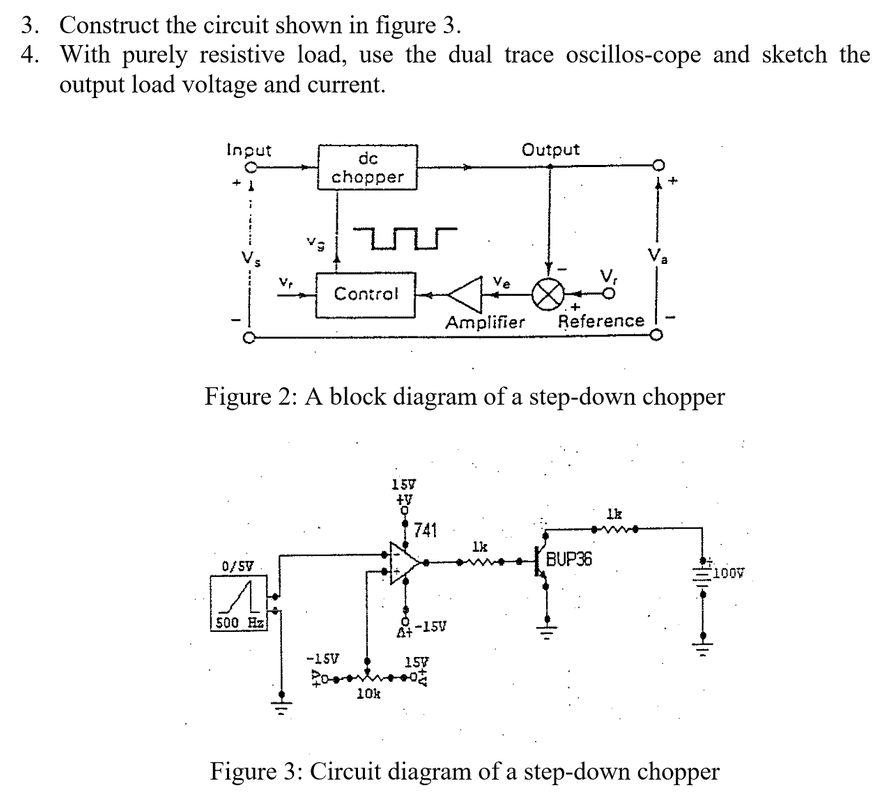
screenshot-115.png
I tried to simulate using Multisim, I got the output voltage.
How to find the waveform for the current ?
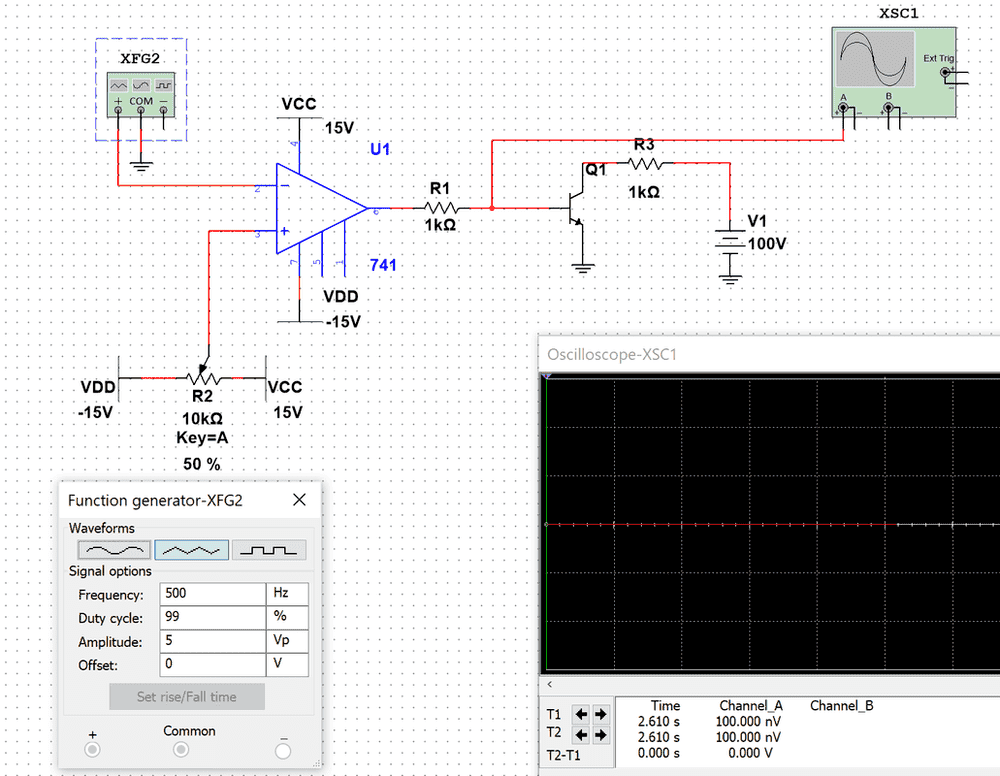
screenshot-115.png


Could someone confirm my answer please? Any help is really appreciated .
 
Physics news on Phys.org
Sorry, how is "Figure 3" the circuit diagram of a step-down chopper? Did that come from some textbook? I'm not seeing any relationship to Figure 2 yet...
 
berkeman said:
Sorry, how is "Figure 3" the circuit diagram of a step-down chopper? Did that come from some textbook? I'm not seeing any relationship to Figure 2 yet...
It's given by the instructor.
 
Fatima Hasan said:
It's given by the instructor.
Then could you please first explain how the circuit in Figure 3 is an inplementation of the block diagram in Figure 2? What circuit components in Figure 3 are in each block in Figure 2? :wink:
 
berkeman said:
Then could you please first explain how the circuit in Figure 3 is an inplementation of the block diagram in Figure 2? What circuit components in Figure 3 are in each block in Figure 2? :wink:
I don't know what is the relation between the two figures. So, I only concentrate on figure(3) to simulate.
 
berkeman said:
Then could you please first explain how the circuit in Figure 3 is an inplementation of the block diagram in Figure 2? What circuit components in Figure 3 are in each block in Figure 2? :wink:
I think there is no relation between them, because figure(3) is also given in another experiment without figure(2). And the same question is repeated ( simulate figure(3) ).
 
Fatima Hasan said:
So, I only concentrate on figure(3) to simulate.
Okay, so let's disregard the thread title (I can fix it up later), and ignore Figure 2. Then tell me what you think the circuit in Figure 3 is doing... What is the LM741 opamp being used as (hint -- it's not being used as an opamp in that circuit). And what is the output of this circuit (hint -- it's not where you are probing...).
 
berkeman said:
What is the LM741 opamp being used as
It should amplify the weak signal .
 
berkeman said:
And what is the output of this circuit (hint -- it's not where you are probing...)
I tried to connect the oscilloscope to the 1k resistor, on the right , but nothing appears.
screenshot-133.png
 
  • #10
Your screenshot shows the 'scope probe on the output of your 100V power supply that is connected to the collector of the transistor through a resistor. The "output" should be the collector of the transistor...

Can you show all of the node voltages in the circuit? What are you doing with the voltage source on the left? I think the original circuit showed a sawtooth waveform into that pin of the LM741.

BTW -- Did you say what that LM741 is being used as?
 
  • #11
berkeman said:
Your screenshot shows the 'scope probe on the output of your 100V power supply that is connected to the collector of the transistor through a resistor. The "output" should be the collector of the transistor...

Can you show all of the node voltages in the circuit? What are you doing with the voltage source on the left? I think the original circuit showed a sawtooth waveform into that pin of the LM741.

BTW -- Did you say what that LM741 is being used as?
I connected a sawtooth waveform to pin2 of LM741 .
LM741 is used to amplify the signal .
I connected the scope to the collector of the transistor directly , but the result is still the same.
screenshot-134.png
 
  • #12
Here's the thing about computer simulations: They simulate exactly what you program them to do. You can draw your circuit and just run the simulator, but, in my experience, you will have about 10-20% chance of it working. You know; garbage in, garbage out.

People make mistakes. A key engineering skill, in any discipline, is to check your work. So once you have drawn the schematic, you should spend some time checking carefully to make sure it is what you intended. This practice will save you lots of time and aggravation. For example, look at every pin on your IC and verify that it is connected to what you want it to be connected to.
 
  • Like
Likes   Reactions: BvU and berkeman
  • #13
Fatima Hasan said:
I connected a sawtooth waveform to pin2 of LM741 .
LM741 is used to amplify the signal .
I connected the scope to the collector of the transistor directly , but the result is still the same.
Please learn to plot multiple waveforms on the same display at the same time, and to plot a length of time that shows multiple cycles of interest in your switching waveform. Thank you.

Show on one plot of multiple cycles:
  • The + and - inputs to the opamp (which is being used as a _______ [not an "amplifier"])
  • The output of the opamp which is mostly the same as the base of the transistor
  • The drain of the transistor
 
  • #14
DaveE said:
Here's the thing about computer simulations: They simulate exactly what you program them to do. You can draw your circuit and just run the simulator, but, in my experience, you will have about 10-20% chance of it working. You know; garbage in, garbage out.

People make mistakes. A key engineering skill, in any discipline, is to check your work. So once you have drawn the schematic, you should spend some time checking carefully to make sure it is what you intended. This practice will save you lots of time and aggravation. For example, look at every pin on your IC and verify that it is connected to what you want it to be connected to.
I tried to modified the circuit and here's what I got:
Output voltage:
current.png

Output current :
current.png


Could you confirm my answer please?
 
  • #15
Fatima Hasan said:
Could you confirm my answer please?
No. I don't know what your new circuit is (I suppose the corrected version shown before), and your plots have no information about the waveform. 1V, 100V, 1mV? However, I will say this: it appears that your circuit is making pulses. The circuit you showed before (with some minor corrections) will also make voltage pulses.

Anyway, I'm glad your making progress, but don't you think you can check it yourself? What is this circuit supposed to do? Suppose the transistor was off what would the displayed voltage be? What about when it's on?When should it be on? When should it be off? Frequency? Duty cycle?
 
  • #16
Fatima Hasan said:
I tried to modified the circuit and here's what I got:
Output voltage:
View attachment 262156
Output current :
View attachment 262157

Could you confirm my answer please?
I tried to simulate the circuit again:
q2-381.png

The load voltage:
q2-381.png

The load current:
q2-381.png

Oscilloscope 1
q2-381.png


However, the values of the load current and load voltage seem to be incorrect. Could someone check where is my mistake, please ?
 

Similar threads

  • · Replies 16 ·
Replies
16
Views
4K
  • · Replies 12 ·
Replies
12
Views
4K
  • · Replies 16 ·
Replies
16
Views
3K
  • · Replies 1 ·
Replies
1
Views
4K
  • · Replies 21 ·
Replies
21
Views
4K
  • · Replies 8 ·
Replies
8
Views
3K
  • · Replies 3 ·
Replies
3
Views
2K
  • · Replies 13 ·
Replies
13
Views
3K
  • · Replies 6 ·
Replies
6
Views
2K
  • · Replies 5 ·
Replies
5
Views
4K