Understanding the Function of Switches to LAN Traffic Management

Click For Summary

Discussion Overview

The discussion revolves around the functioning of network switches in LAN traffic management, addressing conflicting information from textbooks and online resources. Participants explore the operational mechanics of switches, their differences from hubs, and the implications of their behavior in network communication.

Discussion Character

  • Exploratory
  • Technical explanation
  • Debate/contested

Main Points Raised

  • Some participants express confusion over whether switches send data only to the appropriate connections or replicate signals to all LAN segments, as different sources provide conflicting information.
  • One participant mentions the importance of understanding the OSI model to grasp how switches operate differently from hubs.
  • Another participant describes switches as layer 2 devices that remember MAC addresses and transmit information between devices, contrasting them with routers, which connect to WANs.
  • Several participants discuss the behavior of switches when they first power on, noting that they initially flood packets to all ports until they learn the addresses of connected devices.
  • There is a claim that switches do not send packets to every device on every LAN segment but only to the correct device behind the switch.
  • One participant clarifies that switches only know about devices connected to them and must communicate with other switches to reach devices on different segments.
  • Another participant emphasizes that switches maintain a device list to manage traffic efficiently, but this list can change as devices are added or removed.

Areas of Agreement / Disagreement

Participants generally do not reach a consensus on the exact functioning of switches, as multiple competing views remain regarding whether switches replicate signals to all segments or only send them to specific devices. The discussion reflects ongoing uncertainty and differing interpretations of how switches operate.

Contextual Notes

Participants highlight limitations in the clarity of textbook definitions and the potential for misunderstanding due to vague explanations. The discussion reveals a need for more precise definitions and examples to clarify the behavior of switches in network traffic management.

AdityaDev
Messages
527
Reaction score
33
In my computer textbook, on one page, its given that switches can't stop traffic from traveling to all other LAN segments.
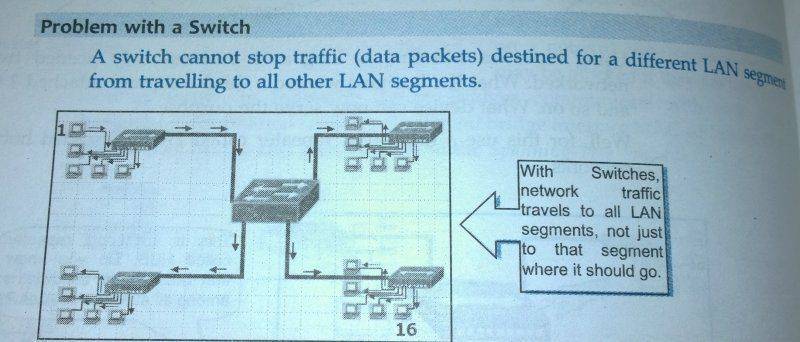
WP_20150320_19_46_45_Pro.jpg

On the next page, it says that switches send traffic only to appropriate connections.
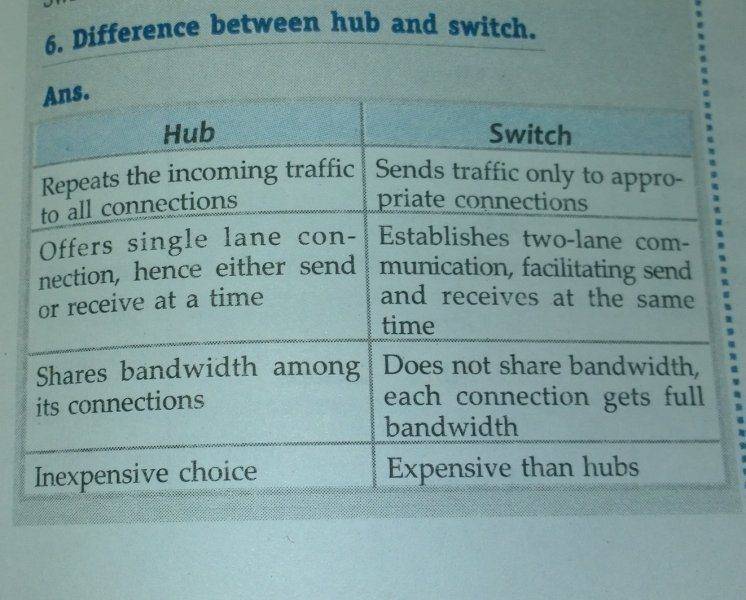
WP_20150320_19_51_53_Pro.jpg


On a YouTube video, it says both will happen. First it send the packets to all workstations, learns the address, and then next time, sends data only to the required destination.

I am totally confused. Everyone has their own definition for a switch. Can someone give the actual working of a switch?
 
Technology news on Phys.org
It definitely will help you if you know something about the OSI model of communication, as they all work differently because they all work on different levels of it (the OSI).
I would recommend starting here. The book should have mentioned this first, or possibly it's about to.
Hubs work on a very low level, the physical level, as does USB devices. Switches and routers have software built into them. This allows them to work sooooo much differently than a hub, and they're much better at everything they do.
I hope this helps a bit.

http://en.wikipedia.org/wiki/OSI_model
 
cptstubing said:
It definitely will help you if you know something about the OSI model of communication
Ok. But how does a switch work? Everyone seems to have their own definition and mechanism gor switch.
 
AdityaDev said:
Ok. But how does a switch work? Everyone seems to have their own definition and mechanism gor switch.

Think of a switch (layer 2 device) as a device that connects things on a network (hubs (layer 1 device) are too simple for that task nowadays). Switches know addresses of devices because they remember MAC addresses, and can transmit information from device to device, like a computer to a printer, computer to computer, etc.

A router (layer 3 device) will be attached to a switch, but the router connects everything to a WAN (ie. the internet) The internet needs at least a layer 3 device to talk to it.

If you run out ethernet ports to use on a router, you can buy a switch and connect it to one router port, and then share that one port with more devices that are connected to the switch.

Really, a switch is like a router, except the router connects to a WAN.

Does this help?
 
One question.(my only question)
Does a switch transmit data to the required LAN segment or does it replicate the signal and send it to all LAN segments like a hub?
My book says it does and also says it doesn't :(
 
Here is another pic. They say switch sends packets only to the target LAN. But they also state that switch sends packets to all LANs like HUB. Soon, I am going to get mad because of this confusion. Please help.
WP_20150320_23_02_47_Pro.jpg
 
Here is another picture in the next page of the same book.
WP_20150320_23_07_24_Pro.jpg
 
AdityaDev said:
One question.(my only question)
Does a switch transmit data to the required LAN segment or does it replicate the signal and send it to all LAN segments like a hub?
My book says it does and also says it doesn't :(

The book is correct, but a bit vague.

A basic switch will send data packets to all LAN segments, but they won't do what a hub does and keep sending to all devices/connections on that switch. The switch will not send data to all devices PAST itself.
So if you are a switch, and you receive packets from another switch, you will look to see if you have a matching address. If you don't, you'll ignore it. If you do, you will pass it on to the appropriate device.

Btw, it should say MAC address, not MAL address. There are a lot of spelling mistakes in that textbook.
 
So you say that Switch does not send the packets to the appropriate segment. But look at the comparison given between hub and switch. It says it sends packets only to appropriate connections.
 
  • #10
Yes, it's correct because it doesn't send packets to each computer behind the switch, only the correct computer behind the switch.
It doesn't send packets to every single device on every single LAN segment. It sends to all LAN segments, but not every device on every LAN segment.
 
  • #11
cptstubing said:
Yes, it's correct because it doesn't send packets to each computer behind the switch, only the correct computer behind the switch.
It doesn't send packets to every single device on every single LAN segment. It sends to all LAN segments, but not every device on every LAN segment.
Switch sends signals to all LAN segments.
Switch stores the MAC address.
Once the signal reaches the LAN segment, then which device filters it?
It should know if the packets received belongs to its segment.
 
  • #12
AdityaDev said:
Switch sends signals to all LAN segments.
Switch stores the MAC address.
Once the signal reaches the LAN segment, then which device filters it?
It should know if the packets received belongs to its segment.

A switch only knows about the devices connected to it. (they OWN the devices, so to speak)
A switch doesn't know about devices connected to other switches. (computers and printers connected to other switches)

Example:
If a computer behind switch A wants to print to a printer that is behind switch F, switch A will need to send the request to all of the other switches it knows, so switches B, C, D, E, and F. Only the switch with that printer behind it will be able to act on the request. The other switches (B, C, D, E) will ignore the request.
 
  • Like
Likes   Reactions: AdityaDev
  • #13
AdityaDev said:
Does a switch transmit data to the required LAN segment or does it replicate the signal and send it to all LAN segments like a hub?
The answer is yes - and no.
When the switch is powered up for the first time, it does not know what devices are connected to its ports (it does, however know whether or not a powered-up device is connected to a port). Then a packet comes in on one of the ports. The switch does two things:
  1. It stores the sender address and the port number in a device list
  2. It then transmits the packet onto every port except the port it arrived on (this is called "flooding")
This behavior continues until a packet arrives where the destination address is already in the table. Then the switch "knows" what port the packet should be transmitted on and only transmits the packet on that port.

After a (short) while, the device list contains the address of all live devices in the system and does not need to use flooding anymore - with two exceptions:
  1. If a new device is powered on, the switch has to learn the address of that device in the same way
  2. The switch also has an internal clock. Every time a packet arrives, the clock value is stored together with the address and port number in the device list. Every minute (or so), the switch looks through the device list and deletes devices it has not heard from for a long time (2 - 5 minutes). This allows devices to be disconnected and reconnected somewhere else in the system.
 
  • Like
Likes   Reactions: AdityaDev
  • #14
Finally. Thank you @Svein and @cptstubing for helping me.
@cptstubing , sorry for troubling you with so many doubts. Now i know how a switch works. Thank you.
 
  • Like
Likes   Reactions: cptstubing

Similar threads

  • · Replies 14 ·
Replies
14
Views
2K
  • · Replies 27 ·
Replies
27
Views
4K
Replies
13
Views
2K
  • Sticky
  • · Replies 13 ·
Replies
13
Views
8K
  • · Replies 13 ·
Replies
13
Views
3K
  • · Replies 14 ·
Replies
14
Views
6K
Replies
4
Views
3K
Replies
3
Views
3K
  • · Replies 5 ·
Replies
5
Views
6K